显示标签为“sublimation printer”的博文。显示所有博文

2018年9月27日星期四

Does the Epson Inkjet Printer Can Convert a Sublimation Printer? - These Steps Tell You

Hello, nice to see you again, my dear friends! During sublimation printing industry, do you know how to converting your epson inkjet printer into one sublimation printer, then help you save some cost? If you don't know how to do, now reading my this article, may be I can help you!

You should following these steps.
1. Converting a brand-new Epson printer
If your Epson printer is brand-new out of the box, and has never been used, you can proceed straight to using our inks. Do not install the Epson cartridges provided with the printer. Instead, either install a set of refillable cartridges with our bottled ink or a set of compatible sublimation cartridges.
Recommended items:
To use sublimation cartridges:
  1. Set of Skyimage Sublimation Cartridges
  2. For printers that have two black slots: Photo Black Cleaning Cartridge
To use sublimation ink bottles:
  1. Set of Skyimage Sublimation Inks
  2. Set of Refillable Cartridges
  3. Chip Resetter
  4. For printers that have two black slots: Photo Black Cleaning Cartridge or Bottled Purge Fluid

2. Converting a used Epson printer
If your Epson printer is currently using any other ink (Epson-brand ink, compatible ink, another brand of sublimation ink), it is absolutely necessary that you purge all old ink from the printer's lines prior to installing SKYIMAGE Sublimation Ink.

  • Before starting the conversion process, print a nozzle check to confirm that the printhead is working properly. Do not attempt to perform a conversion on a printer that is not printing correctly.
  • Ensure that you have a spare maintenance tank or a maintenance tank resetter available before moving on.
  • Remove all the old ink cartridges and install a set of cleaning cartridges (or a set of refillable cartridges filled with bottled purge fluid).
  • Do the initial fill procedure to clear the old ink from the lines and replace it with purge fluid. Repeat the initial fill procedure once more to flush all residues.
  • Remove the cleaning cartridges and install the sublimation ink.
  • Perform the initial fill procedure to fill the lines with sublimation ink for printing!

Note: Some printers have two black slots (photo black & matte black). Only the matte black slot needs to be used. Leave the cleaning cartridge inside the photo black slot, as this slot will not be used in printing.

3. After the conversion of your printer
With your printer now converted to SKYIMAGE Sublimation Ink, you can start sublimation printing. For best results, print your images onto a sublimation transfer paper specifically intended for sublimation printing. Transfer the prints using a heat press onto the sublimation blank or polyester fabric.
Although it is possible to obtain decent results without color management, the color gamut will be very limited. To produce professional-grade sublimated materials, color management is required.

Okay, after reading this article, now you can know how to convert your epson inkjet  printer into one sublimation printer. If you want to know more about sublimation printing, welcome to contact us at any time. We will provide you the best quality product and service. Hope my article can be useful to you. Thank you for your reading.

2018年7月30日星期一

How Does Sublimation Printer Work? & What make it Print Perfectly?

Nowadays, sublimation printing apply in everywhere, such as home textile, sportswear, outdoor displiay, fashion farbric and so on. During sublimation printing, the sublimation printer must be use. Then, do you know how does it work? If you don't clearly, hoping my this artical will help you find the answer.
Dye Sublimation Printer

How Does Dye Sublimation Printer Work?

For More Information Dye sublimation printing starts with films that contain dyes. This will either be a single four layered film with cyan, magenta, yellow, and gray pigments or four separate films for each color. Because the films contain the pigments, they will appear red, blue, green, and gray.

process, the films are placed on the paper and heated up by the print head. This will cause the pigments to leave the film and enter into the paper where it cools re-solidifies. This is the "sublimation" part. Sublimation means to heat something and turn it into a vapor, then to form it back into a solid. Because the pigments go from solid, to gas, and back to solid, there is little mess compared to ink.
Dye Sublimation Printer

What make dye sublimation printer print perfectly?
There are two factors that contribute to the quality of dye sub printers. The first is continuous ink supply, and the other is un-dithered color.

The color produced by a dye-sub is the result of the mixing of pigments to get the actual color. This is in contrast to most other printing methods which use a tight group of colored dots which, when seen by the human eye from a distance, appear to be a color (a process known as "dithering"). Under magnification, the dots are clearly different colors, and when seen close up with the naked eye the picture appears grainy. Because only one color needs to be printed (instead of up to four), a dye sub can place more dots on a paper. It takes a 1200 dpi printer to get the resolution a 300 dpi dye-sub printer is capable of.

Another difference that helps is that because the color sublimes on the paper instead of being laid down as little dots, the edges of each pixel are blurred. This gives the impression of blending for a more natural appearance. Dots from an inkjet leave large white gaps in between pixels, giving the impression of a grain.

Okay, These all above are my share about the knowledge of sublimation inkjet printer. If you have any other needs or questions welcome to contact us at any time. We will provide you the best quality product and service. Hope my article can be useful to you. Thank you for your reading.

Nanjing Feiyue paper Industrial Co.,ltd
www.feiyuepaper.com
Email: sales@feiyuepaper.com
jenny@feiyuepaper.com
Whatsapp: +8618755150383

2018年7月24日星期二

There Are 7 Issues Should Not Be Ignored When You Want to Buy a Inkjet Printer

Hi, good afternoon, my dear friends! Are plan to buy a inkjet printer? If you want to buy one, do you know what should you care for? Today, i will tell you there are 7 issues should not be ignored when you want to buy a good inkjet printer!

1. How to Buy a inkjet Printer?
So you’ve made the decision to buy a inkjet printer only you’re not sure how to buy a printer that fits for your needs. Not to fear – we’ve helped countless people choose the right printer for their lifestyle and needs. Here are some real-life questions we ask every consumer in helping them to refine their search and find the most suitable match.

2. What type of printing do you do?
This is perhaps the most important question to ask since it will point you towards a specific printing applications – that is sublimation printer vs eco-solvent Printer.
The biggest difference of the sublimation printing and eco-solvent printing is the ink and application.If you use it for the sublimation printing, you must choose the high quality sublimation ink. Of course if you use it for eco-solvent printing, you should choose the eco-solvent ink. Then you will fine it equipped the expand eco-solvent ink set.

3. What are the operating costs?
Printer manufacturers make a substantial operating profit from their consumables divisions. They want you to purchase a printer that will make them the highest profit as soon as you run dry. We assume you, like most of our clients are interested in a good quality printer that will also not have extremely high operating costs down the road.

One way of increasing their profits is to sell you a printer with a set of starter cartridges. What are starter cartridges? There are two types we commonly see- cartridges that are simply half full to begin with or worse; cartridges with additional manufacturing designed to limit use (think of adding a dividing wall to the inside of a water bottle and then filling the bottle to capacity – albeit of a smaller chamber). Starter cartridges ensure you need to buy a new set of cartridges sooner.

That said, the only way to really ensure you have an economical printer is to calculate the total cost of ownership. This is done by calculating how many printer cartridges you will need each year (based on their yield) and multiplying by how many years you plan to keep the printer and then by the purchase price of each cartridge. Finally, add the purchase price of the printer. This will give you a number that you can compare across different printers. Printers that use cartridges that can be refilled or for which we carry a compatible product can help you find the most economical printer for your needs.

We also recommend you check the cartridge yield in relation to the amount of printing you do on a monthly basis (this is known as the monthly duty cycle). You’ll want to ensure the printer you buy can adequately handle the amount of printing you do.

4. Do you need a single function printer or a multifunction (MFP) / “all-in-one”?


There a variety of single function printers available including portable printers, edible ink printers dedicated and near-dedicated photo printers, label printers, wide format printers and fax machines to name a few.

Multifunction or all-in-one printers have become increasingly and refer to printers that are capable of more than one basic function (ie. scanning, copying, printing and faxing) – thus serving multiple needs.

In addition to the basic functionality, printers have an increasing set of features such as scan to email, scan to PDF, duplex printing (automatic printing on two sides of each sheet). They also have an ever increasing amount of interfaces (methods of communicating with the printer).

5. What type of interface is needed?


Most printers have USB connectivity as a standard feature. Web-enabled printers (also known as networked printers) have an Ethernet port allowing connection to your home or office network. WiFi interfaces allow the printer to connect remotely to your home or office network or to connect directly with tablets or other WiFi enabled devices in some cases allowing you to print documents and images from handheld devices. WiFi enabled printers are also particularly handy if the physical printer needs to be in a remote corner of your home or office where no wiring is available.

For Apple users, you may be interested in WiFi enabled AirPrint interface printers. AirPrint enabled WiFi printers allow for instant printing from certain models of the iPad, iPhone and iPod touch without the need to install drivers or download software.

6. How Big a Printer Are You Comfortable With?
Make sure to check the printer’s physical size and footprint. Some can fit on a desk while others are stand-alone items. Be sure to pick one that fits the space available.

7. Is speed a consideration?
In general, it is if you print large documents in high quantities or if you print a significant number of documents. The more you use the printer the faster you want it to be. Laser printers tend to be faster than inkjets so if you’re printing long documents such as legal documents, you will likely be looking for a laser printer.

Okay, that's all! These all above are my share about the methods of choosing a perfect inkjet printer. If you have any other needs or questions welcome to contact us at any time. We will provide you the best quality product and service. Hope my article can be useful to you. Thank you for your reading.

2018年5月13日星期日

What Digital Inkjet Printers are Suitable for Sublimation Transfer Paper?

Hi, Nice to see you.Today, it is very hot! The reall summer is coming! After the introduce of the laser cutting machine in the last articles.Today the topic is about the Digital inkjet printer. Do you know the inkjet printers which are suitable for sublimation transfer paper? If you don't know clearly about it,read the following and I will share you more.

What is the sublimation transfer paper?

Sublimation transfer is to print the portrait, landscape, text or other graphics onto the inkjet paper which is specially used for sublimation transfer through the inkjet printer which is with the sublimation transfer ink, then heat it up to about 200 degree by using the heat transfer equipment, to make the sublimation transfer ink on the sublimation transfer paper sublimated and substrates into the medium, in the end, the colored images on the transfer paper can be vividly transfered to the textiles, mugs, ceramic plates, metal and other materials, it is a new technology.


Sublimation printer is the difference from commercial printing in the aspect that they use heat to transfer dye onto various materials. This technology is frequently used by textile manufacturers to place dyes on their products. Other uses include photographic prints, ID cards and much more.

Let us explore the process. Sublimation printers use different ink cartridges which use cyan, magenta, yellow and overcoating colors as opposed to the traditional cyan, magenta, yellow and black found in inkjet printers.


The design layout is printed on a substrate. This acts as the medium of transfer. The design is printed on this sublimation transfer sheets and is placed on the medium to which the transfer is to be made. The sheet is placed on it and by application of calculated heat, the transfer is done. This heat applied on this special combination, changes depending on the substrate. During the transfer, dye is applied on a molecular level. They penetrate the medium and when coated with an overcoat become water proof and are present for an indefinite duration.

Owing to the unique blend that is required for the sublimation process and also the properties of the sublimation ink, regular inkjet printers are not cut out for the task and are actively avoided. However, there are exceptions to this and a few inkjet printers with unique settings specific to this task can perform sublimation printing.

What Digital Inkjet Printers are Suitable for Sublimation Transfer Paper?

Common inkjet printer: Epson: C65、830u、R210、R310、R800、1520K、EX3、1290、2100、Lenovo:CJ100 and so on.
Wide-format inkjet printer: SURE COLOR F-series F6070 F7070 F6200 F7170 F9200 F6200 F7270 F6000 F7000 and so on;
MIMAKI TS3 TS3OOP TS3-1600 TS34 JV33 JV300 JV4 JV5 and so on;
Roland, Mutoh, MS and so on.

Okay, These all above are my share about the answer of the question---The dye sublimation printers which are suitable for sublimation transfer paper. If you have any other needs or questions welcome to contact us at any time. We will provide you the best quality product and service. Hope my article can be useful to you. Thank you for your reading.

Nanjing Feiyue paper Industrial Co.,ltd
www.feiyuepaper.com
Email: sales@feiyuepaper.com
jenny@feiyuepaper.com
Whatsapp: +8618755150383

2018年2月27日星期二

Such Advantages of The Epson Sublimation Pinter-----Do You Know It?

  Hi, Nice to see you again. People who read about my articles before, must know that we are professional in the sublimation industry. Including the sublimation paper, sublimation ink, sublimation printer and the heat press machine. For the sublimation printers, the Epson is the most popular in the whole industry. While do you know what's the specific advantages of it and why people always choose it for their printing. Read the following and today I will share you more about the Epson sublimation printer.

  Firstly, from the side of the performance of the Epson printer. With the development of the technology, the Epson sublimation printer has improved a lot. Some important newest features are here as follows.
Feature 1 Connect with Mobile Phone
  Firstly, we can see that the newest updated Epson wide format sublimation printer can be connected with the mobile phone directly. There is also special feature of wifi, it can wireless direct transmission to print. You can also print your patterns by control the app in your mobile  phone.
Feature 2 LCD of The Epson printer
  Also, there is a high quality LCD in the Epson printer. If you come from China there can also have the Chinese on the LCD. This feature makes it more convenience and easy for use, bring customers the better experience.
Feature 3 Wireless function
  The last one is the wireless function.  It can connect a several printers for printing at a time. This function makes it much more convenience when working with many people.


  Next, for such a great and popular brand. The Epson sublimation printer must have a wonderful after-sales service. The specific tips are as follows
Factor 1
  Epson is a famous brand in the world, has a very good service in the after-sales, also it has its professional service personnel all over the world. When your printer has any problems, contact them at the first time so that they can be able to solve the problem as soon as possible
Factor 2
  Buy your Epson printer by the formal channels, your supplier will give you the telephone or the contact details about the after-sales. If there is any problems about your printer you can contact them at the first time. You can choose the home maintenance, or choose to maintenance in the shop. You can have a free choice about the maintenance, also the spare parts they provided can have a better quality to ensure your printer can still have a normal use after maintenance.

  Okay, These all above are my share about the advantages and great features of the Epson inkjet sublimation printer. If you have any other needs or questions welcome to contact us at any time. We will provide you the best quality product and service. Hope my article can be useful to you. Thank you for your reading.


Nanjing Feiyue paper Industrial Co.,ltd
www.feiyuepaper.com
Facebook: Fei Yue Paper Industrial Co.,Ltd
Whatsapp:+8618752006819
Skype:+8618752006819

2018年1月2日星期二

Nozzle of Your Desktop Inkjet Printer-----Do you Know how to Maintain?

  Happy new year, the new 2018 is coming. Is it snowing in your hometown? I seems going yo snow in my city tomorrow. I am so excited about this. I have just finished my three days new year holidays and back to work. Then in the New Year's first article I will share you some tips about how to maintain and clean the print head of your desktop digital sublimation printer in the different situations. Please read the following and hope my article can attract you.


Initial Maintain after Installation
  1. In order to make the digital inkjet printer nozzle into the best operating state, the equipment began to undertake the production business before, please use 1 to 2 days to do most of the most possible print some pictures, the picture is best CMYK 4 colors are used, and in the screen The two sides have to add C, M, Y, K 4 color bar to ensure that the four nozzles are always in the inkjet state, just like the car just bought back to run the same, the better run, the machine later use more smoothly
  2.Inkjet is best to the most right side of the cleaning station moisturizing sponge with its bracket together with the removal.


Maintain And Cleaning after The Daily Work
  After all the print jobs are completed every day, to keep the digital inkjet printer nozzle in the best working condition and to avoid clogging the nozzle due to solvent ink evaporation, keep the equipment overnight after the nozzle is maintained as follows.
  1. turn off the device power.
  2. first with a special cleaning solution will be moisturizing sponge clean, and then pour the liquid on the sponge to soak it.
  3. the nose back to the right of the cleaning station and the nozzle and moisturizing sponge close together.
  4. keep this state so that the device overnight.


Slightly Block of The Print Head
   In the inkjet process found a slight jam phenomenon after the digital inkjet printer nozzle should not hesitate to suspend the print job by PAUSE key, and then use a vacuum cleaner or manual air pump to spray the nozzle from the nozzle for cleaning, after cleaning must be squeezed with plastic Press the bottle to spray some of the cleaning solution on the nozzle surface to remove the residual ink.
Attention
  1. Do not use excessive force when using manual air pump, otherwise it will damage the nozzle due to excessive pressure.
  2.  Timely and decisive and thorough handling of the nozzle slightly blocked for the long time in the printing process to maintain the best working condition of the nozzle is very important!
  3. In addition, it is necessary to carefully check the print head and find the reasons for nozzle clogging.


Frequent Block of The Print Head
  1. Press the PAUSE button to pause the inkjet job firstly , and then press the PURGE button to move the nose to the leftmost cleaning position.
  2. keep the device power is turned on, the vice tank connected to the nose control panel on the liquid level sensor signal line all pulled out.
  3. The nozzle on the ink tube (from the vice tank) and then use a glass syringe to extract a special cleaning solution cleaning nozzle, the method: each with 40ml of cleaning fluid, every 10 minutes, a total of 3 to 4 times The
  4. After the re-plug the ink tube and liquid level sensor signal line, and then continue to suspend the previous print job.


  Okay, These all above are my share about how to maintain and cleaning your desktop digital inkjet printer print head. If you have any other needs or questions welcome to contact us at any time. We will provide you with the best quality product and service. Hope my article can be useful to you and best wished for you in the new year 2018. Thank for your reading.


Whatsapp:+8618752006819
Website: www.heatsub.com
Facebook: Fei Yue Paper Industrial Co.,Ltd
Email: zeo@feiyuepaper.com

2017年12月25日星期一

Characteristic of Digital Inkjet Printer From Different Side

  Digital inkjet printer is more and more popular in the world. It's special characteristic and feature make it attracted many people's eyes. The digital inkjet printer can be roughly divided into the UV printer, eco-solvent printer and the sublimation printer. Each one have its special application. But mostly, you use use both of them for your banners or advertisement printing. Today I order to let you know more about the digital inkjet printer I will share you the special characteristics of the digital inkjet printers from different side. Read the following and get to know more.

Practicality
  The digital inkjet printer is very practical in usage,it can be printed for a variety of materials. No matter in the garment processing industry or the advertising printing industry. What's more, it can help you enhance the value of your product so that the product can be more beautiful from the side of appearance.
  So in order to guarantee the practicality, when you buy your digital inkjet printer you must have a good choice of the manufacturer. This choice can directly influence the key performance of your digital inkjet printer. You must  from a more professional level point of view to a reasonable grasp of its reliability advantages will be very clear.

Stability
  Digital inkjet printer all use a special ink, this process can be more convenient. Different from the traditional typographic printing, this digital inkjet printing can help you print your patterns directly onto the fabric or any surface you want. One of the biggest advantage is that the cost is much lower than the traditional printing and the the operator does not need a high experience.
  What's more the patterns printed onto the material has high stability, your patterns can not be washed and fade easily. You can store your patterns for a long time.

Color Richness
  The last characteristic of the digital inkjet printer is the color richness. The digital inkjet printer can help you rendered a variety colors, and the original ink may have only 4 color (C,M,Y,K) .
  On the one hand, by increasing the print density (resolution) to print out the point of thinner, so that the map becomes more delicate. On the other hand, there are several ways to improve the color harmony, such as increasing the number of colors, changing the size of ink drops, and lowering the basic color density of ink cartridges. 
  Which increase the number of colors to come to the most effective. It is usually a five-color color cartridge, with the original black cartridge, forming a so-called six-color print. As a result, the number of color combinations arranged and obtained in a single step has been improved many times, and the effect is naturally improved obviously.


  Okay, These all above are my share and introduce about the characteristic of the digital inkjet printer from the side of practicality,stability and color richness. If you have any other needs or questions welcome to contact us at any time. We will provide you with the best quality product and service. Hope my article can be useful to you. Thank you for your reading.


Whatsapp:+8618752006819
Website: www.heatsub.com
Facebook: zeo(章江徽) 
Email: zeo@feiyuepaper.com

2017年11月12日星期日

Have A Try about This Amazing Machine-----Mutoh ValueJet 1638WX Sublimation Printer

  Hi, Nice to see you. A new week is coming. In the last several weeks I have shared you a variety problems and small tips about the sublimation printing and transferring from different aspects. Then this week, I will share you some new products that we can provide you for the sublimation. Today is the high speed sublimation printer-----Mutoh ValueJet 1638WX .

  Firstly, have a brief introduction about the product description.The ValueJet 1638WX offers the fastest production speeds of any dye-sublimation printer in its class. The VJ-1638WX is ideal for production run sublimation printing where performance and quality is required.Featuring a dual-staggered head design, the ValueJet 1638WX offers production quality speeds of up to 42 m²/h. The VJ-1638WX provides outstanding performance at a competitive price, making it the smart printer choice for business looking to expand capabilities and increase production efficiency.

  Ink configuration choices include either dual CMYK or CMYK plus either two or four spot colors.The VJ-1638WX is designed with advanced features, such as a rear media feed lever for easy material handling, two choices of optional take-up systems and an easy to navigate control panel.Create trade show graphics, flags, banners, custom interior designs, apparel, sports uniforms, swimwear, yardage and more.

Feature
The ValueJet 1638WX features include:
*Sublimation printing on 1625mm / 64" transfer paper
*Handles popular transfer paper from 66 to 150 gsm
*Staggered dual print heads with latest generation 1440 dpi Piezo heads
*Production print speeds up to 42 m²/h
*Utilises Mutoh i² Intelligent Interweaving and new DropMaster technology
*Ideal for production of soft signage, apparel and promotional goods

More Specification
Print Method: Drop-On Demand Piezo Drive Method
Number of Nozzles: Two heads, staggered arrangement (180 nozzles x 8 rows each) 
Ink: Aqueous / Dye-Sublimation
Minimum droplet size: 3.5 pl
Variable dot: Yes
Media auto cut: Standard

Application
  Targeted at the sublimation transfer market, the ValueJet 1638WX dye sublimation printer delivers high quality graphics for transfer onto all possible flexible and rigid polyester materials:
*Yardage: sportswear, polyester T-shirts, school sportswear, swimwear and other apparel
*Soft signage and graphics for events, trade shows, sports grounds
*Home decoration: curtains, bed linen
*Flags and pennants
*Sports goods, snowboards, helmets
*Promotional goods: mugs, umbrellas, i-devices, mouse mats, photo panels

  Okay, These all above are my share and introduction about the Mutoh 1638WX sublimation printer. If you have any needs or questions about this machine welcome to contact us at any time. We will provide you with the best quality product and service. Hope my article can be useful to you. Thank you for your reading.


Nanjing Feiyue Digital Technology Co.,ltd
www.heatsub.com
Facebook: Zeo
Whatsapp:+8618752006819
Skype:+8618752006819

2017年10月18日星期三

Epson F Series Sublimation Printer VS Epson S Series Eco-solvent Printer

  Hi, Nice to see you. Yesterday I have shared you about how to solve the waste ink of your Epson digital inkjet printer. Then today I will keep share you more about the Epson. As such a famous brand in the digital inkjet printing industry the Epson has many different series printer for different printing. And now I will help you distinguish the difference between the S series and F series printer from the side of ink and print head.
  Firstly, the biggest difference between them is that the F series is for sublimation digital inkjet printing and the S series is for the eco-solvent printing.

Then talking about the difference from the side of ink and print head more specifically.
Ink for Printing

  F series: As a professional sublimation printer, the F series sublimation printer must use the original Epson sublimation ink. This Epson technology make dye sublimation printing reliable and economical.
  S series: Of course, specially for the eco-solvent printing the S series printer also must use the eco-solvent ink. Same take the Epson S40600 as an example, the 64-inch Sure Color S40600 features newly-developed Epson Ultra Chrome® GS3 4-color solvent ink for outstanding print quality, durability, and media compatibility. 


Print Head
  F series: The Precision Core print head used in the Epson F-Series printer is an exclusive thin film piezo technology head with 720 nozzles per color that delivers up to 40 million precise drops per second. This is double the ink volume of the DX5, DX6, and DX7 heads used in Epson based Mimaki, Mutoh, and Roland printers. Epson Ultra Chrome® DS Ink with new High Density Black maximizes color and quality when used with the Precision Core print heads.
  
  S series: Take the Epson S40600 as an example, When combined with an all-new precision media feeding system and a high-performance Precision Core® TFP print  head, the Sure Color S40600 is capable of producing sellable quality banner at 215 ft 2 per hour, while also producing adhesive vinyl output at up to 170 ft2 per hour – making the new Sure Color S40600 the ideal entry-level sign printer for any size print shop.

  Okay, These all above are my share about the difference between the Epson F series and S series printer. If you have any needs or questions welcome to contact us at any time. We will provide you with the best quality product and service. Hope my article can be useful to you. Thank you for your reading.


Whatsapp:+8618752006819
www.heatsub.com
Facebook: zeo(章江徽) 
Email:zeo@feiyuepaper.com

2017年10月13日星期五

The High Contrast Series Printer in The Mimaki Family----Mimaki JV150-160A

  Hi, Nice to see you again. In my last article I have shared you about the most frequently questions of the Mimaki JV150 series printer in the using process. And I believe this article can be useful to you in your usage. Today as a member of the Mimaki JV150 series, I will share you more carefully about the Mimaki JV150-160A printer. And help you know more about it.


  In the JV150 series printer there are many different models. Some are used for the eco-solvent printing and some are used for the sublimation printing. This JV150-160A large format printer specially designed for sublimation printing."High Contrast Series" is a color profile specialized for photographs that suppress graininess and require smooth gradation expression.Keep read the following and I  have some other introduction of it's specification and performance.


Characteristic
  *Some of the screens and printing samples in this website are artificial renderings.
  *Specifications are subject to change without notice.
  *All trademarks or registered trademarks are the property of their respective owners.
  *Inkjet printers print using extremely fine dots, thus colors may vary slightly following replacement of the printing heads. Also note that if using multiple printer units, colors may vary slightly among the units due to slight individual differences among the units.


Specification Advantage
  Highly-assured inkjet technology
  Mimaki Advanced Pass System 3 (MAPS3) delivers stable high-quality printing
  Three-way intelligent heater system optimizes the ink droplets size.
  Quick-dry SS21 ink that achieves outstanding speed
  Nozzle check unit (NCU) automatically detects clogged nozzles and unclogs them.
  Nozzle recovery system (NRS) for maintaining productivity


  Okay, These all above arr my share about the Mimaki JV150-160A large format  sublimation printer. If you have any needs or questions welcome to contact us at any time. We will provide you with the best quality product and service. Hope my article can be useful to you. Thank you for your reading.


Nanjing Feiyue Digital Technology Co.,ltd
www.heatsub.com
Facebook: Zeo
Whatsapp:+8618752006819
Skype:+8618752006819

2017年9月26日星期二

Daily Maintain of Your Epson Digital Printer-----You Deserve to Know More

  Hi, Nice to see you again. In our daily use of the digital printing a high quality and high speed printing machine is very important. But do you know how can we make our digital printer always keep a good printing performance. For example, the Epson printer is a very famous brand but if you use it for a long time but if you can't maintain it in a right way even it is a good printer it may also in a bad efficiency. Today I share you some tips about how to maintain your Epson digital printer in your daily use from different side.


Daily Use And Install
  1.The black insurance at the bottom, both two  sides of the print head is kept clean, especially inside and outside the spray room, because there is a fluffy cloth
  2.Ground wrie  must be connected, requiring steel grounding 1.5 meters, and add a bag of saline water into the room, to maintain a certain humidity, the machine should often use cloth to wipe, otherwise there will be static electricity, will cause flying ink
  3.Voltage regulator, each machine should be equipped with voltage regulator, otherwise, once the voltage instability or sudden power failure, will cause a burning nozzle or motherboard, trolley board, voltage regulator minimum 3000W
  4.Press the wheel when the machine does not work
  5. Frequent move of the slide need to use the grease , but must not butter
  6. If the nozzle is broken, the number of needles is less, it will not affect the quality of painting, cleaning or filling can be, if there are many broken needles, please timely bubble nozzle

Machine Cleaning


  1. After starting the first cleaning, playing test whether there is broken needle, if there is broken needle cleaning or filling, before the shutdown also need to wash, hit the test
  2.Limit, when  cleaning   the nozzle, cleaning fluid and water do not add too full, otherwise easy to splash limit, so that the limit is not easy to use

  3.The ink station cap need to keep cleaning because  the ink station cap is directly attached to the nozzle
  4.Grating need to cleaned with alcohol, because it will have the ink stains and dust when you use for a long time
  5.Keep the wiper clean at all times, as the wiper is directly attached to the nozzle
  6.Empty the ink pail in time
  7.Platform suction port will be blocked for a long time to use it , you need to cleaning it use toothpicks
  8.The machine is used for a long time should check whether there is loose
  9.Computer system or reinstall software, do not have anti-virus software

Daily common Broken ink phenomenon
  1. When cleaning, check the Ink suction suck print head whether have suction, Ink suction whether have damaged
  2. The buffer bottle has air, drained
  3. Print head mirror and whether there are dirt around, whether have enough ink
  4. Observe whether the machine platform has items attached to the nozzle during printing
  5. Whether it is used for a long time, there is broken needle, no timely soak printer head
  6. Whether the nozzle line has ink and whether there is loose place
  7. Indoor temperature can not be less than 20 degrees
  8. Cool ink, especially in winter, get back the ink must first put a while, so that the ink and the indoor temperature is almost the same

  These all above are my share about the daily maintain of the Epson digital printer. If you have any needs or questions welcome to contact us at any time. We will provide you with the best quality product and service. Hope my article cam be useful to you. Thank you for your reading.


Nanjing Feiyue Digital Technology Co.,ltd
www.heatsub.com
Facebook: Zeo
Whatsapp:+8618752006819
Skype:+8618752006819

2017年9月18日星期一

Why Not Try about The Mutoh VJ1624-WX Sublimation Printer?

  Hi, Nice to see you again. How is your weekend going? In the sublimation or eco-solvent digital printing and transferring industry, I have shared you many different plotters. Such as the Mimaki , Roland, Epson, also with the Mutoh sublimation printer. The Mutoh wide format digital printer is a famous brand in the sublimation printing industry. Today I will share you one model of this big Mutoh family and may be you can have a try of it. I believe it can bring you a new experience-----Mutoh VJ1624-W.
  Firstly, have a definition introduct with this Mutoh VJ1624-W sublimation printer. The VJ-1624W is an aqueous sublimation transfer printer and is capable of handling up to 64" / 1625mm sublimation transfer rolls. It is perfect for both startup and established businesses wanting to extend their product portfolio printing soft- signage as well producing sports and team wear. What's more, the VJ1624W prints on most typical dye sublimation transfer papers, making transfer onto all possible flexible and rigid polyester materials possible.


Feature
  The ValueJet 1624W is the perfect printer for soft signage, custom sports apparel and other textile applications. Print a wide variety of applications, such as POP signage, trade show graphics, museum fine art prints, banners, flags, custom fabrics prints and more.
  *Transfer sublimation printing up to 1625 mm (64”) transfer paper
  *Latest generation 8 channel 1440 nozzle piezo head
  *Typical production speeds between 14 and 27.5 m²/hr
  *Suitable for water-based dye sublimation inks
  *Ideal for production of soft signage, sportswear, promotional goods, photo panels and more
  *Environmentally friendly printing


Speed And More Specification


Production Print Speed: 20.5 m²/h at 360x720 dpi
Print Resolution: 1440/1080/720/540/360 dpi 
Minimum Droplet Size: 3.5 pl
Head Height: 1.5 mm / 2.5 mm / 4.0 mm
Heating System: None
Maximum Media Width: 1625 mm (64")
Maximum Print Width: 1615 mm (63.58")
Max Media Roll Weight: 30 kg 


Wide Application
  Print on Dye Sublimation Transfer Paper – The Mutoh ValueJet 1624W is perfect for large application printing to dye sublimation transfer paper.  Mutoh’s speed and print quality make this the perfect printer for any commercial application.
Typical dye sublimation applications are:
  *Soft signage and graphics for events, tradeshows and sporting grounds
  *Home decoration: curtains, bed linen, soft furnishings
  *Flags & pennants
  *Sports goods: snowboards, helmets etc
  *Promotional Goods: mugs, umbrellas, iPods, mouse mats, photo panels
  *Apparel: blouses, sportswear, outdoor jackets, T-shirts, school sportswear, swimwear


  Okay, These all above are my share about the Mutoh VJ1624-W sublimation digital printer. If you have any needs or questions welcome to contact us at any time. We will provide you with the best quality product and service. Hope my article can be useful to you. Thank you for your reading.


Nanjing Feiyue Digital Technology Co.,ltd
www.heatsub.com
Facebook: Zeo
Whatsapp:+8618752006819
Skype:+8618752006819

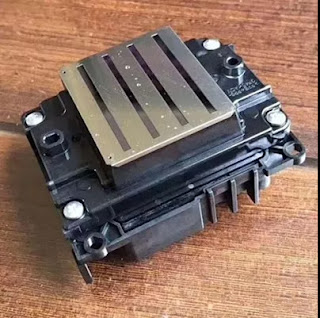
What is Epson 4720 Printhead? It Can Replace 5113 Print Nozzle?

Hello, nice to see you again, my dear friends. It will rainy in Nanjing, the sky is dack, wind is heavy. Now I will tell you the topic is a...