显示标签为“wide format inkjet printer”的博文。显示所有博文

2018年6月7日星期四

What things Need you to Consider when Buying a Sublimation Inkjet Printer?

Hi~ nice to see you again, my friends. Do you know what things need you to consider when buying a sublimation inkjet printer? It is not easy for someone! Choosing the correct sublimation printer requires first determining what you want to produce.

Are you printing large designs on apparel? Smaller items, such as coasters, cellphone covers, flip flops, bag tags and plaques? Full-color graphics? High-definition photography? The answers to these questions will have a significant impact on your choice.

Other key factors to consider when choosing a sublimation printer are 
printing-field size, number of ink colors, and printing speed and cost.
Sublimation printers size:

Desktop Format inkjet printer: These are office-style units that print on individual sheets of paper and fit easily on any desk or table surface. They are ideal for startup operations due to their cost and ease of use. Paper sizes range from 8.5″ x 11″ to 13″ x 19″.

Narrow Format inkjet printer: These freestanding, commercial-grade units print onto rolls of paper ranging from 24-44 inches wide. They are ideal for growing businesses 
that need to generate larger images or higher-volume production.

Wide Format inkjet printer: These freestanding, industrial-grade units print onto rolls of paper measuring 44-104 inches wide. They are ideal for production facilities with specialized needs such as textile printing, trade-show banners, allover garments, etc.
Number of Ink Colors
Inkjet printers generate hundreds of thousands of output colors by mixing a select number of base ink colors. Most printers are four-color units with base ink colors of cyan, magenta, yellow and black (CMYK).

Other printer models are available with eight base colors. Examples of additional base colors include: light cyan, light magenta, red, orange, blue, etc. Eight-color systems present options for different ink sets to be used in different applications.
For example, if you want to focus on high-resolution photographs, buy an ink set specifically designed for delivering top-quality photographic images for sublimation. If you want to produce fluorescent colors, use an ink set designed for that application.
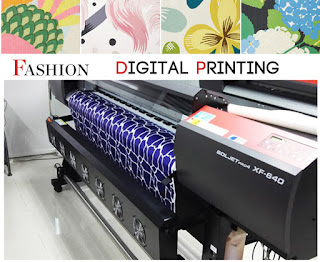

For most sublimators, a four-color printer will produce vibrant graphics, stunning colors and high-resolution photography. However, for fine art or photographic work — where subtle shades of color make a big difference — an eight-color printer may be more ideal.

Printing Speed
Specialy sublimation ink sets exist for operations focusing primarily on graphics and color matching.

Graphics often require expanded gamuts that deliver a more unique set of ink colors. For example, oranges and reds can be difficult to accurately match with standard CMYK printing. In addition, some blues and purples are on the outer fringes of the true CMYK gamut.

In the case of an eight-color set, the two light black inks are replaced with fluorescent pink and fluorescent yellow. This enables users to add a wide range of fluorescent spot colors to images or produce completely fluorescent images for special effects that are not possible with a CMYK-only solution. It also opens the door to a variety of special applications, such as promotional, safety and high-visibility products.

These specialty sublimation inks are examples of how technology within the decorating discipline continues to expand. Though not every ink is available for every printer, stay abreast of what your suppliers offer.

If you want to purchase new sublimation equipment, look beyond the image size and print speed, and focus on the available ink sets and how they can benefit your operation. More color options yield more sublimation opportunities, which lead to increased profitability and business growth.

Okay, these all above are my share about the tips of buying sublimation inkjet printers. If you have any other needs or questions welcome to contact us at any time. We will provide you the best quality product and service. Hope my article can be useful to you. Thank you for your reading.

Nanjing Feiyue paper Industrial Co.,ltd
www.feiyuepaper.com
Email: sales@feiyuepaper.com 
jenny@feiyuepaper.com
Whatsapp: +8618755150383

2018年5月22日星期二

Do You Know What Kind of Environment is Your Sublimation Inkjet printer likes ---- Moisture or Dry?

Hi, Nice to see you! Today, I want to talk about the topic is sublimation inkjet printer's environment. If you just buy a inkjet sublimation printer, do you know what kind of environment is your sublimation inkjet printer likes ---- moisture or dry? If you don't know the answer, read the following and I will share you more!


PROTECT YOUR PRINTER’S ENVIRONMENT

The environment—most specifically, humidity and temperature—plays a big part in how an inkjet printer functions. Inkjet printers prefer a consistent temperature that is cool but not cold. Further, they love humidity between 40-60 percent. If your environment is very high humidity, and sublimators may still have problems with printers. But remember, it may be really humid outside, but inside your air conditioning has taken all the moisture out of the air. This is bad for your printer. It is suggested to run a humidifier inside your home near the printer to maintain inside humidity.

If you are working in your home, and have a basement, inkjet printers love to live there. I had an old epson sublimation printer with inks installed and had it stored in my basement for over a year unused. A basement is naturally cool and humid. I took the printer out and printed a test print, as I was curious, and the first print was perfect. That printer would not have printed, had it not been in my basement because the ink would have dried solid inside the print heads and would have been very difficult if not impossible to correct.


How to Protect the sublimation printer nozzles?

You should never leave your inkjet sublimation printer sit for an extended period of time without printing. The length of time depends on your environment. You should run at least a nozzle check periodically to move fresh ink through your print heads. Think of your nozzles as a cup of coffee that you leave sitting on your office desk. If you left it there for a couple weeks or maybe only a couple of days, the water would evaporate, leaving a brown crusty deposit. You would have to scrub pretty aggressively to clean out that mug.


The same thing can happen to a print head. The ink sits in the nozzle and the liquid evaporates over time, leaving a crusted over nozzle. You would have to run some head cleaning cycles to get all the nozzles to print correctly, and this wastes ink. I personally recommend running a nozzle check each day, although sometimes that can be hard to remember. It only takes a few drops of ink to do a nozzle check, but it takes a lot more to run cleaning cycles to clear a clogged printer.


You probably spent a lot of time researching sublimation printers before you eventually settled on the model you purchased. You ordered your package, and when it arrived, you set it up, and started creating sublimation products.

Now you have the knowledge of how your wide format inkjet printer works, and you know that you must provide your printer a good environment, and exercise it regularly. If you do these simple things, you can be confident that when you need your inkjet sublimation printer, it will print flawlessly.Thank you for your reading.If you have any other needs or questions welcome to contact us at any time. We will provide you the best quality product and service. Hope my article can be useful to you.

Nanjing Feiyue paper Industrial Co.,ltd
www.feiyuepaper.com
Email: sales@feiyuepaper.com
jenny@feiyuepaper.com
Whatsapp: +8618755150383

2018年1月11日星期四

Have A Regular Maintenance for Your Inkjet Printer from Different Side

  Hi, Nice to see you. This week I have mostly shared you about our new products. Then as a summary, today is a new topic about your inkjet printer. We all know that the inkjet printing is a very important step in the sublimation or eco-solvent printing. And it is getting more and more popular in the whole printing process. While do you know how to have a regular maintenance for your inkjet printer? Read the following and I will share you more.

Print Head
  We all know that the print head is one of the most important part for the inkjet printer. So have a right maintenance for the inkjet printer is very important. Then we can do it from the following two steps:
Check nozzle before you start the day
  Every day before you start printing, you should perform print head checks or test prints. Print head checks will let you know if all the printer heads are working at optional levels. If there is clogging in the heads, you will notice a drop in the quality of your print. In such situations, you need to clean the print head before you start printing.

Check the print head regularly
  You need to keep checking the print head on a regular basis if you want to have high-quality prints all the time. Move the print head to one side and look at the sides to see if there is any ink build up. If you notice ink build up on the plastic part of the print head, you should clean it. However, do not try to clean the head directly as you may damage it.

Capping station, flush pad, and wiper blade
  For all the accessories of inkjet printer, keep cleaning is very important. The detailed cleaning introduction are as follows:
Capping station
  The capping station is important because it uses a vacuum to prepare your print heads. If there is any contamination due to the deposition of ink, it will overload itself every time you need to get something printed. Clean the capping station with the help of a Q-tip.
Flush pad
  The flush pad is where the print head will release small amounts of ink to ensure the nozzle is open. As you keep printing with your sublimation printer, the pad will reach a saturation point after which it won’t work at all. Rinse the flush pad regularly so that you have a hassle-free printing experience.
Wiper blade
  The wiper blade will keep your print head clean by removing excess ink from it. Over time, your wiper blade will become dirty with ink. As a result of this, your wiper blade won’t be able to clean the printer heads. Use a Q-tip to clean your wiper blade.

  Okay, These all above are my share about how to maintain your inkjet printer from the different side. If you have any other needs or questions welcome to contact us at any time. We will provide you with the best quality product and service. Hope my article can be useful to you. Thank you for your reading.


Whatsapp:+8618752006819
Website: www.feiyuepaper.com
Facebook: Fei Yue Paper Industrial Co.,Ltd
Email:zeo@feiyuepaper.com

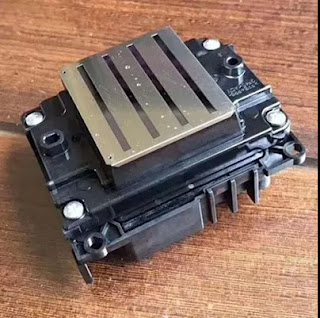
What is Epson 4720 Printhead? It Can Replace 5113 Print Nozzle?

Hello, nice to see you again, my dear friends. It will rainy in Nanjing, the sky is dack, wind is heavy. Now I will tell you the topic is a...