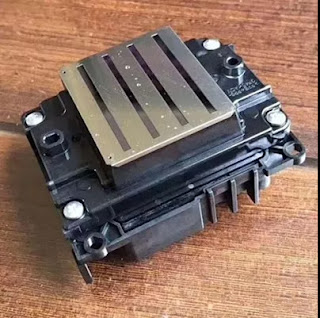
Hi, Nice to see you. In my last article I have shared you a high quality Epson F2000 direct to garment printer for your T-shirt DTG printing. This technology is mostly used in the T-shirt direct inkjet printer. But the T-shirt should better be cotton fabric. While do you know what questions should you take care before you start your DTG printing? Then today in order to let your DTG printing achieve a better printing effect I will share you more. The specific question that need to take care are as follows.
Do you need pre-treat shirts in advance?
Generally we suggest pre-treat the t-shirt in advance. We recommend 3 weeks but have actually had shirts pretreated for months and still gotten good results. The hardest part is keeping pretreated shirts clean and dust free until you need them.
Can it print on the blend cotton/poly blends (70/30) ?
Yes, of course. But you should avoid printing on any clothing with odor blockers or any kind of stain resistant technology though. We use water based inks and those are MADE to repel water!
If there is a wrinkle in the t-shirt when printing, what will happened?
The wrinkle will be still in the t-shirt after printing. So remember pay attention to the t-shirt before printing.
Will the print head got clogged if not use it for a while?
If you never use the printer, the print heads will eventually clog. But the WIMS and good maintenance make this very rare.
What RIP software should the DTG printer use?
Use RipPro C6. It comes with the new DTG printers and is made specifically for them.
Would you ever need to pretreat a light color shirt?
We recommend that you do pretreat light garments. That way, you’ll get better color fastness, croc fastness and the image will wash better and last longer.
What will influence the quality of you DTG garments?
A. The quality of the garment
B. How well you pretreated it
C. How you wash it
How long can the machine sit without running?
If you want to leave it for more than a few days then we suggest a system flush. Then you can leave it for as long as you’d like.
What material do you have to pretreat?
We pretreat everything except for some wood products.
How long and cost for pre-treatment per shirt?
Pretreatment takes under a minute. Cost is negligible.
Okay, These all above are the questions I concluded. May be the quantity of the question is much, but I think if you can take care of it your DTG printing effect will be better and your machine can have a longer service life. Of course if you have any needs or questions welcome to contact us at any time. We will provide you with the best quality product and service. Hope my article can be useful to you. Thank you for your reading.
Whatsapp:+8618752006819
Website:www.heatsub.com
Facebook: zeo(章江徽)
Email:zeo@feiyuepaper.com
2017年11月29日星期三
2017年9月14日星期四
Do You Know how to Adjust The Color for Your Digital Inkjet Printer?
Hi, Nice to see you again. Today one of my customer tell that the sublimation printing and transferring is getting more and more old. And now the eco-solvent and UV printing are getting more and more popular. But do you when whatever which printer do you use you must need to adjust the color of your digital inkjet printer in a right way. Then do you know how to do it? Read the following and I will share you about the tips.
1.The experience of color: the color of the speed, accuracy depends on the operator's experience and level.
2. Color card color method: by contrasting the color of the color card to color.
3. Color measurement method
By means of color measurement equipment, the color of the target color, and the color measurement results into the computer, and then print out the color. This method is paletized by the instrument, thus reducing the impact of many man-made and environmental factors.
4. The screen display method
By adjusting the color of the screen to adjust the color of the image, usually on the screen through the color menu to select or adjust the color. This method is very useful in color matching or when it starts to be toned, and is a coloring method commonly used by designers. However, due to the principle of hair color and dye on the fabric of the hair color principle is not the same, the screen can display the color can not be all through the dye displayed on the fabric, and the dye shown by the subtle differences can not be on the screen display. Therefore, this is a kind of approximate color method, can not be used as
accurate color.
Okay, These all above are my share about how to adjust the color of your digital printer in a right way. If you have any needs or questions welcome to contact us at any time. We will provide you with the best quality product and service. Hope my article can be useful to you. Thank you for your reading.
Whatsapp:+8618752006819
www.heatsub.com
Facebook: zeo(章江徽)
Email:zeo@feiyuepaper.com
1.The experience of color: the color of the speed, accuracy depends on the operator's experience and level.
2. Color card color method: by contrasting the color of the color card to color.
3. Color measurement method
By means of color measurement equipment, the color of the target color, and the color measurement results into the computer, and then print out the color. This method is paletized by the instrument, thus reducing the impact of many man-made and environmental factors.
By adjusting the color of the screen to adjust the color of the image, usually on the screen through the color menu to select or adjust the color. This method is very useful in color matching or when it starts to be toned, and is a coloring method commonly used by designers. However, due to the principle of hair color and dye on the fabric of the hair color principle is not the same, the screen can display the color can not be all through the dye displayed on the fabric, and the dye shown by the subtle differences can not be on the screen display. Therefore, this is a kind of approximate color method, can not be used as
accurate color.
Okay, These all above are my share about how to adjust the color of your digital printer in a right way. If you have any needs or questions welcome to contact us at any time. We will provide you with the best quality product and service. Hope my article can be useful to you. Thank you for your reading.
Whatsapp:+8618752006819
www.heatsub.com
Facebook: zeo(章江徽)
Email:zeo@feiyuepaper.com
2017年9月3日星期日
Mimaki TX300P-1800------- Try And Create Your Own Design Fabric!
Hi, Nice to see you again. In my last article I have introduced you about the Mimaki TS300P-1800 large format sublimation printer. And if you are professional in digital printing industry, you must know that there is also a model in the Mimaki digital printer and its name is very likely with the TS300P-1800. Today I will introduce you about it-----Mimaki TX300P-1800.
Firstly, have a brief introduction about the Mimaki TX300P-1800. Owing to the widespread use of the Internet, the number of orders for personalized/customized design products has been increasing.To meet the latest market needs, Mimaki developed the Tx300P-1800. This entry-level model fits perfectly in places with limited floor space, such as design studios or school facilities. The Tx300P-1800 delivers high-quality printing on a wide range of textiles. So the biggest difference of the TS300P-1800 and the TX300P-1800 is that the TS300P is a sublimation printer while the TX300P-18000 is a digital printer that can print direct to the fabric.
Feature
*New print head allows printing on various types of textile
*Reliable textile feeding mechanism ensures stable printing
*Mimaki’s print technologies for achieving beautiful printing
*Uninterrupted printing solutions
*Maximum print speed (66 m2/h) achieves high productivity
*An abundance of textile inks to choose from.
*High-performance RIP software TxLink3 Lite
More detail of the Feature
New print head allows printing on various types of textile
While maintaining high-quality printing, high gap settings of the print head allow printing on not only thick textiles but also various woven patterns or raised fiber surfaces.
Reliable textile feeding mechanism ensures stable printing
Reliable and unique feeding mechanism including front and rear tension bars ensures stable textile transportation for providing quality printing.
Mimaki’s print technologies for achieving beautiful printing
- Mimaki Advanced Pass System 4 (MAPS4) reduces banding.
- Superior inkjet technology
Uninterrupted printing solutions
- Nozzle Check Unit (NCU) automatically detects and cleans clogged nozzles.
- Nozzle Recovery System (NRS) uses only good nozzles as substitutes, when the
clogged nozzles are not recovered after cleaning.
- Mimaki Bulk Ink System 3 (MBIS3) for long-time continuous printing.
Maximum print speed (66 m2/h) achieves high productivity
66 m2/h maximum print speed with 4-color printing and 35 m2/h with 6-color printing.
- 66 m2/h: 4-color draft mode / 540 × 360 dpi / 2 pass (Sb420 ink)
- 35 m2/h: 6-color draft mode / 540 × 360 dpi / 4 pass (Sb420 ink)
An abundance of textile inks to choose from.
Textile pigment ink and sublimation dye ink can be loaded at the same time.
Mimaki offers five ink types—sublimation, dispersant, pigment, reactive, and acid—to meet various application needs. For providing affordable ink prices, inks are packed in large volume packs (2 liters) and can be installed to MBIS3.
High-performance RIP software TxLink3 Lite
The TxLink3 Lite offers simple RGB and CMYK color replacement on raster and vector data, as well as the ability to produce different color patterns. Moreover, various color replacement functions can represent desired colors.
* TxLink3 Lite or RasterLink6 is bundled according to a user' s choice.
These all above are my share and introduction of the Mimaki TX300P-1800 large format direct to fabric printer. If you have any needs or questions welcome to contact us at any time. We will provide you with the best quality produce and service. Hope my article can be useful to you. Thank you for your reading.
Nanjing Feiyue paper Industrial Co.,ltd
www.heatsub.com
Facebook: Zeo
Whatsapp:+8618752006819
Skype:+8618752006819
Firstly, have a brief introduction about the Mimaki TX300P-1800. Owing to the widespread use of the Internet, the number of orders for personalized/customized design products has been increasing.To meet the latest market needs, Mimaki developed the Tx300P-1800. This entry-level model fits perfectly in places with limited floor space, such as design studios or school facilities. The Tx300P-1800 delivers high-quality printing on a wide range of textiles. So the biggest difference of the TS300P-1800 and the TX300P-1800 is that the TS300P is a sublimation printer while the TX300P-18000 is a digital printer that can print direct to the fabric.
Feature*New print head allows printing on various types of textile
*Reliable textile feeding mechanism ensures stable printing
*Mimaki’s print technologies for achieving beautiful printing
*Uninterrupted printing solutions
*Maximum print speed (66 m2/h) achieves high productivity
*An abundance of textile inks to choose from.
*High-performance RIP software TxLink3 Lite
More detail of the Feature
New print head allows printing on various types of textile
While maintaining high-quality printing, high gap settings of the print head allow printing on not only thick textiles but also various woven patterns or raised fiber surfaces.
Reliable textile feeding mechanism ensures stable printing
Reliable and unique feeding mechanism including front and rear tension bars ensures stable textile transportation for providing quality printing.
Mimaki’s print technologies for achieving beautiful printing
- Mimaki Advanced Pass System 4 (MAPS4) reduces banding.
- Superior inkjet technology
Uninterrupted printing solutions
- Nozzle Check Unit (NCU) automatically detects and cleans clogged nozzles.
- Nozzle Recovery System (NRS) uses only good nozzles as substitutes, when the
clogged nozzles are not recovered after cleaning.
- Mimaki Bulk Ink System 3 (MBIS3) for long-time continuous printing.
Maximum print speed (66 m2/h) achieves high productivity
66 m2/h maximum print speed with 4-color printing and 35 m2/h with 6-color printing.
- 66 m2/h: 4-color draft mode / 540 × 360 dpi / 2 pass (Sb420 ink)
- 35 m2/h: 6-color draft mode / 540 × 360 dpi / 4 pass (Sb420 ink)
An abundance of textile inks to choose from.
Textile pigment ink and sublimation dye ink can be loaded at the same time.
Mimaki offers five ink types—sublimation, dispersant, pigment, reactive, and acid—to meet various application needs. For providing affordable ink prices, inks are packed in large volume packs (2 liters) and can be installed to MBIS3.
High-performance RIP software TxLink3 Lite
The TxLink3 Lite offers simple RGB and CMYK color replacement on raster and vector data, as well as the ability to produce different color patterns. Moreover, various color replacement functions can represent desired colors.
* TxLink3 Lite or RasterLink6 is bundled according to a user' s choice.
These all above are my share and introduction of the Mimaki TX300P-1800 large format direct to fabric printer. If you have any needs or questions welcome to contact us at any time. We will provide you with the best quality produce and service. Hope my article can be useful to you. Thank you for your reading.
Nanjing Feiyue paper Industrial Co.,ltd
www.heatsub.com
Facebook: Zeo
Whatsapp:+8618752006819
Skype:+8618752006819
订阅:
博文 (Atom)
What is Epson 4720 Printhead? It Can Replace 5113 Print Nozzle?
Hello, nice to see you again, my dear friends. It will rainy in Nanjing, the sky is dack, wind is heavy. Now I will tell you the topic is a...
-
Hi~ nice to see you again, my dear friends. The National Day will coming! So from tomorrow to 7th October, I am in holiday. And today's...
-
Hi! Nice to see you again, my friends. Today, let's talk about how to clean epson nozzles . No matter if you use branded, compatible or ...
-
Hello, nice to see you again, my dear friends. It will rainy in Nanjing, the sky is dack, wind is heavy. Now I will tell you the topic is a...