显示标签为“digital printing”的博文。显示所有博文

2018年9月25日星期二

How to Keep Your Inkjet Printer with Good Effect? You Know the Tip of Maintenance?

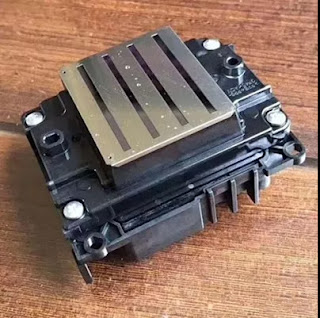
With the development of sublimation printing, the inkjet printer wide application in this field. But the printhead of inkjet printer broken easily, so we should maintain your digital inkjet printer.

Printer Maintenance: if a plotter lives long, a business may prosper.


Large format printers, like any other type of machines, need regular maintenance to increase its longevity. Nonetheless, frequent and proper maintenance policies help not only save significant amounts of money, but also regular maintenance is necessary to keep getting high-quality prints out of the machine.

Our years of experience in this industry have taught us valuable lessons related to printer maintenance and we will like to share some of that accumulated knowledge with you in this article. We will not go into too much detail since this will not be a tutorial or a “how to” manual to fix specific issues. We will simply comment on a few general recommended practices that we employ to maintain our equipment printing smoothly.

Periodic care keeps printers healthy and happy.
For a printing company, printers are a fundamental part of the production process. The failure in one of these high-tech machines could have catastrophic consequences starting with a negative impact on the workflow, followed by turnaround time variations and unhappy customers. Printers cost money but are also the moneymaker for print shops, so neglecting their care will never be a smart business decision.

Every manufacturer recommends specific maintenance schedules for their machines. That is the first rule to printer maintenance we follow: listen to what the manufacturer or supplier has to say about taking care of the machine they built. Another recommendation relates to using the right tools for even the small tweaks. For example, we use only lint-free cloths and factory maintenance fluid for cleaning accumulated dust and dirt build-up, that way we protect our print-heads. In addition, for pinch rollers, print heaters and other areas that have contact with media we use sometimes Isopropyl Alcohol as a general purpose cleaner.

The “best equipment” is nothing without proper care.
One of the key elements that have lead us to our success in the large format industry has been our cutting-edge equipment capabilities. But, like any other machines, our printers could only give us so much before breaking down or start to lose their print quality. We understand that to keep our quality prints, we need to take proper care of our printing tools, and believe it, we do. Whether we are talking about checking the system that controls the ink stability and tank levels, or simply wiping off the accumulated dirt, we would not be able to deliver the outstanding high-quality prints we are known for, without attention to our printer maintenance regimen.


Okay, these all above are my share about the maintenance of inkjet printer during digital printing. If you have any other needs or questions welcome to contact us at any time. We will provide you the best quality product and service. Hope my article can be useful to you. Thank you for your reading.

Nanjing Feiyue paper Industrial Co.,ltd
www.feiyuepaper.com
Email: sales@feiyuepaper.com 
jenny@feiyuepaper.com
Whatsapp: +8618755150383

2018年8月17日星期五

Inkjet Printer VS Laser Printer, Do You Know Which One Is Suitable for You?

Hi, nice to see you again, my dear friends! There still heavy rain and wind in Nanjing. Today's topic is about laser printer and inkjet printer. Do you know which one is suitable for you? Should you get an inkjet or laser printer? Many consumers have asked the very same question and this article serves to answer it. First, let me give you the short of it.

The biggest differences between inkjet and laser printers is that an inkjet printer uses ink, is suitable for low volume printing, and is the traditional choice of home users, while a laser printer uses toner, is ideal for high volume printing, and is mostly utilized in (but not exclusive to) office settings.

Printer Types Comparison
Inkjet printers are generally cheaper, smaller, and have the versatility to print both text-based documents and high quality images, especially photos. BUT be wary of cheap inkjet printers as those will end up costing you a fortune later on.
Laser printers, on the other hand, may be expensive upfront and uses pricier toner cartridges but still offers an overall lower cost per page, faster print speeds and typically involve a lower total cost of ownership.

Let’s take a closer look at the strengths and weaknesses of laser and inkjet printers so you can make your next purchase with confidence.

What Will You Use The Printer For?
If you’re looking for a home printer for occasional printing, most people would advice you to get an inkjet printer. However, a common complaint with inkjet printers is that the ink dries up if you don’t use it often. With that said, if you have the budget for it, I strongly suggest you get an affordably priced laser printer instead; the toner used by laser printers doesn’t dry up.

But if you’ll be printing a small volume of documents and colored images regularly, inkjet printers will get the job done. Laser printers are known to be more durable and can print large quantities of black and white and colored documents frequently. Though laser printers were originally built for office use, they are now growing in popularity as a home printer for economical reasons.

Color laser printers are good for everyday color printing but if you’re looking to print professional high resolution photos, go with a photo inkjet printer. High quality photo inkjet printers are particularly engineered for printing out vividly detailed photos with the tonal variety and deeper blacks that photographers need. Many professional photo inkjet printers use pigment-based ink which is more fade-resistant and works with a wide variety of art paper types as well as a range of paper sizes.

Inkjet vs. Color Laser Printer – One of the most popular questions we get from buyers is: should I get a color laser printer or an inkjet printer? It boils down to what you need color printing for. If you need gallery quality photos, get a photo inkjet printer. But if you need to print medium quality colored images that don’t require color depth and tonal range, we recommend color laser printers over inkjet printers for two reasons: first – laser toner does not dry up if left unused, and second – you print more pages from laser toner cartridges than inkjet cartridges.

Okay, these all above are my share about the differences of laser printer and inkjet printer. And now I believe that you have knew that which one is better for your digital printing. If you have any other needs or questions welcome to contact us at any time. We will provide you the best quality product and service. Hope my article can be useful to you. Thank you for your reading.

Nanjing Feiyue paper Industrial Co.,ltd
www.feiyuepaper.com
Email: sales@feiyuepaper.com
jenny@feiyuepaper.com
Whatsapp: +8618755150383

2018年3月2日星期五

Take Care of The Factors When Operate the UV Printer

  Hi, Nice to see you. How are you today? It is always rainy in Nanjing, China. But the temperature is getting more and more warm now. Nowadays, apart the sublimation printing, the UV printing is also very popular in the world now. It can also help us print the patterns with vivid and brilliant color. While do you know what factors should you take care when operate your UV printer? Read the following and I will share you more.

1.Brute force adjustment print head.
  Do not use outside force to adjust nozzle position without regulation. Do not use brute force, whether changing or lightly adjusting nozzles. Please follow the instructions carefully.
2.Ignore the work ground line.
  UV flatbed printer is affected by static electricity very much. It is necessary to check the connection of ground line regularly and sprinkle a little salt water around the ground.
3. Random switching circuit.
  Install and remove the UV flatbed printer circuit, without turning off the power.This behavior can damage the life of each system, endanger the nozzle.
4.Cleaning without turn off the power.
  Pay attention to protecting the circuit board and other internal systems, and turn off the power when cleaning, and be careful not to touch the circuit board and other internal systems.

5.Use no inspection cleaning liquid.
  Clean the nozzle with an unclean liquid solution. Print head nozzle are very susceptible to contamination and wear, So please use the manufacturer specified product and quality inspection clearance product to clean nozzle.
6.High pressure cleaning nozzle.
  If the nozzle is slightly blocked, it is recommended to use a vacuum cleaner to wash out the dust, and then fine cleaning, do not use high pressure to clean the nozzle.
7.Soak the nozzle for cleaning.
  Although the to put the nozzle into cleaning solution for a long time can be more effective and clear stains, but the cleaning fluid has a certain corrosive, if the time more than 48 hours, the nozzle itself will be affected.Therefore, generally only take the appropriate time for cleaning the print head.
8. Ultrasonic cleaning nozzle.
  Do not long time using ultrasonic cleaning machine cleaning nozzle.In fact, if you usually pay attention to the maintenance of the nozzle, then no need for ultrasonic cleaning. Ultrasound can cause undesirable effects on the nozzle.But if the blockage is serious, need to use ultrasonic cleaning, then only cleaning time up to 3 minutes.If there is no cleaning at all, please wait for the nozzle to cool naturally to the normal state during the second cleaning.
9. Mix the ink at will.
  Do not arbitrarily raise different batches of ink, or use the bad quality ink, cleaning fluid. Two different configurations of ink mixing will change the ink color and quality, and will affect the printing effect and plug the nozzle.


  Okay, These all above are my share about the factors that you should better take care when operate your UV printer. If you have any other needs or questions welcome to contact us at any time. We will provide you the best quality product and service. Hope my article can be useful to you. Thank you for your reading.


Nanjing Feiyue paper Industrial Co.,ltd
www.feiyuepaper.com
Facebook: Fei Yue Paper Industrial Co.,Ltd
Whatsapp:+8618752006819
Skype:+8618752006819

2018年1月30日星期二

Do You Know How to Keep The Printing Effect of Your Inkjet Printer in A Wet Environment?

  Hi, Nice to see you. Chinese Spring Festival will coming soon. This is a very important festival for all Chinese people, it means a new year will come. And of course we will have a two weeks vocation from Feb 10 to Feb 22. While before this I will also keep share you the solutions and more about the sublimation inkjet printing and transferring. Today the topic is about the printing.


  We all know that the climate is different across the world, somewhere is always warm, somewhere is hot and dry, or somewhere is clod and wet. Then do you know how can you keep the printing effect of your inkjet printer in the different environments( Whatever for the sublimation printing or eco-solvent printing)? Today I will share you some small tips to help you protect your inkjet printer in a wet environment and make your printing always fine. Read the following and I will share you more.


  Keep the printing effect of a printer, the necessary maintenance is very important. Here are some small methods for you:
Step 1
  Pay attention to the printer working environment, close the door and windows in night. Keep the outside moisture from room.
Step 2
  Shell of the printer should be sealed, keep the moisture from electric parts, such as electric boards , cables.
Step 3
  Printing material should keep well, print medium easy to absorb moisture, wet material will cause ink disperse. Every time after you use these materials , the material should put back in the package, Try not to touch the ground and the wall.

Step 4
 Due to the wet weather, ink drying slow, we always need to wait long time. So advise you to open printer heating function or related drying equipment, it can speed up the drying image.
Step 5
  Especially when users need to laminate the film, need to wait for completely dry before coating. If the film is covered immediately, the ink will blur, clients can use drying equipment to dry the certain part of material.
Step 6
  It is recommended to use air exhauster or air conditioning dehumidification mode in the working environment of the printing machine. If the moisture is too heavy, some moisture absorbent or desiccant can be placed in the room.

  Okay, These all above are my share about how to maintain your inkjet printer in the wet environment. Hope it can be useful to you, so that your printing effect can always be great. If you have any other needs or questions welcome to contact us at any time. We will provide you the best quality product and service. Thank you for your reading.


Nanjing Feiyue paper Industrial Co.,ltd
www.feiyuepaper.com
Facebook: Fei Yue Paper Industrial Co.,Ltd
Whatsapp:+8618752006819
Skype:+8618752006819


2017年12月13日星期三

Do You Know How to Save The Cost in Your Digital Inkjet Printing ?

  Hi, Nice to see you. It is rainy today and the weather is getting colder and colder. How about you? Same as before, today the topic is also around the sublimation printing and transferring. We all know that the digital inkjet printing is getting more and more popular in the world and most people choose this industry for there business. Whether for the fabric, textile, clothes produce or the banners, advertisements printing. This industry can bring people many profits and benefit. While in the printing process, do you know how to save your more costs from many different small aspect? How can you get more from the savings ? Then I will share you about this. Please be patient and keep  read the following.


1. The concentrated print as much as possible
  When using Micro Piezo printer, inkjet printer, the most bad is printed every few minutes once, if you need to print a lot of things, I suggest that you will need to print something together for printing. Every start up time, because the machine to clean the print head and begin to printers, ink, ink delivery system the process for waste more ink, so try not to frequent start the machine.


2. The correct cleaning the print head
    Most ink-jet printing equipment is automatically cleaning the print head on, and have a button on the print head cleaning. If the device of automatic cleaning function is invalid, the print head can be wash by hand. Manual cleaning the steps to remove the print head should be in accordance with the operating manual. Manual cleaning the print head can be in medical syringe front end of the hose, a section loaded by strictly filtered water, wash with a magnifying glass observation carefully when the nozzle, such as near the nozzle has the remains of the sedimentation, clear soft rubber products are available.Long on the integration of the print head due to the ink dries up and blocking the nozzle, can use hot water soak before washing.

3. Don't Immediately Replacement Cartridges 
  We know print equipment is through the sensor to detect the cartridge ink in ink volume , sensor detected as long as one of the color is less than the value of internal set printer, prompt replacement cartridges. At this time, we can remove the ink cartridge to reset the printer internal sensors, so as to determine the install the new cartridges.

4. Try to Reduce The Washing Time
  Equipment in use process middling become ink-jet printer jams phenomenon, caused by blocked for many reasons, such as the machine's working environment, the quality of the ink, machine not busy time and so on, because every time wash ink jet head will consume large amounts of ink, so should be cleaned to minimize the number of ink-jet printer, of course, should be paid attention to when using the machine models ink using machine manufacturers designated as much as possible. 

  Okay, These all above are my share about how to save the cost of your digital inkjet printing from some small aspects. If you have any needs or questions welcome to contact us at any time. We will provide you with the best quality product and service. Hope my article can be useful to you. Thank you for your reading.


Nanjing Feiyue paper Industrial Co.,ltd
www.heatsub.com
Facebook: Zeo(章江徽)
Whatsapp:+8618752006819
Skype:+8618752006819

What is Epson 4720 Printhead? It Can Replace 5113 Print Nozzle?

Hello, nice to see you again, my dear friends. It will rainy in Nanjing, the sky is dack, wind is heavy. Now I will tell you the topic is a...