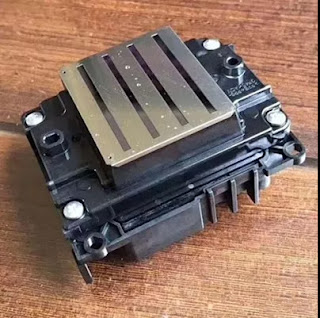
Hi, Nice to see you. Do you still remember me? Just finished my holiday from Singapore and Malaysia, enjoyed my travel and then come back to work. We are a professional digital printing material manufacturer in China. And we have 10 years experience in this industry, so we can help you about solve a lot problems in your digital inkjet printing process. Today I will help you solve one important problem in your printing process-----The drop ink in the printing.
It is normal that the equipment have some small problems, the most important thing is to find what can be resolved? Where will the digital printer be with problems? Today we have summarized the problems with the dropout of the digital printer and the problem of printing skew and the solution.
First of all, there are drops of digital ink printer phenomenon where there are some, we have to understand clearly to find the right way, first in a certain material on the requirements of the amount of ink there are different paper there is the appearance of static electricity, The second setting in the weather climate for the ink preheat value should also be different. And the ink of the large cartridge is full, the ink cartridge is not scrubbed on time.
The last one is a lot of bubbles inside the ink pipeline.The amount of ink can be used to set the software parameters to set, to avoid some areas of the spot color ink is too high. For different weather conditions can reduce the storage value of the cartridge, to avoid too high, so that ink droplets become more fine. If the ink cartridges ink over the phenomenon of drop ink can be reduced, reduce the amount of ink cartridges, it is best to control the amount of one-third to clean the wipe ink cartridges. If there is air bubbles, as long as the bubble can be reduced.
Okay, These all above are my share about how to solve the problem about the drop ink in the digital inkjet printing. Of course if you have any better suggestions or needs welcome to contact us at any time. We will provide you with the best quality product and service.We believe our experience can help you more. Thank you for your reading.
Nanjing Feiyue Digital Technology Co.,ltd
www.heatsub.com
Facebook: Zeo
Whatsapp:+8618752006819
Skype:+8618752006819
2017年10月11日星期三
2017年9月27日星期三
Mimaki CG-SRIII Series Cutting Plotter with Extreme Curve Cutting Speed-----Come on And Have A Try
Hi, Nice to see you again.This week we take our customer to our Mimaki factory and show him our high quality products and service. In the factory I saw the new CG-130SRIII large format plotter. This printer has exterme curve cutting speed and high quality. Then have you heard about this printer before? Today I will share you more about this machine .

Firstly, have a brief introduction about the Mimaki CG-SRIII series cutting plotter.The Mimaki CG-SRIII Series of roll-based cutters are available in three widths. These models feature continuous crop mark detection for precise contour cutting. A proprietary half cut function leaves a small bit of backing sheet at connecting points for easier handling. Accurate long-length cutting is enabled through segment compensation. These cutting plotters are ideal for producing decals, stickers, cut-vinyl signs and more.

Characteristic
A best-in-class cutting pressure of 500g for a wider range of materials
Up to 2 times the curve cutting speed increases productivity
Event Notification function for remote monitoring
Continuous Crop Mark Detection for precise stickers and seals.
Upgrade of firmware can be done quickly and easily by user.
Ethernet connection for LAN use as well as USB2.0 and RS-232C
Main Advantages
Maximum cutting pressure of 500g, use more widely
The curve cutting speed is 2 times larger than that in the past, and the productivity is further improved
"Event notification" function, to achieve remote monitoring
Drawing start / end, error / warning message
With "continuous reading of the cutting mark" and the unique "half (dotted line) cut" function, you can accurately create labels and stickers. With the newly developed "Segment Correction Function" that detects the intermediate crop mark, it is also possible to accurately cut the contours for easy skewed long prints.
Equipped with the user can easily upgrade the soft firmware function
In addition to RS232C, USB2.0 connection, but also supports LAN connection
Okay, These all above are my share about the Mimaki CG-SRIII series cutting plotter. If you have any needs or questions welcome to contact us at any time. We will provide you with the best quality product and service. Hope my article can be useful to you. Thank you for your reading.
Nanjing Feiyue Digital Technology Co.,ltd
www.heatsub.com
Facebook: Zeo
Whatsapp:+8618752006819
Skype:+8618752006819

Firstly, have a brief introduction about the Mimaki CG-SRIII series cutting plotter.The Mimaki CG-SRIII Series of roll-based cutters are available in three widths. These models feature continuous crop mark detection for precise contour cutting. A proprietary half cut function leaves a small bit of backing sheet at connecting points for easier handling. Accurate long-length cutting is enabled through segment compensation. These cutting plotters are ideal for producing decals, stickers, cut-vinyl signs and more.

Characteristic
A best-in-class cutting pressure of 500g for a wider range of materials
Up to 2 times the curve cutting speed increases productivity
Event Notification function for remote monitoring
Continuous Crop Mark Detection for precise stickers and seals.
Upgrade of firmware can be done quickly and easily by user.
Ethernet connection for LAN use as well as USB2.0 and RS-232C
Main Advantages
Maximum cutting pressure of 500g, use more widely
The curve cutting speed is 2 times larger than that in the past, and the productivity is further improved
"Event notification" function, to achieve remote monitoring
Drawing start / end, error / warning message
With "continuous reading of the cutting mark" and the unique "half (dotted line) cut" function, you can accurately create labels and stickers. With the newly developed "Segment Correction Function" that detects the intermediate crop mark, it is also possible to accurately cut the contours for easy skewed long prints.
Equipped with the user can easily upgrade the soft firmware function
In addition to RS232C, USB2.0 connection, but also supports LAN connection
Okay, These all above are my share about the Mimaki CG-SRIII series cutting plotter. If you have any needs or questions welcome to contact us at any time. We will provide you with the best quality product and service. Hope my article can be useful to you. Thank you for your reading.
Nanjing Feiyue Digital Technology Co.,ltd
www.heatsub.com
Facebook: Zeo
Whatsapp:+8618752006819
Skype:+8618752006819
2017年9月18日星期一
Why Not Try about The Mutoh VJ1624-WX Sublimation Printer?
Hi, Nice to see you again. How is your weekend going? In the sublimation or eco-solvent digital printing and transferring industry, I have shared you many different plotters. Such as the Mimaki , Roland, Epson, also with the Mutoh sublimation printer. The Mutoh wide format digital printer is a famous brand in the sublimation printing industry. Today I will share you one model of this big Mutoh family and may be you can have a try of it. I believe it can bring you a new experience-----Mutoh VJ1624-W.
Firstly, have a definition introduct with this Mutoh VJ1624-W sublimation printer. The VJ-1624W is an aqueous sublimation transfer printer and is capable of handling up to 64" / 1625mm sublimation transfer rolls. It is perfect for both startup and established businesses wanting to extend their product portfolio printing soft- signage as well producing sports and team wear. What's more, the VJ1624W prints on most typical dye sublimation transfer papers, making transfer onto all possible flexible and rigid polyester materials possible.
Feature
The ValueJet 1624W is the perfect printer for soft signage, custom sports apparel and other textile applications. Print a wide variety of applications, such as POP signage, trade show graphics, museum fine art prints, banners, flags, custom fabrics prints and more.
*Latest generation 8 channel 1440 nozzle piezo head
*Typical production speeds between 14 and 27.5 m²/hr
*Suitable for water-based dye sublimation inks
*Ideal for production of soft signage, sportswear, promotional goods, photo panels and more
*Environmentally friendly printing
Speed And More Specification

Production Print Speed: 20.5 m²/h at 360x720 dpi
Print Resolution: 1440/1080/720/540/360 dpi
Minimum Droplet Size: 3.5 pl
Head Height: 1.5 mm / 2.5 mm / 4.0 mm
Heating System: None
Maximum Media Width: 1625 mm (64")
Maximum Print Width: 1615 mm (63.58")
Max Media Roll Weight: 30 kg
Wide Application
Print on Dye Sublimation Transfer Paper – The Mutoh ValueJet 1624W is perfect for large application printing to dye sublimation transfer paper. Mutoh’s speed and print quality make this the perfect printer for any commercial application.
Typical dye sublimation applications are:
*Soft signage and graphics for events, tradeshows and sporting grounds
*Home decoration: curtains, bed linen, soft furnishings
*Flags & pennants
*Sports goods: snowboards, helmets etc
*Promotional Goods: mugs, umbrellas, iPods, mouse mats, photo panels
*Apparel: blouses, sportswear, outdoor jackets, T-shirts, school sportswear, swimwear
Okay, These all above are my share about the Mutoh VJ1624-W sublimation digital printer. If you have any needs or questions welcome to contact us at any time. We will provide you with the best quality product and service. Hope my article can be useful to you. Thank you for your reading.
Nanjing Feiyue Digital Technology Co.,ltd
www.heatsub.com
Facebook: Zeo
Whatsapp:+8618752006819
Skype:+8618752006819
Firstly, have a definition introduct with this Mutoh VJ1624-W sublimation printer. The VJ-1624W is an aqueous sublimation transfer printer and is capable of handling up to 64" / 1625mm sublimation transfer rolls. It is perfect for both startup and established businesses wanting to extend their product portfolio printing soft- signage as well producing sports and team wear. What's more, the VJ1624W prints on most typical dye sublimation transfer papers, making transfer onto all possible flexible and rigid polyester materials possible.
Feature
The ValueJet 1624W is the perfect printer for soft signage, custom sports apparel and other textile applications. Print a wide variety of applications, such as POP signage, trade show graphics, museum fine art prints, banners, flags, custom fabrics prints and more.
*Latest generation 8 channel 1440 nozzle piezo head
*Typical production speeds between 14 and 27.5 m²/hr
*Suitable for water-based dye sublimation inks
*Ideal for production of soft signage, sportswear, promotional goods, photo panels and more
*Environmentally friendly printing
Speed And More Specification

Production Print Speed: 20.5 m²/h at 360x720 dpi
Print Resolution: 1440/1080/720/540/360 dpi
Minimum Droplet Size: 3.5 pl
Head Height: 1.5 mm / 2.5 mm / 4.0 mm
Heating System: None
Maximum Media Width: 1625 mm (64")
Maximum Print Width: 1615 mm (63.58")
Max Media Roll Weight: 30 kg
Wide Application
Print on Dye Sublimation Transfer Paper – The Mutoh ValueJet 1624W is perfect for large application printing to dye sublimation transfer paper. Mutoh’s speed and print quality make this the perfect printer for any commercial application.
Typical dye sublimation applications are:
*Soft signage and graphics for events, tradeshows and sporting grounds
*Home decoration: curtains, bed linen, soft furnishings
*Flags & pennants
*Sports goods: snowboards, helmets etc
*Promotional Goods: mugs, umbrellas, iPods, mouse mats, photo panels
*Apparel: blouses, sportswear, outdoor jackets, T-shirts, school sportswear, swimwear
Okay, These all above are my share about the Mutoh VJ1624-W sublimation digital printer. If you have any needs or questions welcome to contact us at any time. We will provide you with the best quality product and service. Hope my article can be useful to you. Thank you for your reading.
Nanjing Feiyue Digital Technology Co.,ltd
www.heatsub.com
Facebook: Zeo
Whatsapp:+8618752006819
Skype:+8618752006819
2017年9月4日星期一
Do You Know What Should You Pay Attention to Before Open Your UV Digital Printer ?
Hi, Nice to see you. Have you heard about the UV digital printer before ? Did you used about it? Today I will introduce you more about the UV digital printer and give you some tips that you should pay attention to before you open your digital printer.
Firstly, have a brief introduction about this machine. UV flatbed printer, also known as universal flatbed printer or flatbed printer, which broke through the bottleneck of digital printing technology, to achieve a true sense of a printed, no plate, full-color image once completed, is the traditional printing presses.The original design and manufacturing purpose is used to inkjet hard material inkjet equipment, which broke through the inkjet technology can only print on the soft material restrictions, inkjet history is an important turning point, marking the inkjet technology to enter more the birth of a field of time. But do you know what should you pay attention to before you turn on your UV flatbed printer? Read the following article and I will share you more tips about the attention.
Step 1: Checking the rail for lubricant Before using UV flatbed printer,is it possible to keep cars up and running.Because if the guides lack of lubrication will leads to the car slower,it will affect the print quality.
Step 2: Checking whether print head ink sac is well connected with the print head before using the printer.

Step 3: Checking whether the grating bar is clean before using UV printer.If there are stains on the grating bar,This will lead to UV flatbed printer can't recognize the scale of grating bar,and cause printing problems.
Step 4: Checking whether there is ink on the bottom of LED curing lamp before using UV printer, if the lamp stained with ink,wiping out it with alcohol and keep regularly clean the surface of LED curing lamp.
Step 5: Checking whether the connection nozzle flat line is stained with ink before using printer.If yes,must clean up in time.(If it is found that the ink have been Inflow or corrosed flat line, must replace the flat line immediately before the machine working).
Step 6: After finish the checked.First printing test line to test whether the flatbed printer work normally.Through control software to print test,checking whether the nozzle hole is clogged,Each a small short test line is corresponding to a nozzle hole,The lack of short test line called "broken needle",Fuzzy called "virtual needle",must clean the print head If the "broken needle" and "virtual needle" ,please to clean the print head.
Step 7: Checking whether the material placed properly before the UV printer start printing every time,to avoiding impact the print head in printing process.
These all above are my share about the UV digital printer and tips that you should pay attention to before you open your UV digital printer. If you have any needs or questions welcome to contact us at any time. We will provide you with the best quality product and service. Hope my article can be useful to you. Thank you for your reading.
Nanjing Feiyue paper Industrial Co.,ltd
www.heatsub.com
Facebook: Zeo
Whatsapp:+8618752006819
Skype:+8618752006819
Firstly, have a brief introduction about this machine. UV flatbed printer, also known as universal flatbed printer or flatbed printer, which broke through the bottleneck of digital printing technology, to achieve a true sense of a printed, no plate, full-color image once completed, is the traditional printing presses.The original design and manufacturing purpose is used to inkjet hard material inkjet equipment, which broke through the inkjet technology can only print on the soft material restrictions, inkjet history is an important turning point, marking the inkjet technology to enter more the birth of a field of time. But do you know what should you pay attention to before you turn on your UV flatbed printer? Read the following article and I will share you more tips about the attention.
Step 1: Checking the rail for lubricant Before using UV flatbed printer,is it possible to keep cars up and running.Because if the guides lack of lubrication will leads to the car slower,it will affect the print quality.
Step 2: Checking whether print head ink sac is well connected with the print head before using the printer.

Step 3: Checking whether the grating bar is clean before using UV printer.If there are stains on the grating bar,This will lead to UV flatbed printer can't recognize the scale of grating bar,and cause printing problems.
Step 4: Checking whether there is ink on the bottom of LED curing lamp before using UV printer, if the lamp stained with ink,wiping out it with alcohol and keep regularly clean the surface of LED curing lamp.
Step 5: Checking whether the connection nozzle flat line is stained with ink before using printer.If yes,must clean up in time.(If it is found that the ink have been Inflow or corrosed flat line, must replace the flat line immediately before the machine working).
Step 6: After finish the checked.First printing test line to test whether the flatbed printer work normally.Through control software to print test,checking whether the nozzle hole is clogged,Each a small short test line is corresponding to a nozzle hole,The lack of short test line called "broken needle",Fuzzy called "virtual needle",must clean the print head If the "broken needle" and "virtual needle" ,please to clean the print head.
Step 7: Checking whether the material placed properly before the UV printer start printing every time,to avoiding impact the print head in printing process.
These all above are my share about the UV digital printer and tips that you should pay attention to before you open your UV digital printer. If you have any needs or questions welcome to contact us at any time. We will provide you with the best quality product and service. Hope my article can be useful to you. Thank you for your reading.
Nanjing Feiyue paper Industrial Co.,ltd
www.heatsub.com
Facebook: Zeo
Whatsapp:+8618752006819
Skype:+8618752006819
2017年9月3日星期日
Mimaki TX300P-1800------- Try And Create Your Own Design Fabric!
Hi, Nice to see you again. In my last article I have introduced you about the Mimaki TS300P-1800 large format sublimation printer. And if you are professional in digital printing industry, you must know that there is also a model in the Mimaki digital printer and its name is very likely with the TS300P-1800. Today I will introduce you about it-----Mimaki TX300P-1800.
Firstly, have a brief introduction about the Mimaki TX300P-1800. Owing to the widespread use of the Internet, the number of orders for personalized/customized design products has been increasing.To meet the latest market needs, Mimaki developed the Tx300P-1800. This entry-level model fits perfectly in places with limited floor space, such as design studios or school facilities. The Tx300P-1800 delivers high-quality printing on a wide range of textiles. So the biggest difference of the TS300P-1800 and the TX300P-1800 is that the TS300P is a sublimation printer while the TX300P-18000 is a digital printer that can print direct to the fabric.
Feature
*New print head allows printing on various types of textile
*Reliable textile feeding mechanism ensures stable printing
*Mimaki’s print technologies for achieving beautiful printing
*Uninterrupted printing solutions
*Maximum print speed (66 m2/h) achieves high productivity
*An abundance of textile inks to choose from.
*High-performance RIP software TxLink3 Lite
More detail of the Feature
New print head allows printing on various types of textile
While maintaining high-quality printing, high gap settings of the print head allow printing on not only thick textiles but also various woven patterns or raised fiber surfaces.
Reliable textile feeding mechanism ensures stable printing
Reliable and unique feeding mechanism including front and rear tension bars ensures stable textile transportation for providing quality printing.
Mimaki’s print technologies for achieving beautiful printing
- Mimaki Advanced Pass System 4 (MAPS4) reduces banding.
- Superior inkjet technology
Uninterrupted printing solutions
- Nozzle Check Unit (NCU) automatically detects and cleans clogged nozzles.
- Nozzle Recovery System (NRS) uses only good nozzles as substitutes, when the
clogged nozzles are not recovered after cleaning.
- Mimaki Bulk Ink System 3 (MBIS3) for long-time continuous printing.
Maximum print speed (66 m2/h) achieves high productivity
66 m2/h maximum print speed with 4-color printing and 35 m2/h with 6-color printing.
- 66 m2/h: 4-color draft mode / 540 × 360 dpi / 2 pass (Sb420 ink)
- 35 m2/h: 6-color draft mode / 540 × 360 dpi / 4 pass (Sb420 ink)
An abundance of textile inks to choose from.
Textile pigment ink and sublimation dye ink can be loaded at the same time.
Mimaki offers five ink types—sublimation, dispersant, pigment, reactive, and acid—to meet various application needs. For providing affordable ink prices, inks are packed in large volume packs (2 liters) and can be installed to MBIS3.
High-performance RIP software TxLink3 Lite
The TxLink3 Lite offers simple RGB and CMYK color replacement on raster and vector data, as well as the ability to produce different color patterns. Moreover, various color replacement functions can represent desired colors.
* TxLink3 Lite or RasterLink6 is bundled according to a user' s choice.
These all above are my share and introduction of the Mimaki TX300P-1800 large format direct to fabric printer. If you have any needs or questions welcome to contact us at any time. We will provide you with the best quality produce and service. Hope my article can be useful to you. Thank you for your reading.
Nanjing Feiyue paper Industrial Co.,ltd
www.heatsub.com
Facebook: Zeo
Whatsapp:+8618752006819
Skype:+8618752006819
Firstly, have a brief introduction about the Mimaki TX300P-1800. Owing to the widespread use of the Internet, the number of orders for personalized/customized design products has been increasing.To meet the latest market needs, Mimaki developed the Tx300P-1800. This entry-level model fits perfectly in places with limited floor space, such as design studios or school facilities. The Tx300P-1800 delivers high-quality printing on a wide range of textiles. So the biggest difference of the TS300P-1800 and the TX300P-1800 is that the TS300P is a sublimation printer while the TX300P-18000 is a digital printer that can print direct to the fabric.
Feature*New print head allows printing on various types of textile
*Reliable textile feeding mechanism ensures stable printing
*Mimaki’s print technologies for achieving beautiful printing
*Uninterrupted printing solutions
*Maximum print speed (66 m2/h) achieves high productivity
*An abundance of textile inks to choose from.
*High-performance RIP software TxLink3 Lite
More detail of the Feature
New print head allows printing on various types of textile
While maintaining high-quality printing, high gap settings of the print head allow printing on not only thick textiles but also various woven patterns or raised fiber surfaces.
Reliable textile feeding mechanism ensures stable printing
Reliable and unique feeding mechanism including front and rear tension bars ensures stable textile transportation for providing quality printing.
Mimaki’s print technologies for achieving beautiful printing
- Mimaki Advanced Pass System 4 (MAPS4) reduces banding.
- Superior inkjet technology
Uninterrupted printing solutions
- Nozzle Check Unit (NCU) automatically detects and cleans clogged nozzles.
- Nozzle Recovery System (NRS) uses only good nozzles as substitutes, when the
clogged nozzles are not recovered after cleaning.
- Mimaki Bulk Ink System 3 (MBIS3) for long-time continuous printing.
Maximum print speed (66 m2/h) achieves high productivity
66 m2/h maximum print speed with 4-color printing and 35 m2/h with 6-color printing.
- 66 m2/h: 4-color draft mode / 540 × 360 dpi / 2 pass (Sb420 ink)
- 35 m2/h: 6-color draft mode / 540 × 360 dpi / 4 pass (Sb420 ink)
An abundance of textile inks to choose from.
Textile pigment ink and sublimation dye ink can be loaded at the same time.
Mimaki offers five ink types—sublimation, dispersant, pigment, reactive, and acid—to meet various application needs. For providing affordable ink prices, inks are packed in large volume packs (2 liters) and can be installed to MBIS3.
High-performance RIP software TxLink3 Lite
The TxLink3 Lite offers simple RGB and CMYK color replacement on raster and vector data, as well as the ability to produce different color patterns. Moreover, various color replacement functions can represent desired colors.
* TxLink3 Lite or RasterLink6 is bundled according to a user' s choice.
These all above are my share and introduction of the Mimaki TX300P-1800 large format direct to fabric printer. If you have any needs or questions welcome to contact us at any time. We will provide you with the best quality produce and service. Hope my article can be useful to you. Thank you for your reading.
Nanjing Feiyue paper Industrial Co.,ltd
www.heatsub.com
Facebook: Zeo
Whatsapp:+8618752006819
Skype:+8618752006819
2017年8月31日星期四
Difference Between The Mutoh 1938TX and 1938 WX Large Format Printer
Hi, Glad to see you again. How are you today? It is getting much more cold in Nanjing China now. Yesterday I have introduced Mutoh ValueJet 1938TX large format direct to textile printer. And today I will share you the difference between the Mutoh 1938TX and Mutoh 1938WX large format printer.
Brief Difference Introduction
The most important difference of the Mutoh VJ1938TX and Mutoh VJ1938WX is that the 1938TX printer can print direct to fabric and this nachine is designed with advanced features.
While the 1938WX is a sublimation printer, you should use the sublimation paper print with the dye sublimation ink first and it has the fastest production speed of any transfer dye-sublimation printer in its size and price range.

Feature of VJ-1938TX Mutoh printer
*Eight colour, 75 inch (1910 mm) direct to textile printer
*Mutoh genuine textile pigment ink: CMYKOBGK or 2x CMYK
*Prints to coated polyester or pre-treated cotton and other natural fibres - one inkset*
*Sliding platen cover makes printing to open weave media easy
*Dual, staggered head setup with latest generation 1440 nozzle Piezo heads
*Built-in fabric transport system with sensor driven front/rear tensioning
*The textile tensioning cylinder is placed close to the platen to ensure even pressure across the width of the media
*Head height can be set up to 6mm to allow for long fibre fabrics
*Open RIP software architecture, supported by all major RIP vendors
Feature of VJ-1938WX
*75 inch (1.9 metre) dye-sublimation printer
*Staggered, dual-head setup with latest generation 1440 nozzle piezo heads
*Transfer sublimation printing on media up to 1910 mm (75”) wide
*Ideal for the production of yardage for home textiles, fashion, sportswear, soft signage and more
*Environmentally friendly printing - no pre- or post-treatment required for transfer sublimation
*Rear media feed lever for easier loading of print media
*Open RIP software architecture, supported all major RIP vendors
*Automatic sheet off function
Okay, These all above are my share about the difference between the Mutoh 1938TX and Mutoh 1938WX large format printer. If you have any needs or questions welcome to contact us at any time. We will provide you with the best quality product and service. Hope my article can be useful to you. Thank you for your reading.
Nanjing Feiyue paper Industrial Co.,ltd
www.heatsub.com
Facebook: Zeo
Whatsapp:+8618752006819
Skype:+8618752006819
Brief Difference Introduction
The most important difference of the Mutoh VJ1938TX and Mutoh VJ1938WX is that the 1938TX printer can print direct to fabric and this nachine is designed with advanced features.
While the 1938WX is a sublimation printer, you should use the sublimation paper print with the dye sublimation ink first and it has the fastest production speed of any transfer dye-sublimation printer in its size and price range.

Feature of VJ-1938TX Mutoh printer
*Eight colour, 75 inch (1910 mm) direct to textile printer
*Mutoh genuine textile pigment ink: CMYKOBGK or 2x CMYK
*Prints to coated polyester or pre-treated cotton and other natural fibres - one inkset*
*Sliding platen cover makes printing to open weave media easy
*Dual, staggered head setup with latest generation 1440 nozzle Piezo heads
*Built-in fabric transport system with sensor driven front/rear tensioning
*The textile tensioning cylinder is placed close to the platen to ensure even pressure across the width of the media
*Head height can be set up to 6mm to allow for long fibre fabrics
*Open RIP software architecture, supported by all major RIP vendors
Feature of VJ-1938WX
*75 inch (1.9 metre) dye-sublimation printer
*Staggered, dual-head setup with latest generation 1440 nozzle piezo heads
*Transfer sublimation printing on media up to 1910 mm (75”) wide
*Ideal for the production of yardage for home textiles, fashion, sportswear, soft signage and more
*Environmentally friendly printing - no pre- or post-treatment required for transfer sublimation
*Rear media feed lever for easier loading of print media
*Open RIP software architecture, supported all major RIP vendors
*Automatic sheet off function
Okay, These all above are my share about the difference between the Mutoh 1938TX and Mutoh 1938WX large format printer. If you have any needs or questions welcome to contact us at any time. We will provide you with the best quality product and service. Hope my article can be useful to you. Thank you for your reading.
Nanjing Feiyue paper Industrial Co.,ltd
www.heatsub.com
Facebook: Zeo
Whatsapp:+8618752006819
Skype:+8618752006819
订阅:
博文 (Atom)
What is Epson 4720 Printhead? It Can Replace 5113 Print Nozzle?
Hello, nice to see you again, my dear friends. It will rainy in Nanjing, the sky is dack, wind is heavy. Now I will tell you the topic is a...
-
Hi~ nice to see you again, my dear friends. The National Day will coming! So from tomorrow to 7th October, I am in holiday. And today's...
-
Hi! Nice to see you again, my friends. Today, let's talk about how to clean epson nozzles . No matter if you use branded, compatible or ...
-
Hello, nice to see you again, my dear friends. It will rainy in Nanjing, the sky is dack, wind is heavy. Now I will tell you the topic is a...