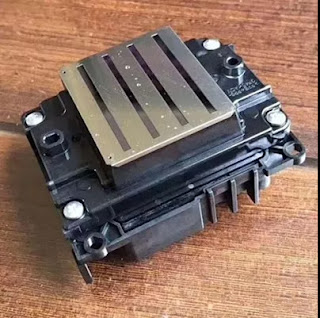
Hi, Nice to see you. How are you today? It is always rainy in Nanjing, China. But the temperature is getting more and more warm now. Nowadays, apart the sublimation printing, the UV printing is also very popular in the world now. It can also help us print the patterns with vivid and brilliant color. While do you know what factors should you take care when operate your UV printer? Read the following and I will share you more.
1.Brute force adjustment print head.
Do not use outside force to adjust nozzle position without regulation. Do not use brute force, whether changing or lightly adjusting nozzles. Please follow the instructions carefully.
2.Ignore the work ground line.
UV flatbed printer is affected by static electricity very much. It is necessary to check the connection of ground line regularly and sprinkle a little salt water around the ground.
3. Random switching circuit.
Install and remove the UV flatbed printer circuit, without turning off the power.This behavior can damage the life of each system, endanger the nozzle.
4.Cleaning without turn off the power.
Pay attention to protecting the circuit board and other internal systems, and turn off the power when cleaning, and be careful not to touch the circuit board and other internal systems.
5.Use no inspection cleaning liquid.
Clean the nozzle with an unclean liquid solution. Print head nozzle are very susceptible to contamination and wear, So please use the manufacturer specified product and quality inspection clearance product to clean nozzle.
6.High pressure cleaning nozzle.
If the nozzle is slightly blocked, it is recommended to use a vacuum cleaner to wash out the dust, and then fine cleaning, do not use high pressure to clean the nozzle.
7.Soak the nozzle for cleaning.
Although the to put the nozzle into cleaning solution for a long time can be more effective and clear stains, but the cleaning fluid has a certain corrosive, if the time more than 48 hours, the nozzle itself will be affected.Therefore, generally only take the appropriate time for cleaning the print head.
8. Ultrasonic cleaning nozzle.
Do not long time using ultrasonic cleaning machine cleaning nozzle.In fact, if you usually pay attention to the maintenance of the nozzle, then no need for ultrasonic cleaning. Ultrasound can cause undesirable effects on the nozzle.But if the blockage is serious, need to use ultrasonic cleaning, then only cleaning time up to 3 minutes.If there is no cleaning at all, please wait for the nozzle to cool naturally to the normal state during the second cleaning.
9. Mix the ink at will.
Do not arbitrarily raise different batches of ink, or use the bad quality ink, cleaning fluid. Two different configurations of ink mixing will change the ink color and quality, and will affect the printing effect and plug the nozzle.
Okay, These all above are my share about the factors that you should better take care when operate your UV printer. If you have any other needs or questions welcome to contact us at any time. We will provide you the best quality product and service. Hope my article can be useful to you. Thank you for your reading.
Nanjing Feiyue paper Industrial Co.,ltd
www.feiyuepaper.com
Facebook: Fei Yue Paper Industrial Co.,Ltd
Whatsapp:+8618752006819
Skype:+8618752006819
2018年3月2日星期五
2018年2月27日星期二
Do You Know The Reason Why Digital Printing is so Popular Now?
Hi, Nice to see you. Yesterday I have shared you the advantages of the Epson wide format sublimation inkjet printer. We all can see that the digital inkjet printing is getting more and more popular in the world. While do you know what are the important factors makes people choose the digital inkjet printer? Today I will share you the tips about this. Read the following and get to know more.
Factor 1 Convenience
Regular fabric patterns are created through rotary or flatbed screen printing that required individual screens for every color used and large yardage. Simply put, you needed to print a lot of fabric and waste a lot of time, so whether you were a small backstreet designer or an incredible exclusive limited edition high-end design house, you would still be restricted in your choices. Digital sublimation printing doesn’t have those issues, because just like your printer back home, it can create how many yards of fabric you want, even just one. You can print a small piece for a skirt then change the design for the next.
Factor 2 Diversity
Fashion is about creativity, what’s with all the technicalities, right? Digital methods improve on that too, by giving unrivaled creative freedom to the designer. The patterns don’t have to be repetitive or make sense for the machine to accept them; any design combination works, which means you can sketch your dress in the finest of details. A printed flower over your shoulder and three silver stripes an inch over your waistline? Done. As long as you understand structure and tailoring that is (which, if you’re like me, you’re better off not trying – it’s an expensive hobby to get wrong).

Factor 4 Sustainability
While digital printing makes it easier than ever to put your imagination into fabric, it also has a very sustainable component. Printing uses 95% less water in the production process, 75% less energy and much less fabric goes to waste since you can print the exact number of meters you will need.
Factor 5 Market
You need different inks for different fabrics and special printer services that might be more expensive the less you print. For mass retail outlets, it’s probably much cheaper to use traditional large yardage methods employed somewhere in China, but the potential for the luxury market is enormous.
Okay, These all above are my share about the factors why the digital inkjet printing is getting more important and popular. If you have any other needs or questions welcome to contact us at any time. We will provide you the best quality product and service. Hope my article can be useful to you. Thank you for your reading.
Nanjing Feiyue paper Industrial Co.,ltd
www.feiyuepaper.com
Facebook: Fei Yue Paper Industrial Co.,Ltd
Whatsapp:+8618752006819
Skype:+8618752006819
Factor 1 Convenience
Regular fabric patterns are created through rotary or flatbed screen printing that required individual screens for every color used and large yardage. Simply put, you needed to print a lot of fabric and waste a lot of time, so whether you were a small backstreet designer or an incredible exclusive limited edition high-end design house, you would still be restricted in your choices. Digital sublimation printing doesn’t have those issues, because just like your printer back home, it can create how many yards of fabric you want, even just one. You can print a small piece for a skirt then change the design for the next.
Factor 2 Diversity
Fashion is about creativity, what’s with all the technicalities, right? Digital methods improve on that too, by giving unrivaled creative freedom to the designer. The patterns don’t have to be repetitive or make sense for the machine to accept them; any design combination works, which means you can sketch your dress in the finest of details. A printed flower over your shoulder and three silver stripes an inch over your waistline? Done. As long as you understand structure and tailoring that is (which, if you’re like me, you’re better off not trying – it’s an expensive hobby to get wrong).

Factor 4 Sustainability
While digital printing makes it easier than ever to put your imagination into fabric, it also has a very sustainable component. Printing uses 95% less water in the production process, 75% less energy and much less fabric goes to waste since you can print the exact number of meters you will need.
Factor 5 Market
You need different inks for different fabrics and special printer services that might be more expensive the less you print. For mass retail outlets, it’s probably much cheaper to use traditional large yardage methods employed somewhere in China, but the potential for the luxury market is enormous.
Okay, These all above are my share about the factors why the digital inkjet printing is getting more important and popular. If you have any other needs or questions welcome to contact us at any time. We will provide you the best quality product and service. Hope my article can be useful to you. Thank you for your reading.
Nanjing Feiyue paper Industrial Co.,ltd
www.feiyuepaper.com
Facebook: Fei Yue Paper Industrial Co.,Ltd
Whatsapp:+8618752006819
Skype:+8618752006819
2018年1月30日星期二
Do You Know How to Keep The Printing Effect of Your Inkjet Printer in A Wet Environment?
Hi, Nice to see you. Chinese Spring Festival will coming soon. This is a very important festival for all Chinese people, it means a new year will come. And of course we will have a two weeks vocation from Feb 10 to Feb 22. While before this I will also keep share you the solutions and more about the sublimation inkjet printing and transferring. Today the topic is about the printing.
We all know that the climate is different across the world, somewhere is always warm, somewhere is hot and dry, or somewhere is clod and wet. Then do you know how can you keep the printing effect of your inkjet printer in the different environments( Whatever for the sublimation printing or eco-solvent printing)? Today I will share you some small tips to help you protect your inkjet printer in a wet environment and make your printing always fine. Read the following and I will share you more.
Keep the printing effect of a printer, the necessary maintenance is very important. Here are some small methods for you:
Step 1
Pay attention to the printer working environment, close the door and windows in night. Keep the outside moisture from room.
Step 2
Shell of the printer should be sealed, keep the moisture from electric parts, such as electric boards , cables.
Step 3
Printing material should keep well, print medium easy to absorb moisture, wet material will cause ink disperse. Every time after you use these materials , the material should put back in the package, Try not to touch the ground and the wall.
Step 4
Due to the wet weather, ink drying slow, we always need to wait long time. So advise you to open printer heating function or related drying equipment, it can speed up the drying image.
Step 5
Especially when users need to laminate the film, need to wait for completely dry before coating. If the film is covered immediately, the ink will blur, clients can use drying equipment to dry the certain part of material.
Step 6
It is recommended to use air exhauster or air conditioning dehumidification mode in the working environment of the printing machine. If the moisture is too heavy, some moisture absorbent or desiccant can be placed in the room.
Okay, These all above are my share about how to maintain your inkjet printer in the wet environment. Hope it can be useful to you, so that your printing effect can always be great. If you have any other needs or questions welcome to contact us at any time. We will provide you the best quality product and service. Thank you for your reading.
Nanjing Feiyue paper Industrial Co.,ltd
www.feiyuepaper.com
Facebook: Fei Yue Paper Industrial Co.,Ltd
Whatsapp:+8618752006819
Skype:+8618752006819
We all know that the climate is different across the world, somewhere is always warm, somewhere is hot and dry, or somewhere is clod and wet. Then do you know how can you keep the printing effect of your inkjet printer in the different environments( Whatever for the sublimation printing or eco-solvent printing)? Today I will share you some small tips to help you protect your inkjet printer in a wet environment and make your printing always fine. Read the following and I will share you more.
Keep the printing effect of a printer, the necessary maintenance is very important. Here are some small methods for you:
Step 1
Pay attention to the printer working environment, close the door and windows in night. Keep the outside moisture from room.
Step 2
Shell of the printer should be sealed, keep the moisture from electric parts, such as electric boards , cables.
Step 3
Printing material should keep well, print medium easy to absorb moisture, wet material will cause ink disperse. Every time after you use these materials , the material should put back in the package, Try not to touch the ground and the wall.
Step 4
Due to the wet weather, ink drying slow, we always need to wait long time. So advise you to open printer heating function or related drying equipment, it can speed up the drying image.
Step 5
Especially when users need to laminate the film, need to wait for completely dry before coating. If the film is covered immediately, the ink will blur, clients can use drying equipment to dry the certain part of material.
Step 6
It is recommended to use air exhauster or air conditioning dehumidification mode in the working environment of the printing machine. If the moisture is too heavy, some moisture absorbent or desiccant can be placed in the room.
Okay, These all above are my share about how to maintain your inkjet printer in the wet environment. Hope it can be useful to you, so that your printing effect can always be great. If you have any other needs or questions welcome to contact us at any time. We will provide you the best quality product and service. Thank you for your reading.
Nanjing Feiyue paper Industrial Co.,ltd
www.feiyuepaper.com
Facebook: Fei Yue Paper Industrial Co.,Ltd
Whatsapp:+8618752006819
Skype:+8618752006819
2018年1月29日星期一
Do You Know The Difference between The Mimaki Sublimation And Eco-solvent Printer?
Hi, Nice to see you. What a sunny day today! How about you? Yesterday I shared you the difference between the wide format flat and rotary heat press machine. Then keep following the topic " difference", today I will share you the difference of the Mimaki sublimation printer and the eco-solvent printer.
Mimaki JV150 series wide format inkjet printer can be used for both the sublimation and eco-solvent printing. Mimaki JV150 Series inkjet printers go beyond versatility to deliver a remarkable range of applications. Gamut-extending eco solvent inks and variable drop technology enable you to accomplish anything from fine art reproduction to vehicle wraps and more.

The biggest difference of the sublimation printing and eco-solvent printing is the ink and application. Whatever, the Mimaki 150 series use the uninterrupted ink supply system and the precision ink drop placement. If you use it for the sublimation printing, you must choose the high quality sublimation ink. Of course if you use it for eco-solvent printing, you should choose the eco-solvent ink. Then you will fine it equipped the expand eco-solvent ink set.
Another important different aspect is the application. Eco-solvent printing application is mostly used for the industrial application; sublimation printing is mostly use for the fabric and clothes application. The detailed applications are as follows:
Firstly, people use the eco-solvent printing for the signage,vehicle graphics printing. The vivid color and special characteristic can make the patterns saved on the material for longer time. Then for the advertisement, you can use it for the banners, posters printing; For the business exhibition, it is also a good choice for the exhibition graphics or the window clings printing.
Next application is the sublimation printing. We all know that the sublimation printing is always combined with the sublimation transfer. So this printing method must always uses for the fabrics. Most of our customers use it for the fashion and sportswear,T-shirt transfer produce. But same as the eco-solvent printing, you can also use it for the flags advertisement printing transfer.
Okay, These all above are my share about the difference of the Mimaki sublimation and eco-solvent printer. If you have any needs or questions welcome to contact us at any time. We will provide you the best quality product and service. Hope my article can be useful to you. Thank you for your reading.
Nanjing Feiyue paper Industrial Co.,ltd
www.feiyuepaper.com
Facebook: Fei Yue Paper Industrial Co.,Ltd
Whatsapp:+8618752006819
Skype:+8618752006819
Mimaki JV150 series wide format inkjet printer can be used for both the sublimation and eco-solvent printing. Mimaki JV150 Series inkjet printers go beyond versatility to deliver a remarkable range of applications. Gamut-extending eco solvent inks and variable drop technology enable you to accomplish anything from fine art reproduction to vehicle wraps and more.

The biggest difference of the sublimation printing and eco-solvent printing is the ink and application. Whatever, the Mimaki 150 series use the uninterrupted ink supply system and the precision ink drop placement. If you use it for the sublimation printing, you must choose the high quality sublimation ink. Of course if you use it for eco-solvent printing, you should choose the eco-solvent ink. Then you will fine it equipped the expand eco-solvent ink set.
Another important different aspect is the application. Eco-solvent printing application is mostly used for the industrial application; sublimation printing is mostly use for the fabric and clothes application. The detailed applications are as follows:
Firstly, people use the eco-solvent printing for the signage,vehicle graphics printing. The vivid color and special characteristic can make the patterns saved on the material for longer time. Then for the advertisement, you can use it for the banners, posters printing; For the business exhibition, it is also a good choice for the exhibition graphics or the window clings printing.
Next application is the sublimation printing. We all know that the sublimation printing is always combined with the sublimation transfer. So this printing method must always uses for the fabrics. Most of our customers use it for the fashion and sportswear,T-shirt transfer produce. But same as the eco-solvent printing, you can also use it for the flags advertisement printing transfer.
Okay, These all above are my share about the difference of the Mimaki sublimation and eco-solvent printer. If you have any needs or questions welcome to contact us at any time. We will provide you the best quality product and service. Hope my article can be useful to you. Thank you for your reading.
Nanjing Feiyue paper Industrial Co.,ltd
www.feiyuepaper.com
Facebook: Fei Yue Paper Industrial Co.,Ltd
Whatsapp:+8618752006819
Skype:+8618752006819
2018年1月3日星期三
Three Common Problems in The Digital Inkjet Printing-----Do You Know How to Solve it ?
Today is a snow day. How about you? If your weather is also snowy, take care of the slippery. Nowadays, with the development of the digital inkjet printing , this printing method is getting more and more popular in the world. People can use it for the fabric printing, paper printing or use it for the advertisement and banners produce.
However, The process of developing progress is the process of finding the problem. In our daily usage of the digital inkjet printings we must meet many different problems. Today in order to help your printing getting a better effect I will analysis three main problems in the printing process.
Sticky of the Paper
This problem is mainly reflected in the process of printing and happened on the sticky sublimation paper. When you printing your inkjet printer may feed two sheet or more papers st a time, this may cause your printing machine can't work normally and shut down.There are two main reasons that may cause this problem.
Firstly, It is because your sticky sublimation paper is to tacky or wet. This problem is easy to be solved. Put your sublimation paper on the radiator and dry your paper. But take care don't put it for a long time, or your sublimation paper may be not sticky than what you need.
Secondly, the sublimation paper you bought mostly stored in the cartons, sometimes if you import it from other countries, your sublimation paper may be pressed for a long time. The solution is holding both ends of the paper with both hands back and forth rubbing before you put it onto the inkjet printer, so that each piece of paper activities, so that the paper formed a neat bevel, so beveled down into the tray, so that will not Re-emergence of sticky sublimation paper phenomenon.
Jam Problem
This problem always happen on the desktop A3,A4 sublimation inkjet printer. Many times the jam is due to improper use. After a paper jam, turn the printer off and decide whether to pull the paper from the outside or inside depending on the jammed paper. Be especially careful at this time to prevent the pieces of paper from remaining inside the printer.
No Feeding of The Sublimation Paper
The general performance of the light to hear the sand wheel into the sublimation paper, that is, can not eat into the paper, causing the computer to prompt the printer out of paper and stop printing. I believe many users have encountered such problems.
The main reason for this problem is that the room is too dry. The dryness of the paper will weaken the friction between the paper feed wheel and the paper so as to slippery and eat without feeding paper. The only way to solve this problem is to increase the humidity of the room, but it must be well controlled. Otherwise, the previous problem will be caused. There is to pay special attention to, do not let the printer near the radiator, not to direct the heater directly on the printer, especially the kind of quartz tube direct-type electric heater, so that in addition to causing such problems do not feed, Will make the inkjet head dry knot, resulting in can not print.
Okay, These all above are my share about three common problems when use the digital inkjet printer. Each problem is related to the sublimation paper. So sometime have a good choice with both the sublimation paper and digital inkjet printer is very important. Of course if you have any needs or questions welcome to contact us at any time. We will provide you with the best quality product and service. Hope my article can be useful to you. Thank you for your reading.
Whatsapp:+8618752006819
Website: www.feiyuepaper.com
Facebook: Fei Yue Paper Industrial Co.,Ltd
Email:zeo@feiyuepaper.com
However, The process of developing progress is the process of finding the problem. In our daily usage of the digital inkjet printings we must meet many different problems. Today in order to help your printing getting a better effect I will analysis three main problems in the printing process.
Sticky of the Paper
This problem is mainly reflected in the process of printing and happened on the sticky sublimation paper. When you printing your inkjet printer may feed two sheet or more papers st a time, this may cause your printing machine can't work normally and shut down.There are two main reasons that may cause this problem.
Firstly, It is because your sticky sublimation paper is to tacky or wet. This problem is easy to be solved. Put your sublimation paper on the radiator and dry your paper. But take care don't put it for a long time, or your sublimation paper may be not sticky than what you need.
Secondly, the sublimation paper you bought mostly stored in the cartons, sometimes if you import it from other countries, your sublimation paper may be pressed for a long time. The solution is holding both ends of the paper with both hands back and forth rubbing before you put it onto the inkjet printer, so that each piece of paper activities, so that the paper formed a neat bevel, so beveled down into the tray, so that will not Re-emergence of sticky sublimation paper phenomenon.
Jam Problem
This problem always happen on the desktop A3,A4 sublimation inkjet printer. Many times the jam is due to improper use. After a paper jam, turn the printer off and decide whether to pull the paper from the outside or inside depending on the jammed paper. Be especially careful at this time to prevent the pieces of paper from remaining inside the printer.
No Feeding of The Sublimation Paper
The general performance of the light to hear the sand wheel into the sublimation paper, that is, can not eat into the paper, causing the computer to prompt the printer out of paper and stop printing. I believe many users have encountered such problems.
The main reason for this problem is that the room is too dry. The dryness of the paper will weaken the friction between the paper feed wheel and the paper so as to slippery and eat without feeding paper. The only way to solve this problem is to increase the humidity of the room, but it must be well controlled. Otherwise, the previous problem will be caused. There is to pay special attention to, do not let the printer near the radiator, not to direct the heater directly on the printer, especially the kind of quartz tube direct-type electric heater, so that in addition to causing such problems do not feed, Will make the inkjet head dry knot, resulting in can not print.
Okay, These all above are my share about three common problems when use the digital inkjet printer. Each problem is related to the sublimation paper. So sometime have a good choice with both the sublimation paper and digital inkjet printer is very important. Of course if you have any needs or questions welcome to contact us at any time. We will provide you with the best quality product and service. Hope my article can be useful to you. Thank you for your reading.
Whatsapp:+8618752006819
Website: www.feiyuepaper.com
Facebook: Fei Yue Paper Industrial Co.,Ltd
Email:zeo@feiyuepaper.com
2017年12月13日星期三
Do You Know How to Save The Cost in Your Digital Inkjet Printing ?
Hi, Nice to see you. It is rainy today and the weather is getting colder and colder. How about you? Same as before, today the topic is also around the sublimation printing and transferring. We all know that the digital inkjet printing is getting more and more popular in the world and most people choose this industry for there business. Whether for the fabric, textile, clothes produce or the banners, advertisements printing. This industry can bring people many profits and benefit. While in the printing process, do you know how to save your more costs from many different small aspect? How can you get more from the savings ? Then I will share you about this. Please be patient and keep read the following.
1. The concentrated print as much as possible
When using Micro Piezo printer, inkjet printer, the most bad is printed every few minutes once, if you need to print a lot of things, I suggest that you will need to print something together for printing. Every start up time, because the machine to clean the print head and begin to printers, ink, ink delivery system the process for waste more ink, so try not to frequent start the machine.
2. The correct cleaning the print head
Most ink-jet printing equipment is automatically cleaning the print head on, and have a button on the print head cleaning. If the device of automatic cleaning function is invalid, the print head can be wash by hand. Manual cleaning the steps to remove the print head should be in accordance with the operating manual. Manual cleaning the print head can be in medical syringe front end of the hose, a section loaded by strictly filtered water, wash with a magnifying glass observation carefully when the nozzle, such as near the nozzle has the remains of the sedimentation, clear soft rubber products are available.Long on the integration of the print head due to the ink dries up and blocking the nozzle, can use hot water soak before washing.
3. Don't Immediately Replacement Cartridges
We know print equipment is through the sensor to detect the cartridge ink in ink volume , sensor detected as long as one of the color is less than the value of internal set printer, prompt replacement cartridges. At this time, we can remove the ink cartridge to reset the printer internal sensors, so as to determine the install the new cartridges.
4. Try to Reduce The Washing Time
Equipment in use process middling become ink-jet printer jams phenomenon, caused by blocked for many reasons, such as the machine's working environment, the quality of the ink, machine not busy time and so on, because every time wash ink jet head will consume large amounts of ink, so should be cleaned to minimize the number of ink-jet printer, of course, should be paid attention to when using the machine models ink using machine manufacturers designated as much as possible.
Okay, These all above are my share about how to save the cost of your digital inkjet printing from some small aspects. If you have any needs or questions welcome to contact us at any time. We will provide you with the best quality product and service. Hope my article can be useful to you. Thank you for your reading.
Nanjing Feiyue paper Industrial Co.,ltd
www.heatsub.com
Facebook: Zeo(章江徽)
Whatsapp:+8618752006819
Skype:+8618752006819
1. The concentrated print as much as possible
When using Micro Piezo printer, inkjet printer, the most bad is printed every few minutes once, if you need to print a lot of things, I suggest that you will need to print something together for printing. Every start up time, because the machine to clean the print head and begin to printers, ink, ink delivery system the process for waste more ink, so try not to frequent start the machine.
2. The correct cleaning the print head
Most ink-jet printing equipment is automatically cleaning the print head on, and have a button on the print head cleaning. If the device of automatic cleaning function is invalid, the print head can be wash by hand. Manual cleaning the steps to remove the print head should be in accordance with the operating manual. Manual cleaning the print head can be in medical syringe front end of the hose, a section loaded by strictly filtered water, wash with a magnifying glass observation carefully when the nozzle, such as near the nozzle has the remains of the sedimentation, clear soft rubber products are available.Long on the integration of the print head due to the ink dries up and blocking the nozzle, can use hot water soak before washing.
3. Don't Immediately Replacement Cartridges
We know print equipment is through the sensor to detect the cartridge ink in ink volume , sensor detected as long as one of the color is less than the value of internal set printer, prompt replacement cartridges. At this time, we can remove the ink cartridge to reset the printer internal sensors, so as to determine the install the new cartridges.
4. Try to Reduce The Washing Time
Equipment in use process middling become ink-jet printer jams phenomenon, caused by blocked for many reasons, such as the machine's working environment, the quality of the ink, machine not busy time and so on, because every time wash ink jet head will consume large amounts of ink, so should be cleaned to minimize the number of ink-jet printer, of course, should be paid attention to when using the machine models ink using machine manufacturers designated as much as possible.
Okay, These all above are my share about how to save the cost of your digital inkjet printing from some small aspects. If you have any needs or questions welcome to contact us at any time. We will provide you with the best quality product and service. Hope my article can be useful to you. Thank you for your reading.
Nanjing Feiyue paper Industrial Co.,ltd
www.heatsub.com
Facebook: Zeo(章江徽)
Whatsapp:+8618752006819
Skype:+8618752006819
2017年11月29日星期三
What Questions Should You Take Care Before Start Your DTG Printing?
Hi, Nice to see you. In my last article I have shared you a high quality Epson F2000 direct to garment printer for your T-shirt DTG printing. This technology is mostly used in the T-shirt direct inkjet printer. But the T-shirt should better be cotton fabric. While do you know what questions should you take care before you start your DTG printing? Then today in order to let your DTG printing achieve a better printing effect I will share you more. The specific question that need to take care are as follows.
Do you need pre-treat shirts in advance?
Generally we suggest pre-treat the t-shirt in advance. We recommend 3 weeks but have actually had shirts pretreated for months and still gotten good results. The hardest part is keeping pretreated shirts clean and dust free until you need them.
Can it print on the blend cotton/poly blends (70/30) ?
Yes, of course. But you should avoid printing on any clothing with odor blockers or any kind of stain resistant technology though. We use water based inks and those are MADE to repel water!
If there is a wrinkle in the t-shirt when printing, what will happened?
The wrinkle will be still in the t-shirt after printing. So remember pay attention to the t-shirt before printing.
Will the print head got clogged if not use it for a while?
If you never use the printer, the print heads will eventually clog. But the WIMS and good maintenance make this very rare.
What RIP software should the DTG printer use?
Use RipPro C6. It comes with the new DTG printers and is made specifically for them.
Would you ever need to pretreat a light color shirt?
We recommend that you do pretreat light garments. That way, you’ll get better color fastness, croc fastness and the image will wash better and last longer.
What will influence the quality of you DTG garments?
A. The quality of the garment
B. How well you pretreated it
C. How you wash it
How long can the machine sit without running?
If you want to leave it for more than a few days then we suggest a system flush. Then you can leave it for as long as you’d like.
What material do you have to pretreat?
We pretreat everything except for some wood products.
How long and cost for pre-treatment per shirt?
Pretreatment takes under a minute. Cost is negligible.
Okay, These all above are the questions I concluded. May be the quantity of the question is much, but I think if you can take care of it your DTG printing effect will be better and your machine can have a longer service life. Of course if you have any needs or questions welcome to contact us at any time. We will provide you with the best quality product and service. Hope my article can be useful to you. Thank you for your reading.
Whatsapp:+8618752006819
Website:www.heatsub.com
Facebook: zeo(章江徽)
Email:zeo@feiyuepaper.com
Do you need pre-treat shirts in advance?
Generally we suggest pre-treat the t-shirt in advance. We recommend 3 weeks but have actually had shirts pretreated for months and still gotten good results. The hardest part is keeping pretreated shirts clean and dust free until you need them.
Can it print on the blend cotton/poly blends (70/30) ?
Yes, of course. But you should avoid printing on any clothing with odor blockers or any kind of stain resistant technology though. We use water based inks and those are MADE to repel water!
If there is a wrinkle in the t-shirt when printing, what will happened?
The wrinkle will be still in the t-shirt after printing. So remember pay attention to the t-shirt before printing.
Will the print head got clogged if not use it for a while?
If you never use the printer, the print heads will eventually clog. But the WIMS and good maintenance make this very rare.
What RIP software should the DTG printer use?
Use RipPro C6. It comes with the new DTG printers and is made specifically for them.
Would you ever need to pretreat a light color shirt?
We recommend that you do pretreat light garments. That way, you’ll get better color fastness, croc fastness and the image will wash better and last longer.
What will influence the quality of you DTG garments?
A. The quality of the garment
B. How well you pretreated it
C. How you wash it
How long can the machine sit without running?
If you want to leave it for more than a few days then we suggest a system flush. Then you can leave it for as long as you’d like.
What material do you have to pretreat?
We pretreat everything except for some wood products.
How long and cost for pre-treatment per shirt?
Pretreatment takes under a minute. Cost is negligible.
Okay, These all above are the questions I concluded. May be the quantity of the question is much, but I think if you can take care of it your DTG printing effect will be better and your machine can have a longer service life. Of course if you have any needs or questions welcome to contact us at any time. We will provide you with the best quality product and service. Hope my article can be useful to you. Thank you for your reading.
Whatsapp:+8618752006819
Website:www.heatsub.com
Facebook: zeo(章江徽)
Email:zeo@feiyuepaper.com
订阅:
博文 (Atom)
What is Epson 4720 Printhead? It Can Replace 5113 Print Nozzle?
Hello, nice to see you again, my dear friends. It will rainy in Nanjing, the sky is dack, wind is heavy. Now I will tell you the topic is a...
-
Hi~ nice to see you again, my dear friends. The National Day will coming! So from tomorrow to 7th October, I am in holiday. And today's...
-
Hi! Nice to see you again, my friends. Today, let's talk about how to clean epson nozzles . No matter if you use branded, compatible or ...
-
Hello, nice to see you again, my dear friends. It will rainy in Nanjing, the sky is dack, wind is heavy. Now I will tell you the topic is a...


