显示标签为“digital printer”的博文。显示所有博文

2018年1月11日星期四

Have A Regular Maintenance for Your Inkjet Printer from Different Side

  Hi, Nice to see you. This week I have mostly shared you about our new products. Then as a summary, today is a new topic about your inkjet printer. We all know that the inkjet printing is a very important step in the sublimation or eco-solvent printing. And it is getting more and more popular in the whole printing process. While do you know how to have a regular maintenance for your inkjet printer? Read the following and I will share you more.

Print Head
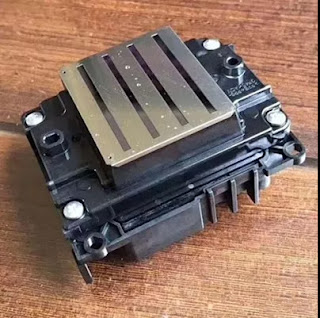
  We all know that the print head is one of the most important part for the inkjet printer. So have a right maintenance for the inkjet printer is very important. Then we can do it from the following two steps:
Check nozzle before you start the day
  Every day before you start printing, you should perform print head checks or test prints. Print head checks will let you know if all the printer heads are working at optional levels. If there is clogging in the heads, you will notice a drop in the quality of your print. In such situations, you need to clean the print head before you start printing.

Check the print head regularly
  You need to keep checking the print head on a regular basis if you want to have high-quality prints all the time. Move the print head to one side and look at the sides to see if there is any ink build up. If you notice ink build up on the plastic part of the print head, you should clean it. However, do not try to clean the head directly as you may damage it.

Capping station, flush pad, and wiper blade
  For all the accessories of inkjet printer, keep cleaning is very important. The detailed cleaning introduction are as follows:
Capping station
  The capping station is important because it uses a vacuum to prepare your print heads. If there is any contamination due to the deposition of ink, it will overload itself every time you need to get something printed. Clean the capping station with the help of a Q-tip.
Flush pad
  The flush pad is where the print head will release small amounts of ink to ensure the nozzle is open. As you keep printing with your sublimation printer, the pad will reach a saturation point after which it won’t work at all. Rinse the flush pad regularly so that you have a hassle-free printing experience.
Wiper blade
  The wiper blade will keep your print head clean by removing excess ink from it. Over time, your wiper blade will become dirty with ink. As a result of this, your wiper blade won’t be able to clean the printer heads. Use a Q-tip to clean your wiper blade.

  Okay, These all above are my share about how to maintain your inkjet printer from the different side. If you have any other needs or questions welcome to contact us at any time. We will provide you with the best quality product and service. Hope my article can be useful to you. Thank you for your reading.


Whatsapp:+8618752006819
Website: www.feiyuepaper.com
Facebook: Fei Yue Paper Industrial Co.,Ltd
Email:zeo@feiyuepaper.com

2017年12月25日星期一

Characteristic of Digital Inkjet Printer From Different Side

  Digital inkjet printer is more and more popular in the world. It's special characteristic and feature make it attracted many people's eyes. The digital inkjet printer can be roughly divided into the UV printer, eco-solvent printer and the sublimation printer. Each one have its special application. But mostly, you use use both of them for your banners or advertisement printing. Today I order to let you know more about the digital inkjet printer I will share you the special characteristics of the digital inkjet printers from different side. Read the following and get to know more.

Practicality
  The digital inkjet printer is very practical in usage,it can be printed for a variety of materials. No matter in the garment processing industry or the advertising printing industry. What's more, it can help you enhance the value of your product so that the product can be more beautiful from the side of appearance.
  So in order to guarantee the practicality, when you buy your digital inkjet printer you must have a good choice of the manufacturer. This choice can directly influence the key performance of your digital inkjet printer. You must  from a more professional level point of view to a reasonable grasp of its reliability advantages will be very clear.

Stability
  Digital inkjet printer all use a special ink, this process can be more convenient. Different from the traditional typographic printing, this digital inkjet printing can help you print your patterns directly onto the fabric or any surface you want. One of the biggest advantage is that the cost is much lower than the traditional printing and the the operator does not need a high experience.
  What's more the patterns printed onto the material has high stability, your patterns can not be washed and fade easily. You can store your patterns for a long time.

Color Richness
  The last characteristic of the digital inkjet printer is the color richness. The digital inkjet printer can help you rendered a variety colors, and the original ink may have only 4 color (C,M,Y,K) .
  On the one hand, by increasing the print density (resolution) to print out the point of thinner, so that the map becomes more delicate. On the other hand, there are several ways to improve the color harmony, such as increasing the number of colors, changing the size of ink drops, and lowering the basic color density of ink cartridges. 
  Which increase the number of colors to come to the most effective. It is usually a five-color color cartridge, with the original black cartridge, forming a so-called six-color print. As a result, the number of color combinations arranged and obtained in a single step has been improved many times, and the effect is naturally improved obviously.


  Okay, These all above are my share and introduce about the characteristic of the digital inkjet printer from the side of practicality,stability and color richness. If you have any other needs or questions welcome to contact us at any time. We will provide you with the best quality product and service. Hope my article can be useful to you. Thank you for your reading.


Whatsapp:+8618752006819
Website: www.heatsub.com
Facebook: zeo(章江徽) 
Email: zeo@feiyuepaper.com

2017年12月5日星期二

Roland XR640 Printer/Cutter-----With Extensive Application And Performance

  Hi, Nice to see you. Today is a new introduce with the Roland brand wide format printer. Roland is a famous and old brand in the digital inkjet printing industry. Also in my last articles I have shared you many different models of Roland. Then today is a new share-----Roland XR640 Printer/Cutter.

  Same as before, the first is a brief introduction of the Roland XR640 printer and cutter. With its two inline, mirrored print heads, integrated printing and contour-cutting technology, and GREEN GUARD Gold Certified Eco-Sol MAX 2 inks in 7 or 8-color configurations, the XR-640 large format printer/cutter with metallic and white ink delivers maximum versatility and productivity with unsurpassed image quality. Thousands of print service providers have built their business on the XR-640, with the ability to produce everything from banners,  vehicle wraps and fine art to print/cut labels, decals, point-of-purchase displays and so much more.


Features

State of the Art Print Engine
Advantage of Integrated Print/Cut
Advanced Production and Media Handling
Superior Print Results with Eco-Sol MAX® 2 Inks
A Choice of Seven or Eight-Color Printing
Automated Ink Circulation System
Roland VersaWorks®RIP Included
Roland Certified Media
Integrated Tri-Heater System
Optional DU-640 Heater/Blower Available Legendary Roland Quality and 
Reliability Come Standard


Applications

1.Die Cut Labels and Decals
  With integrated contour cutting, the Pro 4 XR-640 makes it fast and easy to print and contour cut labels and decals of virtually any shape and size. For cutting laminated graphics, Roland's Quadralign four-point optical registration system automatically realigns the cutting path and compensates for media skew and distortion.
2.Banners
  With a 64" media width and print speeds of up to 528 square feet per hour, the XR-640 sets the standard for the production of vibrant, colorful banners. The addition of Light Cyan, Light Magenta and Light Black enhances gradations, ensures flawless flesh tones and neutral grays, and improves image quality across lighter colors.
3.Signs
  The XR-640 delivers high color density and exceptional images and text that are durable up to three years outdoors without lamination. High density white ink provides greater opacity for window signs and clear materials, while metallic silver ink offers stunning premium effects that warrant a higher selling price.


4.Vehicle Wraps
  With its integrated contour-cutting ability, the XR-640 is perfect for full or partial wraps. An integrated tri-heater system dries prints quickly even in high-speed modes for immediate finishing, installation or collection by the take-up system. Check out Roland Academy for information on our professional Born to Wrap™ workshops.
5.Posters and Back lit Displays
  The XR-640 produces outstanding photo realistic poster graphics regardless of viewing distance. Eco-Sol MAX 2 performs on a wide range of both coated and uncoated media, including papers for posters and film for eye-popping backlit displays.
6.Décor and Fine Art
  With variable droplet technology, the XR-640 is capable of delivering art and photographic reproductions with exquisite detail and stunning color. Light Black adds better reproduction of neutral gray gradations and more natural skin tones. Roland's Solvent Canvas in gloss and matte finishes deliver exceptional gamut and image quality.

  Okay, These all above are my share about the new Roland XR-640 wide format printer and cutter machine. If you have any needs or questions welcome to contact us at any time. We will provide you with the best quality product and service. Hope my article can be useful to you. Thank you for your reading.


Nanjing Feiyue paper Industrial Co.,ltd
www.heatsub.com
Facebook: Zeo
Whatsapp:+8618752006819
Skype:+8618752006819

2017年11月13日星期一

A New Experience with This Machine-----Roland EJ 640 Wide Format Printer

  Hi, Nice to see you again. A new introduction and share will coming again. Yesterday I have shared you about the Mutoh wide format printer from Japan. And today I will share you the Roland wide format digital inkjet printer. In my last article I have shared you about the Roland LEJ640 printer, and now I will share you the other model-----Roland EJ 640 wide format printer.


  Firstly, have a brief introduction of this Roland EJ640 wide format printer. A busy, high-volume print shop needs a printer that can deliver quality output at high speeds. Meet the new EJ-640 large-format color printer. With dual staggered print heads and a rigid new industrial design, productivity and quality are built in. So are big-time savings. The EJ-640 runs with new Roland DG EJ INK that costs up to 35% less than the competition. The result: High-volume, low-maintenance printing and bold, exciting colors with higher profit margins.


Feature
❤Produce Rich, Vibrant, Durable Color for Less
Free Up More of Your Time.
Count On a Quick-Dry Finish
Watch Those Print Heads Last Longer
Enjoy Brilliantly Easy Production with New Versa Works® Dual RIP
Quickly Find the ICC Profiles You Need
Print With Confidence, Even When You're Not There
Calibrate with X-Rite for Accurate Digital Display
Expect Legendary Roland Quality and Reliability


Wide Application
1.Banners
  With a 64" media width and high print speed mode options, the EJ-640 produces vibrant, colorful banners.
2.Signs
  The EJ-640 delivers high color density and exceptional images and text that are last up to three years outdoors without lamination. Choose from a wide range of both coated and uncoated media, including backlit film.
3.Posters
  The EJ-640 produces outstanding photo realistic poster graphics regardless of viewing distance. Roland DG's state-of-the-art state-of-the-art Piezo print head technology creates beautifully smooth, band-free accurate color on a wide range of media - even at high print speeds.


4.Vehicle 
  Wraps Exceptional production capability, excellent imaging and unmatched reliability make the EJ-640 outstanding for vehicle graphics applications. Check out Roland Academy for information on our professional Born to Wrap™ workshops.
5. Décor and Fine Art
  With variable droplet technology, the EJ-640 is generates art and photographic reproductions with accuracy and brilliant color. 


  Okay, These all above are my share and introduction about the Roland EJ640 wide format digital inkjet printer. If you have any needs or questions welcome to contact us at any time. We will provide you with the best quality product and service. Hope my article can be useful to you. Thank you for your reading.


Nanjing Feiyue paper Industrial Co.,ltd
www.heatsub.com
Facebook: Zeo
Whatsapp:+8618752006819
Skype:+8618752006819

2017年10月19日星期四

Why Not Try about It-----Roland XT640 Sublimation Printer

  Hi, Nice to see you. In the last articles I have shared you some tips and information about the Epson digital inkjet printer. Then if you are professional in the digital printer process, you must know that the Roland digital inkjet printer is also vary famous in this industry owing to the high quality of this machine. Today I will share you about the Roland XT-640 wide format sublimation printer


  Firstly,This XT-640 sublimation printer developed specifically for dye-sublimation transfer printing, the Texart XT-640 is an unstoppable machine that delivers outstanding print quality on long print runs, day-after-day. By combining Roland reliability with the latest print technology, users can quickly and effortlessly create high-volume sportswear, fashion, soft signage, interior decoration, promotional merchandise and much more.

Feature

Seven Droplet Print Heads Cover All the Details
More Choice with 4-Color or 8-Color Ink Modes
New Media Feed System for Non-Shift Printing
Simply Print and Go with Precision Take-up System
Automatic Bulk Ink-Switching System
Remote Controlled Printing with Roland Printer Assist
Add Some Rad with Fluorescent Inks 
Real-Time Support with Roland OnSupport
Superior Reliability and Service are Standard


Wide Application
1.Made for Making Sportswear
  Dye-sublimation transfer printing is perfect for customizing polyester sportswear fabrics and apparel. The XT-640 is the ideal device to create brilliantly colorful graphics for team uniforms, amateur sportswear and professional sportswear.


2.Branded and Personalized Fashion and Apparel
  Whether you're making your own fashion statement with clothing and pattern design, or company branding t-shirts and apparel, the XT-640 gives you a wealth of fabric and customization options. It's the perfect machine for high-volume production of corporate clothing or high-end fashion products.


3.Eye-Catching Soft Signage  
  Create stunning banners, flags, backdrops, points-of-purchase and more at high speeds. Utilize the XT-640's additional ink options for producing photographic quality images with subtle skin tones and extremely vivid colors.


4.Merchandise Like Mad
  Use the XT-640 for customizing promotional gifts, gadgets, sports equipment and merchandise. From smart phone cases to custom decorated tiles, the XT-640 is an incredibly reliable and unstoppable dye-sublimation transfer printing machine that can help you kick-start your customization empire.

5.Custom Interior Decor
  Put logos, brands, patterns and designs on a wide variety of fabrics for home furnishing, home décor and wall coverings. With the XT-640, you can create high-volumes of décor items in the fastest time possible.

  
  These all above are my share about the Roland XT-640 sublimation printer. If your business is about the sublimation printing and transferring. I suggest you have a try about this machine. I believe it will let you satisfied. Of course if you have any needs or questions welcome to contact us at any time. We will provide you with the best quality product and service, such as the Roland XT-640 sublimation printer. Hope my article can be useful to you. Thank you for your reading.


Nanjing Feiyue paper Industrial Co.,ltd
www.heatsub.com
Facebook: Zeo
Whatsapp:+8618752006819
Skype:+8618752006819

2017年10月12日星期四

Some Most Frequently Questions of The Mimaki JV150 Series Printer----Do you Know How to Solve It?

  Hi, Nice to see you. It is getting more and more cold in Nanjing now and always rainy. If you have read my article before you must know that we have the Mimaki large format digital inkjet printer. And I have shared you some tips about how to solve the error code of the Mimaki CJV30 series printer. Then today I will share you some most frequently questions of the Mimaki JV 150 series printer. Please read the following and get to know more.

Expiration

Answer: Replace the expired ink cartridge.

  Mimaki Inks have an expiration date on them to avoid poor print quality. Printer displays the message, [Expiration] to let you know that installed ink passes the expiration date.
[How your printer operates in expired ink]
  Your printer displays the message [Expiration] in the next month after the ink expiration; and even if you do not replace the expired ink, you still can continue to run it 2 months after the expiration, and when it passes three month from the expiration date, your printer ceases to operate.
[NOTE]
  If you keep using expired inks, it may result in poor print quality such as degraded colors; we highly recommend for you to replace the expired ink any sooner.


Replace a WIPER

Answer:Please replace the wiper.

  Make sure to follow the instructions on [WIPER EXCHANGE] under the maintenance menu.
  See [Operation manual] > [Chaper4 Maintenance] > [Replacing consumables] for details.
Run [WIPER EXCHANGE] menu after replacing the wiper, or it keeps showing the message, [Replace a WIPER]. It is because systems in the printer counts the number of wiping operation; unless you run [Replace a wiper] menu, it won’t reset the number.
[NOTE]
  In fact, you can perform printing without wiper replacement, but continuous usage of the filthy wiper may result in nozzle clogging, thus we recommend for you to replace it any sooner.

[Check Wash liquid]

Answer
  This is the message to warn you to check on the cartridge to see if it is empty; and it appears occasionally. Remove the washing liquid cartridge and check it’s not empty; and reinstall the cartridge to reset the counter and it will cancel the message.
[NOTE]
  When OK is selected with no washing liquid cartridge removal, then it will cancel the message at the moment, but it will appear once again when you restart the printer.

 Okay, These all above are my share about how to solve the common the frequent questions when us your Mimaki JV150 series printer. If you have any needs or questions welcome to contact us at any time. We will provide you with the best quality product and service. Hope my article can be useful to you. Thank you for your reading.


Nanjing Feiyue paper Industrial Co.,ltd
www.heatsub.com
Facebook: Zeo
Whatsapp:+8618752006819
Skype:+8618752006819

2017年9月29日星期五

How Can We Maintain Our Print Head When Temperature is Getting Cold ?

  Hi, Nice to see you. In China, the summer has passed and the weather is getting colder and colder. When the season changes people also need to change their wearings. Same to this,  when the weather getting cold we should also pay attention to our digital inkjet printer. So as a most important part of the digital inkjet printer, do you know how to maintain the print head when temperature is getting cold.  Then I will share you about some tips that maintain your print head in the cold temperature. Read the following and get to know more. 

1.The temperature below 10℃


   The printer will appear blurry ghosting phenomenon, which is made virtual and ink print head caused by poor fluency.

Ways: open heating or heat lamp to keep the ink flowing(15℃~35℃). The print blurred, with a hairdryer blowing print head (1-2) minutes,blowing position in the print head side, which is encoded by side as shown in the print head,even blowing about can be solved.

2.Before the holidays to clean ink stack
  Comprising: a blade, ink around the ink pad, ink mud clean;bearing,track,on a small amount of gear oil or lubricants. Done more than you can make a test strip, no problem to put around the bottom of the ink print head are clean, and let the print head back to the warehouse with the ink-pad overlap,you can shut down!

3.After holiday back not the first time boot.
  Because inside the ink tube and print head ink may have icing, then we want to raise the room temperature to about 20℃ degrees, put 2-3 hours, and then observe the status of the ink tube and print head, if then not necessary,place a litter longer time, you want the job inside the ink is completely thawed, then duct blowing about sprinklers.

Focus: After thawing ink to stand for 24 hours in order not to affect the print ( fluency in 15 celsius to 35 degrees celsius).

  These all above are my share about the tips that you should pay attention to about how to maintain your print head when temperature is getting cold. We are a professional sublimation digital printing and transferring material manufacturer in China. So if you have any needs or questions welcome to contact us at any time. We will provide you with the best quality product and service. Hope my article can be useful to you. Thank you for your reading.


Nanjing Feiyue Digital Technology Co.,ltd
www.heatsub.com
Facebook: Zeo
Whatsapp:+8618752006819
Skype:+8618752006819

2017年9月26日星期二

Daily Maintain of Your Epson Digital Printer-----You Deserve to Know More

  Hi, Nice to see you again. In our daily use of the digital printing a high quality and high speed printing machine is very important. But do you know how can we make our digital printer always keep a good printing performance. For example, the Epson printer is a very famous brand but if you use it for a long time but if you can't maintain it in a right way even it is a good printer it may also in a bad efficiency. Today I share you some tips about how to maintain your Epson digital printer in your daily use from different side.


Daily Use And Install
  1.The black insurance at the bottom, both two  sides of the print head is kept clean, especially inside and outside the spray room, because there is a fluffy cloth
  2.Ground wrie  must be connected, requiring steel grounding 1.5 meters, and add a bag of saline water into the room, to maintain a certain humidity, the machine should often use cloth to wipe, otherwise there will be static electricity, will cause flying ink
  3.Voltage regulator, each machine should be equipped with voltage regulator, otherwise, once the voltage instability or sudden power failure, will cause a burning nozzle or motherboard, trolley board, voltage regulator minimum 3000W
  4.Press the wheel when the machine does not work
  5. Frequent move of the slide need to use the grease , but must not butter
  6. If the nozzle is broken, the number of needles is less, it will not affect the quality of painting, cleaning or filling can be, if there are many broken needles, please timely bubble nozzle

Machine Cleaning


  1. After starting the first cleaning, playing test whether there is broken needle, if there is broken needle cleaning or filling, before the shutdown also need to wash, hit the test
  2.Limit, when  cleaning   the nozzle, cleaning fluid and water do not add too full, otherwise easy to splash limit, so that the limit is not easy to use

  3.The ink station cap need to keep cleaning because  the ink station cap is directly attached to the nozzle
  4.Grating need to cleaned with alcohol, because it will have the ink stains and dust when you use for a long time
  5.Keep the wiper clean at all times, as the wiper is directly attached to the nozzle
  6.Empty the ink pail in time
  7.Platform suction port will be blocked for a long time to use it , you need to cleaning it use toothpicks
  8.The machine is used for a long time should check whether there is loose
  9.Computer system or reinstall software, do not have anti-virus software

Daily common Broken ink phenomenon
  1. When cleaning, check the Ink suction suck print head whether have suction, Ink suction whether have damaged
  2. The buffer bottle has air, drained
  3. Print head mirror and whether there are dirt around, whether have enough ink
  4. Observe whether the machine platform has items attached to the nozzle during printing
  5. Whether it is used for a long time, there is broken needle, no timely soak printer head
  6. Whether the nozzle line has ink and whether there is loose place
  7. Indoor temperature can not be less than 20 degrees
  8. Cool ink, especially in winter, get back the ink must first put a while, so that the ink and the indoor temperature is almost the same

  These all above are my share about the daily maintain of the Epson digital printer. If you have any needs or questions welcome to contact us at any time. We will provide you with the best quality product and service. Hope my article cam be useful to you. Thank you for your reading.


Nanjing Feiyue Digital Technology Co.,ltd
www.heatsub.com
Facebook: Zeo
Whatsapp:+8618752006819
Skype:+8618752006819

2017年9月18日星期一

Why Not Try about The Mutoh VJ1624-WX Sublimation Printer?

  Hi, Nice to see you again. How is your weekend going? In the sublimation or eco-solvent digital printing and transferring industry, I have shared you many different plotters. Such as the Mimaki , Roland, Epson, also with the Mutoh sublimation printer. The Mutoh wide format digital printer is a famous brand in the sublimation printing industry. Today I will share you one model of this big Mutoh family and may be you can have a try of it. I believe it can bring you a new experience-----Mutoh VJ1624-W.
  Firstly, have a definition introduct with this Mutoh VJ1624-W sublimation printer. The VJ-1624W is an aqueous sublimation transfer printer and is capable of handling up to 64" / 1625mm sublimation transfer rolls. It is perfect for both startup and established businesses wanting to extend their product portfolio printing soft- signage as well producing sports and team wear. What's more, the VJ1624W prints on most typical dye sublimation transfer papers, making transfer onto all possible flexible and rigid polyester materials possible.


Feature
  The ValueJet 1624W is the perfect printer for soft signage, custom sports apparel and other textile applications. Print a wide variety of applications, such as POP signage, trade show graphics, museum fine art prints, banners, flags, custom fabrics prints and more.
  *Transfer sublimation printing up to 1625 mm (64”) transfer paper
  *Latest generation 8 channel 1440 nozzle piezo head
  *Typical production speeds between 14 and 27.5 m²/hr
  *Suitable for water-based dye sublimation inks
  *Ideal for production of soft signage, sportswear, promotional goods, photo panels and more
  *Environmentally friendly printing


Speed And More Specification


Production Print Speed: 20.5 m²/h at 360x720 dpi
Print Resolution: 1440/1080/720/540/360 dpi 
Minimum Droplet Size: 3.5 pl
Head Height: 1.5 mm / 2.5 mm / 4.0 mm
Heating System: None
Maximum Media Width: 1625 mm (64")
Maximum Print Width: 1615 mm (63.58")
Max Media Roll Weight: 30 kg 


Wide Application
  Print on Dye Sublimation Transfer Paper – The Mutoh ValueJet 1624W is perfect for large application printing to dye sublimation transfer paper.  Mutoh’s speed and print quality make this the perfect printer for any commercial application.
Typical dye sublimation applications are:
  *Soft signage and graphics for events, tradeshows and sporting grounds
  *Home decoration: curtains, bed linen, soft furnishings
  *Flags & pennants
  *Sports goods: snowboards, helmets etc
  *Promotional Goods: mugs, umbrellas, iPods, mouse mats, photo panels
  *Apparel: blouses, sportswear, outdoor jackets, T-shirts, school sportswear, swimwear


  Okay, These all above are my share about the Mutoh VJ1624-W sublimation digital printer. If you have any needs or questions welcome to contact us at any time. We will provide you with the best quality product and service. Hope my article can be useful to you. Thank you for your reading.


Nanjing Feiyue Digital Technology Co.,ltd
www.heatsub.com
Facebook: Zeo
Whatsapp:+8618752006819
Skype:+8618752006819

What is Epson 4720 Printhead? It Can Replace 5113 Print Nozzle?

Hello, nice to see you again, my dear friends. It will rainy in Nanjing, the sky is dack, wind is heavy. Now I will tell you the topic is a...