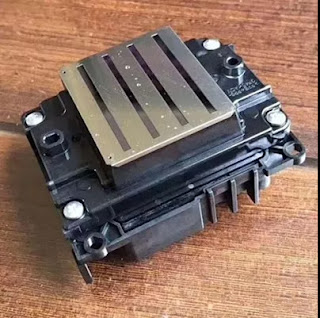
Hi, good afternoon, my dear friends! Are plan to buy a inkjet printer? If you want to buy one, do you know what should you care for? Today, i will tell you there are 7 issues should not be ignored when you want to buy a good inkjet printer!
1. How to Buy a inkjet Printer?
So you’ve made the decision to buy a inkjet printer only you’re not sure how
to buy a printer that fits for your needs. Not to fear – we’ve helped countless
people choose the right printer for their lifestyle and needs. Here are some
real-life questions we ask every consumer in helping them to refine their search
and find the most suitable match.
2. What type of printing do you do?
This is perhaps the most important question to ask since it will point you
towards a specific printing applications – that is sublimation printer vs
eco-solvent Printer.
The biggest difference of the sublimation printing and eco-solvent printing
is the ink and application.If you use it for the sublimation printing, you must
choose the high quality sublimation ink. Of course if you use it for eco-solvent
printing, you should choose the eco-solvent ink. Then you will fine it equipped
the expand eco-solvent ink set.
3. What are the operating costs?
Printer manufacturers make a substantial operating profit from their
consumables divisions. They want you to purchase a printer that will make them
the highest profit as soon as you run dry. We assume you, like most of our
clients are interested in a good quality printer that will also not have
extremely high operating costs down the road.
One way of increasing their profits is to sell you a printer with a set of
starter cartridges. What are starter cartridges? There are two types we commonly
see- cartridges that are simply half full to begin with or worse; cartridges
with additional manufacturing designed to limit use (think of adding a dividing
wall to the inside of a water bottle and then filling the bottle to capacity –
albeit of a smaller chamber). Starter cartridges ensure you need to buy a new
set of cartridges sooner.
That said, the only way to really ensure you have an economical printer is to
calculate the total cost of ownership. This is done by calculating how many
printer cartridges you will need each year (based on their yield) and
multiplying by how many years you plan to keep the printer and then by the
purchase price of each cartridge. Finally, add the purchase price of the
printer. This will give you a number that you can compare across different
printers. Printers that use cartridges that can be refilled or for which we
carry a compatible product can help you find the most economical printer for
your needs.
We also recommend you check the cartridge yield in relation to the amount of
printing you do on a monthly basis (this is known as the monthly duty cycle).
You’ll want to ensure the printer you buy can adequately handle the amount of
printing you do.
4. Do you need a single function printer or a multifunction (MFP) /
“all-in-one”?
There a variety of single function printers available including portable
printers, edible ink printers dedicated and near-dedicated photo printers, label
printers, wide format printers and fax machines to name a few.
Multifunction or all-in-one printers have become increasingly and refer to
printers that are capable of more than one basic function (ie. scanning,
copying, printing and faxing) – thus serving multiple needs.
In addition to the basic functionality, printers have an increasing set of
features such as scan to email, scan to PDF, duplex printing (automatic printing
on two sides of each sheet). They also have an ever increasing amount of
interfaces (methods of communicating with the printer).
5. What type of interface is needed?
Most printers have USB connectivity as a standard feature. Web-enabled
printers (also known as networked printers) have an Ethernet port allowing
connection to your home or office network. WiFi interfaces allow the printer to
connect remotely to your home or office network or to connect directly with
tablets or other WiFi enabled devices in some cases allowing you to print
documents and images from handheld devices. WiFi enabled printers are also
particularly handy if the physical printer needs to be in a remote corner of
your home or office where no wiring is available.
For Apple users, you may be interested in WiFi enabled AirPrint interface
printers. AirPrint enabled WiFi printers allow for instant printing from certain
models of the iPad, iPhone and iPod touch without the need to install drivers or
download software.
6. How Big a Printer Are You Comfortable With?
Make sure to check the printer’s physical size and footprint. Some can fit on
a desk while others are stand-alone items. Be sure to pick one that fits the
space available.
7. Is speed a consideration?
In general, it is if you print large documents in high quantities or if you
print a significant number of documents. The more you use the printer the faster
you want it to be. Laser printers tend to be faster than inkjets so if you’re
printing long documents such as legal documents, you will likely be looking for
a laser printer.
Okay, that's all! These all above are my share about the methods of choosing
a perfect inkjet printer. If you have any other needs or questions welcome to
contact us at any time. We will provide you the best quality product and
service. Hope my article can be useful to you. Thank you for your reading.
2018年7月24日星期二
2017年10月18日星期三
Epson F Series Sublimation Printer VS Epson S Series Eco-solvent Printer
Hi, Nice to see you. Yesterday I have shared you about how to solve the waste ink of your Epson digital inkjet printer. Then today I will keep share you more about the Epson. As such a famous brand in the digital inkjet printing industry the Epson has many different series printer for different printing. And now I will help you distinguish the difference between the S series and F series printer from the side of ink and print head.
Firstly, the biggest difference between them is that the F series is for sublimation digital inkjet printing and the S series is for the eco-solvent printing.
Then talking about the difference from the side of ink and print head more specifically.
Ink for Printing
F series: As a professional sublimation printer, the F series sublimation printer must use the original Epson sublimation ink. This Epson technology make dye sublimation printing reliable and economical.
S series: Of course, specially for the eco-solvent printing the S series printer also must use the eco-solvent ink. Same take the Epson S40600 as an example, the 64-inch Sure Color S40600 features newly-developed Epson Ultra Chrome® GS3 4-color solvent ink for outstanding print quality, durability, and media compatibility.
Print Head
F series: The Precision Core print head used in the Epson F-Series printer is an exclusive thin film piezo technology head with 720 nozzles per color that delivers up to 40 million precise drops per second. This is double the ink volume of the DX5, DX6, and DX7 heads used in Epson based Mimaki, Mutoh, and Roland printers. Epson Ultra Chrome® DS Ink with new High Density Black maximizes color and quality when used with the Precision Core print heads.
S series: Take the Epson S40600 as an example, When combined with an all-new precision media feeding system and a high-performance Precision Core® TFP print head, the Sure Color S40600 is capable of producing sellable quality banner at 215 ft 2 per hour, while also producing adhesive vinyl output at up to 170 ft2 per hour – making the new Sure Color S40600 the ideal entry-level sign printer for any size print shop.
Okay, These all above are my share about the difference between the Epson F series and S series printer. If you have any needs or questions welcome to contact us at any time. We will provide you with the best quality product and service. Hope my article can be useful to you. Thank you for your reading.
Whatsapp:+8618752006819
www.heatsub.com
Facebook: zeo(章江徽)
Email:zeo@feiyuepaper.com
Firstly, the biggest difference between them is that the F series is for sublimation digital inkjet printing and the S series is for the eco-solvent printing.
Then talking about the difference from the side of ink and print head more specifically.
Ink for Printing
F series: As a professional sublimation printer, the F series sublimation printer must use the original Epson sublimation ink. This Epson technology make dye sublimation printing reliable and economical.
S series: Of course, specially for the eco-solvent printing the S series printer also must use the eco-solvent ink. Same take the Epson S40600 as an example, the 64-inch Sure Color S40600 features newly-developed Epson Ultra Chrome® GS3 4-color solvent ink for outstanding print quality, durability, and media compatibility.
Print Head
F series: The Precision Core print head used in the Epson F-Series printer is an exclusive thin film piezo technology head with 720 nozzles per color that delivers up to 40 million precise drops per second. This is double the ink volume of the DX5, DX6, and DX7 heads used in Epson based Mimaki, Mutoh, and Roland printers. Epson Ultra Chrome® DS Ink with new High Density Black maximizes color and quality when used with the Precision Core print heads.
S series: Take the Epson S40600 as an example, When combined with an all-new precision media feeding system and a high-performance Precision Core® TFP print head, the Sure Color S40600 is capable of producing sellable quality banner at 215 ft 2 per hour, while also producing adhesive vinyl output at up to 170 ft2 per hour – making the new Sure Color S40600 the ideal entry-level sign printer for any size print shop.
Okay, These all above are my share about the difference between the Epson F series and S series printer. If you have any needs or questions welcome to contact us at any time. We will provide you with the best quality product and service. Hope my article can be useful to you. Thank you for your reading.
Whatsapp:+8618752006819
www.heatsub.com
Facebook: zeo(章江徽)
Email:zeo@feiyuepaper.com
订阅:
博文 (Atom)
What is Epson 4720 Printhead? It Can Replace 5113 Print Nozzle?
Hello, nice to see you again, my dear friends. It will rainy in Nanjing, the sky is dack, wind is heavy. Now I will tell you the topic is a...
-
Hi~ nice to see you again, my dear friends. The National Day will coming! So from tomorrow to 7th October, I am in holiday. And today's...
-
Hi! Nice to see you again, my friends. Today, let's talk about how to clean epson nozzles . No matter if you use branded, compatible or ...
-
Hello, nice to see you again, my dear friends. It will rainy in Nanjing, the sky is dack, wind is heavy. Now I will tell you the topic is a...