显示标签为“Dye Sublimation Printer”的博文。显示所有博文

2018年8月27日星期一

7 Tips To Guide You How to Maintain the Dye Sublimation Inkjet Printer

Hello, good afternoon, my dear friends, today topic is about how to protect you sublimation inkjet printer. As we know, sublimation printers are one of the staple appliances found in digital printing and like most electronic devices require regular maintenance to keep in perfect working order. There is nothing more exasperating than a malfunctioning printer when you urgently need to it working. Luckily, I will tell you the tips to maintian your sublimation inkjet printer.

Top maintenance tips
Taking good care of your printer will help it last longer. Investing in a maintenance kit is a great idea to assist in extending your printer’s lifespan. Maintenance kits can include cleaning products and replaceable parts, which can come in handy when parts wear out.
We’ve put together some handy tips to help you keep your trusty printer ticking over for longer:

Clean the printheads
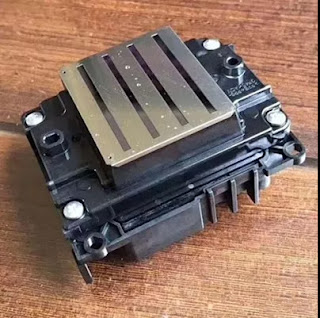
The printhead is the part of your printer which transfers ink onto the paper. It is possible for the printheads to become clogged. A clogged printhead can be identified by white lines running across your printout. It’s important to consult your printer’s manual before attempting to clean the printheads to ensure you do it correctly. Some printers are able to self-clean, and just require a few clicks of a button to get the job done, but the printheads can be cleaned manually too. Try avoid cleaning your printheads more than need be as this process does use up ink.

Keep your sublimation printer clean
Dust can build up in your printer and cause both jams and streaks of unwanted ink on your pages. Ensure your printer is always kept clean inside and out. Use a damp, lint-free cloth to clean the outside of your printer. This will remove the dust and dirt particles that accumulate on the exterior of the printer and help prevent a build up inside the printer. Particles inside the printer can be removed by using a small, pressure-controlled vacuum or a cotton swab and purified water. Be sure to check your manual to confirm which areas of your printer shouldn’t be swabbed and resist the urge to apply too much pressure.

Avoid sublimation paper jams
Mechanical errors sometimes occur despite our best efforts. As frustrating as a paper jam may be, it is best to deal with it calmly and avoid yanking the paper out of the printer. Your manual will provide guidelines on how best to deal with the dreaded paper jam, but usually using two hands to gently and slowly prise the paper out of the machine is the best approach. Take care to avoid damaging any internal parts of the printer or leaving behind ripped pieces of paper. Try to avoid paper jams altogether by always ensuring the paper in your printer is new, no torn or dog-eared pieces, and not over-filling the paper tray.

Consider the placement of your inkjet printer
The area you choose to place your printer can have an impact on its lifespan. Avoid placing it in direct sunlight or directly in line with any air vents. Both heat and dry air can have a negative impact on your printer.
Be cautious
Always take care when opening your printer for maintenance. Remember to always turn the power off first and try not to touch any moving parts or the hot fusers. Taking these precautions will prevent any accidental damage. It’s also a good idea to turn your printer off when it is not in use as they generate a large amount of heat while on.

Use your printer regularly
It is advisable to keep your printer in regular use to prevent the ink from drying up. If the ink is left to dry up it could result in clogging the printhead which could potentially cause serious damage. Printing a page or two every now and then helps keep your printer in good working condition.

Okay, these all above are my share about the maintanence of dye sublimation printer. If you have any other needs or questions welcome to contact us at any time. We will provide you the best quality product and service. Hope my article can be useful to you. Thank you for your reading.

Nanjing Feiyue paper Industrial Co.,ltd
www.feiyuepaper.com
Email: sales@feiyuepaper.com
jenny@feiyuepaper.com
Whatsapp: +8618755150383

2018年7月30日星期一

How Does Sublimation Printer Work? & What make it Print Perfectly?

Nowadays, sublimation printing apply in everywhere, such as home textile, sportswear, outdoor displiay, fashion farbric and so on. During sublimation printing, the sublimation printer must be use. Then, do you know how does it work? If you don't clearly, hoping my this artical will help you find the answer.
Dye Sublimation Printer

How Does Dye Sublimation Printer Work?

For More Information Dye sublimation printing starts with films that contain dyes. This will either be a single four layered film with cyan, magenta, yellow, and gray pigments or four separate films for each color. Because the films contain the pigments, they will appear red, blue, green, and gray.

process, the films are placed on the paper and heated up by the print head. This will cause the pigments to leave the film and enter into the paper where it cools re-solidifies. This is the "sublimation" part. Sublimation means to heat something and turn it into a vapor, then to form it back into a solid. Because the pigments go from solid, to gas, and back to solid, there is little mess compared to ink.
Dye Sublimation Printer

What make dye sublimation printer print perfectly?
There are two factors that contribute to the quality of dye sub printers. The first is continuous ink supply, and the other is un-dithered color.

The color produced by a dye-sub is the result of the mixing of pigments to get the actual color. This is in contrast to most other printing methods which use a tight group of colored dots which, when seen by the human eye from a distance, appear to be a color (a process known as "dithering"). Under magnification, the dots are clearly different colors, and when seen close up with the naked eye the picture appears grainy. Because only one color needs to be printed (instead of up to four), a dye sub can place more dots on a paper. It takes a 1200 dpi printer to get the resolution a 300 dpi dye-sub printer is capable of.

Another difference that helps is that because the color sublimes on the paper instead of being laid down as little dots, the edges of each pixel are blurred. This gives the impression of blending for a more natural appearance. Dots from an inkjet leave large white gaps in between pixels, giving the impression of a grain.

Okay, These all above are my share about the knowledge of sublimation inkjet printer. If you have any other needs or questions welcome to contact us at any time. We will provide you the best quality product and service. Hope my article can be useful to you. Thank you for your reading.

Nanjing Feiyue paper Industrial Co.,ltd
www.feiyuepaper.com
Email: sales@feiyuepaper.com
jenny@feiyuepaper.com
Whatsapp: +8618755150383

What is Epson 4720 Printhead? It Can Replace 5113 Print Nozzle?

Hello, nice to see you again, my dear friends. It will rainy in Nanjing, the sky is dack, wind is heavy. Now I will tell you the topic is a...