
2018年1月30日星期二
Do You Know How to Keep The Printing Effect of Your Inkjet Printer in A Wet Environment?
Hi, Nice to see you. Chinese Spring Festival will coming soon. This is a very important festival for all Chinese people, it means a new year will come. And of course we will have a two weeks vocation from Feb 10 to Feb 22. While before this I will also keep share you the solutions and more about the sublimation inkjet printing and transferring. Today the topic is about the printing.

We all know that the climate is different across the world, somewhere is always warm, somewhere is hot and dry, or somewhere is clod and wet. Then do you know how can you keep the printing effect of your inkjet printer in the different environments( Whatever for the sublimation printing or eco-solvent printing)? Today I will share you some small tips to help you protect your inkjet printer in a wet environment and make your printing always fine. Read the following and I will share you more.

Keep the printing effect of a printer, the necessary maintenance is very important. Here are some small methods for you:
Step 1
Pay attention to the printer working environment, close the door and windows in night. Keep the outside moisture from room.
Step 2
Shell of the printer should be sealed, keep the moisture from electric parts, such as electric boards , cables.
Step 3
Printing material should keep well, print medium easy to absorb moisture, wet material will cause ink disperse. Every time after you use these materials , the material should put back in the package, Try not to touch the ground and the wall.

Step 4
Due to the wet weather, ink drying slow, we always need to wait long time. So advise you to open printer heating function or related drying equipment, it can speed up the drying image.
Step 5
Especially when users need to laminate the film, need to wait for completely dry before coating. If the film is covered immediately, the ink will blur, clients can use drying equipment to dry the certain part of material.
Step 6
It is recommended to use air exhauster or air conditioning dehumidification mode in the working environment of the printing machine. If the moisture is too heavy, some moisture absorbent or desiccant can be placed in the room.

Okay, These all above are my share about how to maintain your inkjet printer in the wet environment. Hope it can be useful to you, so that your printing effect can always be great. If you have any other needs or questions welcome to contact us at any time. We will provide you the best quality product and service. Thank you for your reading.
Nanjing Feiyue paper Industrial Co.,ltd
www.feiyuepaper.com
Facebook: Fei Yue Paper Industrial Co.,Ltd
Whatsapp:+8618752006819
Skype:+8618752006819
We all know that the climate is different across the world, somewhere is always warm, somewhere is hot and dry, or somewhere is clod and wet. Then do you know how can you keep the printing effect of your inkjet printer in the different environments( Whatever for the sublimation printing or eco-solvent printing)? Today I will share you some small tips to help you protect your inkjet printer in a wet environment and make your printing always fine. Read the following and I will share you more.
Keep the printing effect of a printer, the necessary maintenance is very important. Here are some small methods for you:
Step 1
Pay attention to the printer working environment, close the door and windows in night. Keep the outside moisture from room.
Step 2
Shell of the printer should be sealed, keep the moisture from electric parts, such as electric boards , cables.
Step 3
Printing material should keep well, print medium easy to absorb moisture, wet material will cause ink disperse. Every time after you use these materials , the material should put back in the package, Try not to touch the ground and the wall.
Step 4
Due to the wet weather, ink drying slow, we always need to wait long time. So advise you to open printer heating function or related drying equipment, it can speed up the drying image.
Step 5
Especially when users need to laminate the film, need to wait for completely dry before coating. If the film is covered immediately, the ink will blur, clients can use drying equipment to dry the certain part of material.
Step 6
It is recommended to use air exhauster or air conditioning dehumidification mode in the working environment of the printing machine. If the moisture is too heavy, some moisture absorbent or desiccant can be placed in the room.
Okay, These all above are my share about how to maintain your inkjet printer in the wet environment. Hope it can be useful to you, so that your printing effect can always be great. If you have any other needs or questions welcome to contact us at any time. We will provide you the best quality product and service. Thank you for your reading.
Nanjing Feiyue paper Industrial Co.,ltd
www.feiyuepaper.com
Facebook: Fei Yue Paper Industrial Co.,Ltd
Whatsapp:+8618752006819
Skype:+8618752006819
2018年1月29日星期一
Do You Know The Difference between The Mimaki Sublimation And Eco-solvent Printer?
Hi, Nice to see you. What a sunny day today! How about you? Yesterday I shared you the difference between the wide format flat and rotary heat press machine. Then keep following the topic " difference", today I will share you the difference of the Mimaki sublimation printer and the eco-solvent printer.

Mimaki JV150 series wide format inkjet printer can be used for both the sublimation and eco-solvent printing. Mimaki JV150 Series inkjet printers go beyond versatility to deliver a remarkable range of applications. Gamut-extending eco solvent inks and variable drop technology enable you to accomplish anything from fine art reproduction to vehicle wraps and more.

The biggest difference of the sublimation printing and eco-solvent printing is the ink and application. Whatever, the Mimaki 150 series use the uninterrupted ink supply system and the precision ink drop placement. If you use it for the sublimation printing, you must choose the high quality sublimation ink. Of course if you use it for eco-solvent printing, you should choose the eco-solvent ink. Then you will fine it equipped the expand eco-solvent ink set.

Another important different aspect is the application. Eco-solvent printing application is mostly used for the industrial application; sublimation printing is mostly use for the fabric and clothes application. The detailed applications are as follows:
Firstly, people use the eco-solvent printing for the signage,vehicle graphics printing. The vivid color and special characteristic can make the patterns saved on the material for longer time. Then for the advertisement, you can use it for the banners, posters printing; For the business exhibition, it is also a good choice for the exhibition graphics or the window clings printing.

Next application is the sublimation printing. We all know that the sublimation printing is always combined with the sublimation transfer. So this printing method must always uses for the fabrics. Most of our customers use it for the fashion and sportswear,T-shirt transfer produce. But same as the eco-solvent printing, you can also use it for the flags advertisement printing transfer.

Okay, These all above are my share about the difference of the Mimaki sublimation and eco-solvent printer. If you have any needs or questions welcome to contact us at any time. We will provide you the best quality product and service. Hope my article can be useful to you. Thank you for your reading.
Nanjing Feiyue paper Industrial Co.,ltd
www.feiyuepaper.com
Facebook: Fei Yue Paper Industrial Co.,Ltd
Whatsapp:+8618752006819
Skype:+8618752006819

Mimaki JV150 series wide format inkjet printer can be used for both the sublimation and eco-solvent printing. Mimaki JV150 Series inkjet printers go beyond versatility to deliver a remarkable range of applications. Gamut-extending eco solvent inks and variable drop technology enable you to accomplish anything from fine art reproduction to vehicle wraps and more.
The biggest difference of the sublimation printing and eco-solvent printing is the ink and application. Whatever, the Mimaki 150 series use the uninterrupted ink supply system and the precision ink drop placement. If you use it for the sublimation printing, you must choose the high quality sublimation ink. Of course if you use it for eco-solvent printing, you should choose the eco-solvent ink. Then you will fine it equipped the expand eco-solvent ink set.

Another important different aspect is the application. Eco-solvent printing application is mostly used for the industrial application; sublimation printing is mostly use for the fabric and clothes application. The detailed applications are as follows:
Firstly, people use the eco-solvent printing for the signage,vehicle graphics printing. The vivid color and special characteristic can make the patterns saved on the material for longer time. Then for the advertisement, you can use it for the banners, posters printing; For the business exhibition, it is also a good choice for the exhibition graphics or the window clings printing.

Next application is the sublimation printing. We all know that the sublimation printing is always combined with the sublimation transfer. So this printing method must always uses for the fabrics. Most of our customers use it for the fashion and sportswear,T-shirt transfer produce. But same as the eco-solvent printing, you can also use it for the flags advertisement printing transfer.

Okay, These all above are my share about the difference of the Mimaki sublimation and eco-solvent printer. If you have any needs or questions welcome to contact us at any time. We will provide you the best quality product and service. Hope my article can be useful to you. Thank you for your reading.
Nanjing Feiyue paper Industrial Co.,ltd
www.feiyuepaper.com
Facebook: Fei Yue Paper Industrial Co.,Ltd
Whatsapp:+8618752006819
Skype:+8618752006819
2018年1月24日星期三
Do You Know How to Improve the Printing Effect of Your Epson Printer ?
Hi, Nice to see you. Heavy snow in Nanjing today. Take care in your way to work if you are in Nanjing or any snow countries. We all know that Epson is a famous brand in the printing industry. While do you know how can you make your Epson printing get a better effect? Read the following and I will share you more.
Normally, the bad effect of the Epson sublimation printing can be divided into the following two situations:The nozzle check pattern is not printed correctly and the general printing quality is not good. For the different situations, we have the following different ways to solve them.

The nozzle check pattern is not printed correctly
If the nozzle check pattern does not print correctly, try the following solutions:
• Clean the print head and print the test pattern again.
• If the printer has not been used for a long time, the nozzles may be dry and clogged. Turn on the printer at least once every two weeks to avoid clogging the nozzles.
• Lint may adhere to the platen near the print head. Clean the area using the maintenance kit.
• If the nozzles are still clogged after head cleaning at the deepest level, leave the product turned off all night and then check the nozzles again. If you still can not clean the injectors, contact Epson technical support.
If you notice that the print quality is irregular, too light, too dark or if horizontal or vertical lines (bands) appear in the print, try the following solutions:
• Run a nozzle check to see if any of the print head nozzles are clogged. Then, clean the print head, if necessary.
• Align the print head.
• Use original Epson ink packs and make sure they have not expired.
• Make sure that the paper settings in your RIP software or in the product control panel match the paper you loaded.
• If you are comparing the print results with the image on your computer screen, the colors may not match. Because monitors and printers produce colors differently, printed colors and colors on the screen do not always look the same.
• Make sure that the printer cover is closed. Do not open any cover of the printer during printing. This can cause the print head to stop suddenly, resulting in irregular colors.

Okay, These all above are my share about how to improve your Epson sublimation printing with the Epson inkjet printer. If you have any needs or questions welcome to contact us at any time. We will provide you the best quality product and service. Hope my article can be useful to you. Thank you for your reading.
Whatsapp:+8618752006819
Website: www.feiyuepaper.com
Facebook: Fei Yue Paper Industrial Co.,Ltd
Email:zeo@feiyuepaper.com
Normally, the bad effect of the Epson sublimation printing can be divided into the following two situations:The nozzle check pattern is not printed correctly and the general printing quality is not good. For the different situations, we have the following different ways to solve them.
The nozzle check pattern is not printed correctly
If the nozzle check pattern does not print correctly, try the following solutions:
• Clean the print head and print the test pattern again.
• If the printer has not been used for a long time, the nozzles may be dry and clogged. Turn on the printer at least once every two weeks to avoid clogging the nozzles.
• Lint may adhere to the platen near the print head. Clean the area using the maintenance kit.
• If the nozzles are still clogged after head cleaning at the deepest level, leave the product turned off all night and then check the nozzles again. If you still can not clean the injectors, contact Epson technical support.
If you notice that the print quality is irregular, too light, too dark or if horizontal or vertical lines (bands) appear in the print, try the following solutions:
• Run a nozzle check to see if any of the print head nozzles are clogged. Then, clean the print head, if necessary.
• Align the print head.
• Use original Epson ink packs and make sure they have not expired.
• Make sure that the paper settings in your RIP software or in the product control panel match the paper you loaded.
• If you are comparing the print results with the image on your computer screen, the colors may not match. Because monitors and printers produce colors differently, printed colors and colors on the screen do not always look the same.
• Make sure that the printer cover is closed. Do not open any cover of the printer during printing. This can cause the print head to stop suddenly, resulting in irregular colors.
Okay, These all above are my share about how to improve your Epson sublimation printing with the Epson inkjet printer. If you have any needs or questions welcome to contact us at any time. We will provide you the best quality product and service. Hope my article can be useful to you. Thank you for your reading.
Whatsapp:+8618752006819
Website: www.feiyuepaper.com
Facebook: Fei Yue Paper Industrial Co.,Ltd
Email:zeo@feiyuepaper.com
2018年1月11日星期四
Have A Regular Maintenance for Your Inkjet Printer from Different Side
Hi, Nice to see you. This week I have mostly shared you about our new products. Then as a summary, today is a new topic about your inkjet printer. We all know that the inkjet printing is a very important step in the sublimation or eco-solvent printing. And it is getting more and more popular in the whole printing process. While do you know how to have a regular maintenance for your inkjet printer? Read the following and I will share you more.

Print Head
We all know that the print head is one of the most important part for the inkjet printer. So have a right maintenance for the inkjet printer is very important. Then we can do it from the following two steps:
Check nozzle before you start the day
Every day before you start printing, you should perform print head checks or test prints. Print head checks will let you know if all the printer heads are working at optional levels. If there is clogging in the heads, you will notice a drop in the quality of your print. In such situations, you need to clean the print head before you start printing.

Check the print head regularly
You need to keep checking the print head on a regular basis if you want to have high-quality prints all the time. Move the print head to one side and look at the sides to see if there is any ink build up. If you notice ink build up on the plastic part of the print head, you should clean it. However, do not try to clean the head directly as you may damage it.

Capping station, flush pad, and wiper blade
For all the accessories of inkjet printer, keep cleaning is very important. The detailed cleaning introduction are as follows:
Capping station
The capping station is important because it uses a vacuum to prepare your print heads. If there is any contamination due to the deposition of ink, it will overload itself every time you need to get something printed. Clean the capping station with the help of a Q-tip.
Flush pad
The flush pad is where the print head will release small amounts of ink to ensure the nozzle is open. As you keep printing with your sublimation printer, the pad will reach a saturation point after which it won’t work at all. Rinse the flush pad regularly so that you have a hassle-free printing experience.
Wiper blade
The wiper blade will keep your print head clean by removing excess ink from it. Over time, your wiper blade will become dirty with ink. As a result of this, your wiper blade won’t be able to clean the printer heads. Use a Q-tip to clean your wiper blade.

Okay, These all above are my share about how to maintain your inkjet printer from the different side. If you have any other needs or questions welcome to contact us at any time. We will provide you with the best quality product and service. Hope my article can be useful to you. Thank you for your reading.
Whatsapp:+8618752006819
Website: www.feiyuepaper.com
Facebook: Fei Yue Paper Industrial Co.,Ltd
Email:zeo@feiyuepaper.com
Print Head
We all know that the print head is one of the most important part for the inkjet printer. So have a right maintenance for the inkjet printer is very important. Then we can do it from the following two steps:
Check nozzle before you start the day
Every day before you start printing, you should perform print head checks or test prints. Print head checks will let you know if all the printer heads are working at optional levels. If there is clogging in the heads, you will notice a drop in the quality of your print. In such situations, you need to clean the print head before you start printing.
Check the print head regularly
You need to keep checking the print head on a regular basis if you want to have high-quality prints all the time. Move the print head to one side and look at the sides to see if there is any ink build up. If you notice ink build up on the plastic part of the print head, you should clean it. However, do not try to clean the head directly as you may damage it.
Capping station, flush pad, and wiper blade
For all the accessories of inkjet printer, keep cleaning is very important. The detailed cleaning introduction are as follows:
Capping station
The capping station is important because it uses a vacuum to prepare your print heads. If there is any contamination due to the deposition of ink, it will overload itself every time you need to get something printed. Clean the capping station with the help of a Q-tip.
Flush pad
The flush pad is where the print head will release small amounts of ink to ensure the nozzle is open. As you keep printing with your sublimation printer, the pad will reach a saturation point after which it won’t work at all. Rinse the flush pad regularly so that you have a hassle-free printing experience.
Wiper blade
The wiper blade will keep your print head clean by removing excess ink from it. Over time, your wiper blade will become dirty with ink. As a result of this, your wiper blade won’t be able to clean the printer heads. Use a Q-tip to clean your wiper blade.
Okay, These all above are my share about how to maintain your inkjet printer from the different side. If you have any other needs or questions welcome to contact us at any time. We will provide you with the best quality product and service. Hope my article can be useful to you. Thank you for your reading.
Whatsapp:+8618752006819
Website: www.feiyuepaper.com
Facebook: Fei Yue Paper Industrial Co.,Ltd
Email:zeo@feiyuepaper.com
订阅:
博文 (Atom)
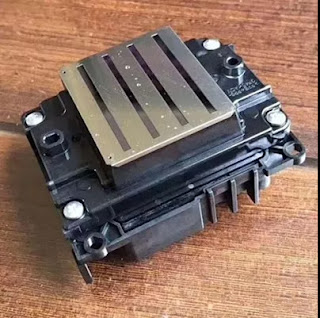
What is Epson 4720 Printhead? It Can Replace 5113 Print Nozzle?
Hello, nice to see you again, my dear friends. It will rainy in Nanjing, the sky is dack, wind is heavy. Now I will tell you the topic is a...
-
 Hi~ nice to see you again, my dear friends. The National Day will coming! So from tomorrow to 7th October, I am in holiday. And today's...
 -
 Hi! Nice to see you again, my friends. Today, let's talk about how to clean epson nozzles . No matter if you use branded, compatible or ...
 -
 Hello, nice to see you again, my dear friends. It will rainy in Nanjing, the sky is dack, wind is heavy. Now I will tell you the topic is a...