2018年5月22日星期二

Do You Know What Kind of Environment is Your Sublimation Inkjet printer likes ---- Moisture or Dry?

Hi, Nice to see you! Today, I want to talk about the topic is sublimation inkjet printer's environment. If you just buy a inkjet sublimation printer, do you know what kind of environment is your sublimation inkjet printer likes ---- moisture or dry? If you don't know the answer, read the following and I will share you more!


PROTECT YOUR PRINTER’S ENVIRONMENT

The environment—most specifically, humidity and temperature—plays a big part in how an inkjet printer functions. Inkjet printers prefer a consistent temperature that is cool but not cold. Further, they love humidity between 40-60 percent. If your environment is very high humidity, and sublimators may still have problems with printers. But remember, it may be really humid outside, but inside your air conditioning has taken all the moisture out of the air. This is bad for your printer. It is suggested to run a humidifier inside your home near the printer to maintain inside humidity.

If you are working in your home, and have a basement, inkjet printers love to live there. I had an old epson sublimation printer with inks installed and had it stored in my basement for over a year unused. A basement is naturally cool and humid. I took the printer out and printed a test print, as I was curious, and the first print was perfect. That printer would not have printed, had it not been in my basement because the ink would have dried solid inside the print heads and would have been very difficult if not impossible to correct.


How to Protect the sublimation printer nozzles?

You should never leave your inkjet sublimation printer sit for an extended period of time without printing. The length of time depends on your environment. You should run at least a nozzle check periodically to move fresh ink through your print heads. Think of your nozzles as a cup of coffee that you leave sitting on your office desk. If you left it there for a couple weeks or maybe only a couple of days, the water would evaporate, leaving a brown crusty deposit. You would have to scrub pretty aggressively to clean out that mug.


The same thing can happen to a print head. The ink sits in the nozzle and the liquid evaporates over time, leaving a crusted over nozzle. You would have to run some head cleaning cycles to get all the nozzles to print correctly, and this wastes ink. I personally recommend running a nozzle check each day, although sometimes that can be hard to remember. It only takes a few drops of ink to do a nozzle check, but it takes a lot more to run cleaning cycles to clear a clogged printer.


You probably spent a lot of time researching sublimation printers before you eventually settled on the model you purchased. You ordered your package, and when it arrived, you set it up, and started creating sublimation products.

Now you have the knowledge of how your wide format inkjet printer works, and you know that you must provide your printer a good environment, and exercise it regularly. If you do these simple things, you can be confident that when you need your inkjet sublimation printer, it will print flawlessly.Thank you for your reading.If you have any other needs or questions welcome to contact us at any time. We will provide you the best quality product and service. Hope my article can be useful to you.

Nanjing Feiyue paper Industrial Co.,ltd
www.feiyuepaper.com
Email: sales@feiyuepaper.com
jenny@feiyuepaper.com
Whatsapp: +8618755150383

2018年5月17日星期四

Do you Know What Makes A Dye-Sublimation Transfer Printer Tick?

Hello, nice to see you. To day is cloudy in Nanjing. Today's topic is about Dye-Sublimation Transfer Printer, the inkjet printer is like any other piece of equipment. You must take care of it and maintain it in the proper environment, so that it works at its very best. If you don’t, just like other equipment, a sublimation printer can be frustrating. And sometimes sublimation printer appear ticks, do you know what happen to it?

And you do need to know what to do to take care of your equipment and not everyone is given this information, so I am going to tell you what makes a sublimation printer tick!

WHAT MAKES A SUBLIMATION PRINTER TICKS?

To take care of an inkjet sublimation printer, first we need to know some basics of how it works. First of all, in sublimation we use Epson inkjet printers. The reason for this is that Epson printers use a“cold” technology to spray the ink onto the paper. This technology is called Piezo head technology which is patented by Epson.


The epson print head has a small crystal that vibrates when stimulated with an electrical charge, and this forces the ink out of the print head nozzles. Since sublimation dyes are heat activated, it is perfect for the sublimation process. Other inkjet printers use heat to “boil” the ink onto the paper. This would not work so well for the sublimation process because the dyes would be activated before we wanted them to.
There are basically two ways to deliver ink to a printer, either cartridges (including refillable), or an external bulk ink delivery system. These cartridges work well, but they are very low capacity, and not very cost effective, so a bulk ink system is preferred.

With a bulk ink system, the ink is contained in bags. The ink feeds through tubing,
up to damper cartridges that install where regular cartridges would be. The bulk system works as a siphon system that is at equilibrium. That is why it is important to keep the container with the ink on the same level as the printer. If you put it higher, the ink could start siphoning into the printer, and if it is lower, the ink will run back into the bags. Either outcome can cause serious problems.

Occasionally with bulk systems, a damper cartridge may lose its prime. Your ink bag may have run empty or the hose may have kinked, cutting off the free flow of liquid. The system loses it prime and will not pull ink through to the print heads. When this happens, a printer cleaning cycle (done through your printer driver) may correct the problem. If not, you need to re-prime that damper cartridge.

Okay, These all above are my share about what makes inkjet sublimation printer ticks. If you have any other needs or questions welcome to contact us at any time. We will provide you the best quality product and service. Hope my article can be useful to you. Thank you for your reading.

Nanjing Feiyue paper Industrial Co.,ltd
www.feiyuepaper.com
Email: sales@feiyuepaper.com
jenny@feiyuepaper.com
Whatsapp: +8618755150383

2018年5月13日星期日

What Digital Inkjet Printers are Suitable for Sublimation Transfer Paper?

Hi, Nice to see you.Today, it is very hot! The reall summer is coming! After the introduce of the laser cutting machine in the last articles.Today the topic is about the Digital inkjet printer. Do you know the inkjet printers which are suitable for sublimation transfer paper? If you don't know clearly about it,read the following and I will share you more.

What is the sublimation transfer paper?

Sublimation transfer is to print the portrait, landscape, text or other graphics onto the inkjet paper which is specially used for sublimation transfer through the inkjet printer which is with the sublimation transfer ink, then heat it up to about 200 degree by using the heat transfer equipment, to make the sublimation transfer ink on the sublimation transfer paper sublimated and substrates into the medium, in the end, the colored images on the transfer paper can be vividly transfered to the textiles, mugs, ceramic plates, metal and other materials, it is a new technology.


Sublimation printer is the difference from commercial printing in the aspect that they use heat to transfer dye onto various materials. This technology is frequently used by textile manufacturers to place dyes on their products. Other uses include photographic prints, ID cards and much more.

Let us explore the process. Sublimation printers use different ink cartridges which use cyan, magenta, yellow and overcoating colors as opposed to the traditional cyan, magenta, yellow and black found in inkjet printers.


The design layout is printed on a substrate. This acts as the medium of transfer. The design is printed on this sublimation transfer sheets and is placed on the medium to which the transfer is to be made. The sheet is placed on it and by application of calculated heat, the transfer is done. This heat applied on this special combination, changes depending on the substrate. During the transfer, dye is applied on a molecular level. They penetrate the medium and when coated with an overcoat become water proof and are present for an indefinite duration.

Owing to the unique blend that is required for the sublimation process and also the properties of the sublimation ink, regular inkjet printers are not cut out for the task and are actively avoided. However, there are exceptions to this and a few inkjet printers with unique settings specific to this task can perform sublimation printing.

What Digital Inkjet Printers are Suitable for Sublimation Transfer Paper?

Common inkjet printer: Epson: C65、830u、R210、R310、R800、1520K、EX3、1290、2100、Lenovo:CJ100 and so on.
Wide-format inkjet printer: SURE COLOR F-series F6070 F7070 F6200 F7170 F9200 F6200 F7270 F6000 F7000 and so on;
MIMAKI TS3 TS3OOP TS3-1600 TS34 JV33 JV300 JV4 JV5 and so on;
Roland, Mutoh, MS and so on.

Okay, These all above are my share about the answer of the question---The dye sublimation printers which are suitable for sublimation transfer paper. If you have any other needs or questions welcome to contact us at any time. We will provide you the best quality product and service. Hope my article can be useful to you. Thank you for your reading.

Nanjing Feiyue paper Industrial Co.,ltd
www.feiyuepaper.com
Email: sales@feiyuepaper.com
jenny@feiyuepaper.com
Whatsapp: +8618755150383

2018年4月22日星期日

Do You Know the Advantages of Epson 5113 Printhead ,Which Inkjet Printers are Suitable for It?

Hi, Nice to see you,new week and new day is coming! Today the topic is about the Epson 5113 Printhead.Do You Know the Advantages of Epson 5113 Printhead ,Which Inkjet Printers are Suitable for It? Ibeliwve ,many people do nor know something about it,Do not worry! Following me ,Here I would like to introduce them to you, then you will know the answer.
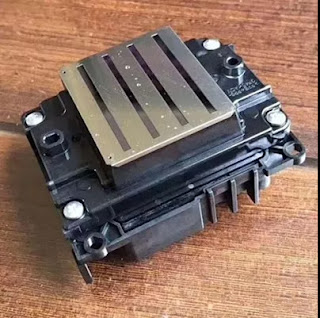
Epson 5113 print head inkjet printer is selling greatly recently. However, what is 5113 print head?Epson 5113 print head belongs to Epson Corporation. They launched a new type of piezoelectric nozzle in recent years. And the name is from Epson 5113 inkjet printer.
The digital printing industry industry generally lists Epson nozzel. While, the other brand nozzel was named as the industrial nozzel. The so called industrial print head are mostly single head & single color inkjet printing. Actually, Epson Corporation also produced single-head monochrome inkjet nozzles.
In fact, industrial print head is just a name. There is no relationship with printing in industrial or not. Also no relationship with the life, quality, performance of print head.
Why Epson 5113 nozzles is popular? it has its advantage features:
1, the number of nozzles: Epson 5113 print head has 8 rows. Each row has 400 holes. The 3200dpi is much more than 1440dpi of Epson DX5 & DX7.
2, the nozzle width: 5113 nozzle prints the effective width at 1.3 inches. It is 30% wider than the Epson DX5& DX7 print head.
3, the speed performance: the digital inkjet machine with 5113 print head. It can achieve the max print speed around 25 square meter per hour under 3pass high speed working mode.
4, the price: the current Epson 5113 nozzle market price is far lower than DX5.
5,Epson 5113 nozzles used for inkjet printer(mimaki, mutoh, etc)
Over the years, Epson company is keeping on developping new technology inkjet print head. Soon later, experts were developping and updating new super performance. We can see that the market using the 5113 nozzle of the machines continue to emerge.
The original Epson 5113 print head can print water-based ink only. Now engineers were trying to transform it with the hope for making it usable on oil based ink and UV curable ink at a better solution in the near future.
Okay, These all above are my share about the advantages of epson 5113 print head. If you have any other needs or questions welcome to contact us at any time. We will provide you the best quality product and service. Hope my article can be useful to you. Thank you for your reading.

Nanjing Feiyue paper Industrial Co.,ltd
www.feiyuepaper.com
Email: sales@feiyuepaper.com
jenny@feiyuepaper.com

2018年4月3日星期二

How to Clean Epson Printer Nozzles,You Should Take Care for These Tips !

Hi, Nice to see you.Thank you for your click for my blog.During sublimation printing technology,printer nozzles play an important role in the accessories of sublimation printer.but once you find that the printed image is unexpectedly faint or dots in the printed image are missing, you may be able to solve these problems by cleaning the print head, which ensures that the nozzles are delivering ink properly.

If your printer brand is Epson,when you clean its printhead,you should take care for those tips!
If you’re unsure on how to clean an Epson printhead these instructions should provide guidance. Most modern printers will have similar cleaning functions to the Epson, so this should help even if your printer isn’t of the Epson brand.

First,if the low ink light is flashing or permanently on, you do not need to perform a nozzle check. This is because you’re out of ink so the cartridge itself needs replacing.
Second,if the ink light is off, hold the ink button down for three seconds, this will start the cleaning process. You’ll know the printer is working as the power and ink light will start flashing. It’s important you do not turn the printer off while this is happening as this could damage the machine.
Third,once the flashing has stopped, perform a nozzle check again to confirm that the print head is clean.
The last,if you find that the problem continues, repeat the process. You may want to leave the printer overnight for the ink to settle before trying again.

These all above is my share and introduction about how to clean Epson
printhead.Now ,you should have a certain understanding of clean Epson nozzles.If you need inkjet printhead ,wecome to contact us,we will provide you with the best quality sublimation printing products or transferring materials and service. Thank you for your reading.!

Nanjing Feiyue paper Industrial Co.,ltd
www.feiyuepaper.com
Email: sales@feiyuepaper.com
jenny@feiyuepaper.com

2018年3月2日星期五

Take Care of The Factors When Operate the UV Printer

  Hi, Nice to see you. How are you today? It is always rainy in Nanjing, China. But the temperature is getting more and more warm now. Nowadays, apart the sublimation printing, the UV printing is also very popular in the world now. It can also help us print the patterns with vivid and brilliant color. While do you know what factors should you take care when operate your UV printer? Read the following and I will share you more.

1.Brute force adjustment print head.
  Do not use outside force to adjust nozzle position without regulation. Do not use brute force, whether changing or lightly adjusting nozzles. Please follow the instructions carefully.
2.Ignore the work ground line.
  UV flatbed printer is affected by static electricity very much. It is necessary to check the connection of ground line regularly and sprinkle a little salt water around the ground.
3. Random switching circuit.
  Install and remove the UV flatbed printer circuit, without turning off the power.This behavior can damage the life of each system, endanger the nozzle.
4.Cleaning without turn off the power.
  Pay attention to protecting the circuit board and other internal systems, and turn off the power when cleaning, and be careful not to touch the circuit board and other internal systems.

5.Use no inspection cleaning liquid.
  Clean the nozzle with an unclean liquid solution. Print head nozzle are very susceptible to contamination and wear, So please use the manufacturer specified product and quality inspection clearance product to clean nozzle.
6.High pressure cleaning nozzle.
  If the nozzle is slightly blocked, it is recommended to use a vacuum cleaner to wash out the dust, and then fine cleaning, do not use high pressure to clean the nozzle.
7.Soak the nozzle for cleaning.
  Although the to put the nozzle into cleaning solution for a long time can be more effective and clear stains, but the cleaning fluid has a certain corrosive, if the time more than 48 hours, the nozzle itself will be affected.Therefore, generally only take the appropriate time for cleaning the print head.
8. Ultrasonic cleaning nozzle.
  Do not long time using ultrasonic cleaning machine cleaning nozzle.In fact, if you usually pay attention to the maintenance of the nozzle, then no need for ultrasonic cleaning. Ultrasound can cause undesirable effects on the nozzle.But if the blockage is serious, need to use ultrasonic cleaning, then only cleaning time up to 3 minutes.If there is no cleaning at all, please wait for the nozzle to cool naturally to the normal state during the second cleaning.
9. Mix the ink at will.
  Do not arbitrarily raise different batches of ink, or use the bad quality ink, cleaning fluid. Two different configurations of ink mixing will change the ink color and quality, and will affect the printing effect and plug the nozzle.


  Okay, These all above are my share about the factors that you should better take care when operate your UV printer. If you have any other needs or questions welcome to contact us at any time. We will provide you the best quality product and service. Hope my article can be useful to you. Thank you for your reading.


Nanjing Feiyue paper Industrial Co.,ltd
www.feiyuepaper.com
Facebook: Fei Yue Paper Industrial Co.,Ltd
Whatsapp:+8618752006819
Skype:+8618752006819

What is Epson 4720 Printhead? It Can Replace 5113 Print Nozzle?

Hello, nice to see you again, my dear friends. It will rainy in Nanjing, the sky is dack, wind is heavy. Now I will tell you the topic is a...