2017年9月26日星期二

Daily Maintain of Your Epson Digital Printer-----You Deserve to Know More

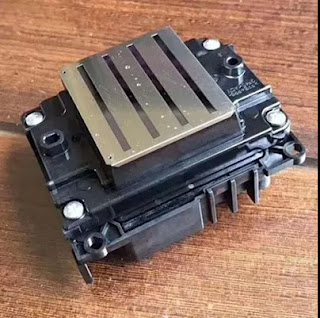
  Hi, Nice to see you again. In our daily use of the digital printing a high quality and high speed printing machine is very important. But do you know how can we make our digital printer always keep a good printing performance. For example, the Epson printer is a very famous brand but if you use it for a long time but if you can't maintain it in a right way even it is a good printer it may also in a bad efficiency. Today I share you some tips about how to maintain your Epson digital printer in your daily use from different side.


Daily Use And Install
  1.The black insurance at the bottom, both two  sides of the print head is kept clean, especially inside and outside the spray room, because there is a fluffy cloth
  2.Ground wrie  must be connected, requiring steel grounding 1.5 meters, and add a bag of saline water into the room, to maintain a certain humidity, the machine should often use cloth to wipe, otherwise there will be static electricity, will cause flying ink
  3.Voltage regulator, each machine should be equipped with voltage regulator, otherwise, once the voltage instability or sudden power failure, will cause a burning nozzle or motherboard, trolley board, voltage regulator minimum 3000W
  4.Press the wheel when the machine does not work
  5. Frequent move of the slide need to use the grease , but must not butter
  6. If the nozzle is broken, the number of needles is less, it will not affect the quality of painting, cleaning or filling can be, if there are many broken needles, please timely bubble nozzle

Machine Cleaning


  1. After starting the first cleaning, playing test whether there is broken needle, if there is broken needle cleaning or filling, before the shutdown also need to wash, hit the test
  2.Limit, when  cleaning   the nozzle, cleaning fluid and water do not add too full, otherwise easy to splash limit, so that the limit is not easy to use

  3.The ink station cap need to keep cleaning because  the ink station cap is directly attached to the nozzle
  4.Grating need to cleaned with alcohol, because it will have the ink stains and dust when you use for a long time
  5.Keep the wiper clean at all times, as the wiper is directly attached to the nozzle
  6.Empty the ink pail in time
  7.Platform suction port will be blocked for a long time to use it , you need to cleaning it use toothpicks
  8.The machine is used for a long time should check whether there is loose
  9.Computer system or reinstall software, do not have anti-virus software

Daily common Broken ink phenomenon
  1. When cleaning, check the Ink suction suck print head whether have suction, Ink suction whether have damaged
  2. The buffer bottle has air, drained
  3. Print head mirror and whether there are dirt around, whether have enough ink
  4. Observe whether the machine platform has items attached to the nozzle during printing
  5. Whether it is used for a long time, there is broken needle, no timely soak printer head
  6. Whether the nozzle line has ink and whether there is loose place
  7. Indoor temperature can not be less than 20 degrees
  8. Cool ink, especially in winter, get back the ink must first put a while, so that the ink and the indoor temperature is almost the same

  These all above are my share about the daily maintain of the Epson digital printer. If you have any needs or questions welcome to contact us at any time. We will provide you with the best quality product and service. Hope my article cam be useful to you. Thank you for your reading.


Nanjing Feiyue Digital Technology Co.,ltd
www.heatsub.com
Facebook: Zeo
Whatsapp:+8618752006819
Skype:+8618752006819

2017年9月24日星期日

Our High Speed Laser Cutting Machine------You Deserve to Have A Try

  Hello, Nice to see you again. It rains so hard in Nanjing today and the cars are flooded in rain. How about you? Last week I went to the 2107 Sign China Expo in China and show our high quality machines to the customers. Such as the Epson printer, rotary heat press machine and the laser cutting machine. In the last articles I have shared you a lot about the printers and the press machine. So today I will share you more about our laser cutting machine from the advantages and the applications.
  Firstly, have a brief introduction about the laser cutting machine. Our high speed automatic textile laser cutting machine, using high-definition digital SLR to one time realization the high precision imaging, which is including the large-format and multi-pattern, and avoid the error of splicing the image and the decline in image quality. Also the speed of it is 2.5 times than traditional.Must be the best choice of modern high-sped automatic large enterprise.


Characteristic

1.Using Vision Positioning System, auto identity the material edge
2.Using high-definition digital SLR to one time realization the high precision imaging
3.Automatically feeding the material
4.Automatically correct and find the border again when the prints was deformed
5.Using high-speed stepper motor
Feature
1.High speed automatic textile laser cutting machine
2.Including the large-format and multi-pattern, and avoid the error of splicing the image and the decline in image quality. 
3.High speed stepper motor,cutting speed is 2.5 times than of the traditional
4.The best choice of modern high-speed fully automatic large enterprise

Advantage
Tip 1
  There is a high quality Canon 1300D SLR camera on the upside of the laser cutting machine. It can help you cut your patterns better.
Tip 2
  Our machine can help you feed the fabric or textile automatically.  This performance can help you save your time and money. Improve your efficiency highly.
Tip 3
  There are also two LED light in the left and right. It can illuminate and help you reduce the error. The low power of teh LED light can also make it have a long lasting life.
Tip 4
  There are two beams of the laser cutting machine. And each of the beam has a laser head. The asynchronous cutting has high working efficiency and they can reach the seamless stitching.
Tip 5 
  Our laser cutting machine has the high cutting speed of the 200mm~300mm/s . And this machine is much suitable for the garment industry and the toy industry.

Application
  1.Under the car seat cushion blanking, snow boots slippers, pillow under the warm hand treasure material, clothing affixed cloth embroidered, woven label, trademark cutting, garment accessories, ornamental engraving, punching and trimming, leather punch, lofting and cutting, organic glass, plastic, PVC, paper, wood and bamboo, ceramic, granite, graven images industry.
  2.Banners & flags & all printing signs cutting,Sportswear & swim suit & all printing garments cutting. Strip & plaids cutting-suit,t-shirt. Arabesquitic cutting bags,suitcase and Cloth sofa industry.

  These all above are my introduction about our high speed laser cutting machine. If you have any needs or questions welcome to contact us at any time. We will provide you with the best quality product and service. Hope my article can be useful to you. Thank you for your reading.


Nanjing Feiyue Digital Technology Co.,ltd
www.heatsub.com
Facebook: Zeo
Whatsapp:+8618752006819
Skype:+8618752006819

2017年9月18日星期一

Why Not Try about The Mutoh VJ1624-WX Sublimation Printer?

  Hi, Nice to see you again. How is your weekend going? In the sublimation or eco-solvent digital printing and transferring industry, I have shared you many different plotters. Such as the Mimaki , Roland, Epson, also with the Mutoh sublimation printer. The Mutoh wide format digital printer is a famous brand in the sublimation printing industry. Today I will share you one model of this big Mutoh family and may be you can have a try of it. I believe it can bring you a new experience-----Mutoh VJ1624-W.
  Firstly, have a definition introduct with this Mutoh VJ1624-W sublimation printer. The VJ-1624W is an aqueous sublimation transfer printer and is capable of handling up to 64" / 1625mm sublimation transfer rolls. It is perfect for both startup and established businesses wanting to extend their product portfolio printing soft- signage as well producing sports and team wear. What's more, the VJ1624W prints on most typical dye sublimation transfer papers, making transfer onto all possible flexible and rigid polyester materials possible.


Feature
  The ValueJet 1624W is the perfect printer for soft signage, custom sports apparel and other textile applications. Print a wide variety of applications, such as POP signage, trade show graphics, museum fine art prints, banners, flags, custom fabrics prints and more.
  *Transfer sublimation printing up to 1625 mm (64”) transfer paper
  *Latest generation 8 channel 1440 nozzle piezo head
  *Typical production speeds between 14 and 27.5 m²/hr
  *Suitable for water-based dye sublimation inks
  *Ideal for production of soft signage, sportswear, promotional goods, photo panels and more
  *Environmentally friendly printing


Speed And More Specification


Production Print Speed: 20.5 m²/h at 360x720 dpi
Print Resolution: 1440/1080/720/540/360 dpi 
Minimum Droplet Size: 3.5 pl
Head Height: 1.5 mm / 2.5 mm / 4.0 mm
Heating System: None
Maximum Media Width: 1625 mm (64")
Maximum Print Width: 1615 mm (63.58")
Max Media Roll Weight: 30 kg 


Wide Application
  Print on Dye Sublimation Transfer Paper – The Mutoh ValueJet 1624W is perfect for large application printing to dye sublimation transfer paper.  Mutoh’s speed and print quality make this the perfect printer for any commercial application.
Typical dye sublimation applications are:
  *Soft signage and graphics for events, tradeshows and sporting grounds
  *Home decoration: curtains, bed linen, soft furnishings
  *Flags & pennants
  *Sports goods: snowboards, helmets etc
  *Promotional Goods: mugs, umbrellas, iPods, mouse mats, photo panels
  *Apparel: blouses, sportswear, outdoor jackets, T-shirts, school sportswear, swimwear


  Okay, These all above are my share about the Mutoh VJ1624-W sublimation digital printer. If you have any needs or questions welcome to contact us at any time. We will provide you with the best quality product and service. Hope my article can be useful to you. Thank you for your reading.


Nanjing Feiyue Digital Technology Co.,ltd
www.heatsub.com
Facebook: Zeo
Whatsapp:+8618752006819
Skype:+8618752006819

2017年9月14日星期四

Do You Know how to Adjust The Color for Your Digital Inkjet Printer?

  Hi, Nice to see you again. Today one of my customer tell that the sublimation printing and transferring is getting more and more old. And now the eco-solvent and UV printing are getting more and more popular. But do you when whatever which printer do you use you must need to adjust the color of your digital inkjet printer in a right way. Then do you know how to do it? Read the following and I will share you about the tips.

1.The experience of color: the color of the speed, accuracy depends on the operator's experience and level.

2. Color card color method: by contrasting the color of the color card to color.
    
3. Color measurement method
  By means of color measurement equipment, the color of the target color, and the color measurement results into the computer, and then print out the color. This method is paletized by the instrument, thus reducing the impact of many man-made and environmental factors.

4. The screen display method
   By adjusting the color of the screen to adjust the color of the image, usually on the screen through the color menu to select or adjust the color. This method is very useful in color matching or when it starts to be toned, and is a coloring method commonly used by designers. However, due to the principle of hair color and dye on the fabric of the hair color principle is not the same, the screen can display the color can not be all through the dye displayed on the fabric, and the dye shown by the subtle differences can not be on the screen display. Therefore, this is a kind of approximate color method, can not be used as 
accurate color.


  Okay, These all above are my share about how to adjust the color of your digital printer in a right way. If you have any needs or questions welcome to contact us at any time. We will provide you with the best quality product and service. Hope my article can be useful to you. Thank you for your reading.


Whatsapp:+8618752006819
www.heatsub.com
Facebook: zeo(章江徽) 
Email:zeo@feiyuepaper.com 

2017年9月4日星期一

Do You Know What Should You Pay Attention to Before Open Your UV Digital Printer ?

  Hi, Nice to see you. Have you heard about the UV digital printer before ? Did you used about it? Today I will introduce you more about the UV digital printer and give you some tips that you should pay attention to before you open your digital printer.
  Firstly, have a brief introduction about this machine. UV flatbed printer, also known as universal flatbed printer or flatbed printer, which broke through the bottleneck of digital printing technology, to achieve a true sense of a printed, no plate, full-color image once completed, is the traditional printing presses.The original design and manufacturing purpose is used to inkjet hard material inkjet equipment, which broke through the inkjet technology can only print on the soft material restrictions, inkjet history is an important turning point, marking the inkjet technology to enter more the birth of a field of time. But do you know what should you pay attention to before you turn on your UV flatbed printer? Read the following article and I will share you more tips about the attention.


  Step 1: Checking the rail for lubricant Before using UV flatbed printer,is it possible to keep cars up and running.Because if the guides lack of lubrication will leads to the car slower,it will affect the print quality.

  Step 2: Checking whether print head ink sac is well connected with the print head before using the printer.


  Step 3: Checking whether the grating bar is clean before using UV printer.If there are stains on the grating bar,This will lead to UV flatbed printer can't recognize the scale of grating bar,and cause printing problems.


  Step 4: Checking whether there is ink on the bottom of LED curing lamp before using UV printer, if the lamp stained with ink,wiping out it with alcohol and keep regularly clean the surface of LED curing lamp.

  Step 5: Checking whether the connection nozzle flat line is stained with ink before using printer.If yes,must clean up in time.(If it is found that the ink have been Inflow or corrosed flat line, must replace the flat line immediately before the machine working).


  Step 6: After finish the checked.First printing test line to test whether the flatbed printer work normally.Through control software to print test,checking whether the nozzle hole is clogged,Each a small short test line is corresponding to a nozzle hole,The lack of short test line called "broken needle",Fuzzy called "virtual needle",must clean the print head If the "broken needle" and "virtual needle" ,please to clean the print head.


  Step 7: Checking whether the material placed properly before the UV printer start printing every time,to avoiding impact the print head in printing process.

  These all above are my share about the UV digital printer and tips that you should pay attention to before you open your UV digital printer. If you have any needs or questions welcome to contact us at any time. We will provide you with the best quality product and service. Hope my article can be useful to you. Thank you for your reading.


Nanjing Feiyue paper Industrial Co.,ltd
www.heatsub.com
Facebook: Zeo
Whatsapp:+8618752006819
Skype:+8618752006819

2017年9月3日星期日

Mimaki TX300P-1800------- Try And Create Your Own Design Fabric!

  Hi, Nice to see you again. In my last article I have introduced you about the Mimaki TS300P-1800 large format sublimation printer. And if you are professional in digital printing industry, you must know that there is also a model in the Mimaki digital printer and its name is very likely with the TS300P-1800. Today I will introduce you about it-----Mimaki TX300P-1800.
  Firstly, have a brief introduction about the Mimaki TX300P-1800. Owing to the widespread use of the Internet, the number of orders for personalized/customized design products has been increasing.To meet the latest market needs, Mimaki developed the Tx300P-1800. This entry-level model fits perfectly in places with limited floor space, such as design studios or school facilities. The Tx300P-1800 delivers high-quality printing on a wide range of textiles.  So the biggest difference of the TS300P-1800 and the TX300P-1800 is that the TS300P is a sublimation printer while the TX300P-18000 is a digital printer that can print direct to the fabric.


Feature
  *New print head allows printing on various types of textile
  *Reliable textile feeding mechanism ensures stable printing
  *Mimaki’s print technologies for achieving beautiful printing
  *Uninterrupted printing solutions
  *Maximum print speed (66 m2/h) achieves high productivity
  *An abundance of textile inks to choose from.
  *High-performance RIP software TxLink3 Lite


More detail of the Feature

New print head allows printing on various types of textile
  While maintaining high-quality printing, high gap settings of the print head allow printing on not only thick textiles but also various woven patterns or raised fiber surfaces.

Reliable textile feeding mechanism ensures stable printing
  Reliable and unique feeding mechanism including front and rear tension bars ensures stable textile transportation for providing quality printing.

Mimaki’s print technologies for achieving beautiful printing
  - Mimaki Advanced Pass System 4 (MAPS4) reduces banding.
  - Superior inkjet technology


Uninterrupted printing solutions
  - Nozzle Check Unit (NCU) automatically detects and cleans clogged nozzles.
  - Nozzle Recovery System (NRS) uses only good nozzles as substitutes, when the 
clogged nozzles are not recovered after cleaning.
  - Mimaki Bulk Ink System 3 (MBIS3) for long-time continuous printing.

Maximum print speed (66 m2/h) achieves high productivity
  66 m2/h maximum print speed with 4-color printing and 35 m2/h with 6-color printing. 
  - 66 m2/h: 4-color draft mode / 540 × 360 dpi / 2 pass (Sb420 ink)
  - 35 m2/h: 6-color draft mode / 540 × 360 dpi / 4 pass (Sb420 ink)


An abundance of textile inks to choose from. 
  Textile pigment ink and sublimation dye ink can be loaded at the same time.
  Mimaki offers five ink types—sublimation, dispersant, pigment, reactive, and acid—to meet various application needs. For providing affordable ink prices, inks are packed in large volume packs (2 liters) and can be installed to MBIS3.

High-performance RIP software TxLink3 Lite
  The TxLink3 Lite offers simple RGB and CMYK color replacement on raster and vector data, as well as the ability to produce different color patterns. Moreover, various color replacement functions can represent desired colors. 
  * TxLink3 Lite or RasterLink6 is bundled according to a user' s choice.


  These all above are my share and introduction of the Mimaki TX300P-1800 large format direct to fabric printer. If you have any needs or questions welcome to contact us at any time. We will provide you with the best quality produce and service. Hope my article can be useful to you. Thank you for your reading.


Nanjing Feiyue paper Industrial Co.,ltd
www.heatsub.com
Facebook: Zeo
Whatsapp:+8618752006819
Skype:+8618752006819

What is Epson 4720 Printhead? It Can Replace 5113 Print Nozzle?

Hello, nice to see you again, my dear friends. It will rainy in Nanjing, the sky is dack, wind is heavy. Now I will tell you the topic is a...