显示标签为“digital inkjet printer”的博文。显示所有博文

2018年9月25日星期二

How to Keep Your Inkjet Printer with Good Effect? You Know the Tip of Maintenance?

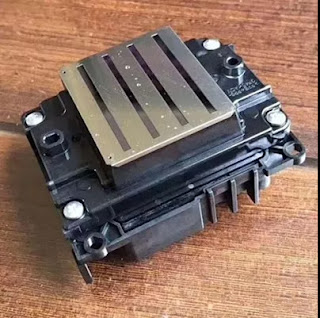
With the development of sublimation printing, the inkjet printer wide application in this field. But the printhead of inkjet printer broken easily, so we should maintain your digital inkjet printer.

Printer Maintenance: if a plotter lives long, a business may prosper.


Large format printers, like any other type of machines, need regular maintenance to increase its longevity. Nonetheless, frequent and proper maintenance policies help not only save significant amounts of money, but also regular maintenance is necessary to keep getting high-quality prints out of the machine.

Our years of experience in this industry have taught us valuable lessons related to printer maintenance and we will like to share some of that accumulated knowledge with you in this article. We will not go into too much detail since this will not be a tutorial or a “how to” manual to fix specific issues. We will simply comment on a few general recommended practices that we employ to maintain our equipment printing smoothly.

Periodic care keeps printers healthy and happy.
For a printing company, printers are a fundamental part of the production process. The failure in one of these high-tech machines could have catastrophic consequences starting with a negative impact on the workflow, followed by turnaround time variations and unhappy customers. Printers cost money but are also the moneymaker for print shops, so neglecting their care will never be a smart business decision.

Every manufacturer recommends specific maintenance schedules for their machines. That is the first rule to printer maintenance we follow: listen to what the manufacturer or supplier has to say about taking care of the machine they built. Another recommendation relates to using the right tools for even the small tweaks. For example, we use only lint-free cloths and factory maintenance fluid for cleaning accumulated dust and dirt build-up, that way we protect our print-heads. In addition, for pinch rollers, print heaters and other areas that have contact with media we use sometimes Isopropyl Alcohol as a general purpose cleaner.

The “best equipment” is nothing without proper care.
One of the key elements that have lead us to our success in the large format industry has been our cutting-edge equipment capabilities. But, like any other machines, our printers could only give us so much before breaking down or start to lose their print quality. We understand that to keep our quality prints, we need to take proper care of our printing tools, and believe it, we do. Whether we are talking about checking the system that controls the ink stability and tank levels, or simply wiping off the accumulated dirt, we would not be able to deliver the outstanding high-quality prints we are known for, without attention to our printer maintenance regimen.


Okay, these all above are my share about the maintenance of inkjet printer during digital printing. If you have any other needs or questions welcome to contact us at any time. We will provide you the best quality product and service. Hope my article can be useful to you. Thank you for your reading.

Nanjing Feiyue paper Industrial Co.,ltd
www.feiyuepaper.com
Email: sales@feiyuepaper.com 
jenny@feiyuepaper.com
Whatsapp: +8618755150383

2018年1月11日星期四

Have A Regular Maintenance for Your Inkjet Printer from Different Side

  Hi, Nice to see you. This week I have mostly shared you about our new products. Then as a summary, today is a new topic about your inkjet printer. We all know that the inkjet printing is a very important step in the sublimation or eco-solvent printing. And it is getting more and more popular in the whole printing process. While do you know how to have a regular maintenance for your inkjet printer? Read the following and I will share you more.

Print Head
  We all know that the print head is one of the most important part for the inkjet printer. So have a right maintenance for the inkjet printer is very important. Then we can do it from the following two steps:
Check nozzle before you start the day
  Every day before you start printing, you should perform print head checks or test prints. Print head checks will let you know if all the printer heads are working at optional levels. If there is clogging in the heads, you will notice a drop in the quality of your print. In such situations, you need to clean the print head before you start printing.

Check the print head regularly
  You need to keep checking the print head on a regular basis if you want to have high-quality prints all the time. Move the print head to one side and look at the sides to see if there is any ink build up. If you notice ink build up on the plastic part of the print head, you should clean it. However, do not try to clean the head directly as you may damage it.

Capping station, flush pad, and wiper blade
  For all the accessories of inkjet printer, keep cleaning is very important. The detailed cleaning introduction are as follows:
Capping station
  The capping station is important because it uses a vacuum to prepare your print heads. If there is any contamination due to the deposition of ink, it will overload itself every time you need to get something printed. Clean the capping station with the help of a Q-tip.
Flush pad
  The flush pad is where the print head will release small amounts of ink to ensure the nozzle is open. As you keep printing with your sublimation printer, the pad will reach a saturation point after which it won’t work at all. Rinse the flush pad regularly so that you have a hassle-free printing experience.
Wiper blade
  The wiper blade will keep your print head clean by removing excess ink from it. Over time, your wiper blade will become dirty with ink. As a result of this, your wiper blade won’t be able to clean the printer heads. Use a Q-tip to clean your wiper blade.

  Okay, These all above are my share about how to maintain your inkjet printer from the different side. If you have any other needs or questions welcome to contact us at any time. We will provide you with the best quality product and service. Hope my article can be useful to you. Thank you for your reading.


Whatsapp:+8618752006819
Website: www.feiyuepaper.com
Facebook: Fei Yue Paper Industrial Co.,Ltd
Email:zeo@feiyuepaper.com

2018年1月2日星期二

Nozzle of Your Desktop Inkjet Printer-----Do you Know how to Maintain?

  Happy new year, the new 2018 is coming. Is it snowing in your hometown? I seems going yo snow in my city tomorrow. I am so excited about this. I have just finished my three days new year holidays and back to work. Then in the New Year's first article I will share you some tips about how to maintain and clean the print head of your desktop digital sublimation printer in the different situations. Please read the following and hope my article can attract you.


Initial Maintain after Installation
  1. In order to make the digital inkjet printer nozzle into the best operating state, the equipment began to undertake the production business before, please use 1 to 2 days to do most of the most possible print some pictures, the picture is best CMYK 4 colors are used, and in the screen The two sides have to add C, M, Y, K 4 color bar to ensure that the four nozzles are always in the inkjet state, just like the car just bought back to run the same, the better run, the machine later use more smoothly
  2.Inkjet is best to the most right side of the cleaning station moisturizing sponge with its bracket together with the removal.


Maintain And Cleaning after The Daily Work
  After all the print jobs are completed every day, to keep the digital inkjet printer nozzle in the best working condition and to avoid clogging the nozzle due to solvent ink evaporation, keep the equipment overnight after the nozzle is maintained as follows.
  1. turn off the device power.
  2. first with a special cleaning solution will be moisturizing sponge clean, and then pour the liquid on the sponge to soak it.
  3. the nose back to the right of the cleaning station and the nozzle and moisturizing sponge close together.
  4. keep this state so that the device overnight.


Slightly Block of The Print Head
   In the inkjet process found a slight jam phenomenon after the digital inkjet printer nozzle should not hesitate to suspend the print job by PAUSE key, and then use a vacuum cleaner or manual air pump to spray the nozzle from the nozzle for cleaning, after cleaning must be squeezed with plastic Press the bottle to spray some of the cleaning solution on the nozzle surface to remove the residual ink.
Attention
  1. Do not use excessive force when using manual air pump, otherwise it will damage the nozzle due to excessive pressure.
  2.  Timely and decisive and thorough handling of the nozzle slightly blocked for the long time in the printing process to maintain the best working condition of the nozzle is very important!
  3. In addition, it is necessary to carefully check the print head and find the reasons for nozzle clogging.


Frequent Block of The Print Head
  1. Press the PAUSE button to pause the inkjet job firstly , and then press the PURGE button to move the nose to the leftmost cleaning position.
  2. keep the device power is turned on, the vice tank connected to the nose control panel on the liquid level sensor signal line all pulled out.
  3. The nozzle on the ink tube (from the vice tank) and then use a glass syringe to extract a special cleaning solution cleaning nozzle, the method: each with 40ml of cleaning fluid, every 10 minutes, a total of 3 to 4 times The
  4. After the re-plug the ink tube and liquid level sensor signal line, and then continue to suspend the previous print job.


  Okay, These all above are my share about how to maintain and cleaning your desktop digital inkjet printer print head. If you have any other needs or questions welcome to contact us at any time. We will provide you with the best quality product and service. Hope my article can be useful to you and best wished for you in the new year 2018. Thank for your reading.


Whatsapp:+8618752006819
Website: www.heatsub.com
Facebook: Fei Yue Paper Industrial Co.,Ltd
Email: zeo@feiyuepaper.com

2017年12月25日星期一

Characteristic of Digital Inkjet Printer From Different Side

  Digital inkjet printer is more and more popular in the world. It's special characteristic and feature make it attracted many people's eyes. The digital inkjet printer can be roughly divided into the UV printer, eco-solvent printer and the sublimation printer. Each one have its special application. But mostly, you use use both of them for your banners or advertisement printing. Today I order to let you know more about the digital inkjet printer I will share you the special characteristics of the digital inkjet printers from different side. Read the following and get to know more.

Practicality
  The digital inkjet printer is very practical in usage,it can be printed for a variety of materials. No matter in the garment processing industry or the advertising printing industry. What's more, it can help you enhance the value of your product so that the product can be more beautiful from the side of appearance.
  So in order to guarantee the practicality, when you buy your digital inkjet printer you must have a good choice of the manufacturer. This choice can directly influence the key performance of your digital inkjet printer. You must  from a more professional level point of view to a reasonable grasp of its reliability advantages will be very clear.

Stability
  Digital inkjet printer all use a special ink, this process can be more convenient. Different from the traditional typographic printing, this digital inkjet printing can help you print your patterns directly onto the fabric or any surface you want. One of the biggest advantage is that the cost is much lower than the traditional printing and the the operator does not need a high experience.
  What's more the patterns printed onto the material has high stability, your patterns can not be washed and fade easily. You can store your patterns for a long time.

Color Richness
  The last characteristic of the digital inkjet printer is the color richness. The digital inkjet printer can help you rendered a variety colors, and the original ink may have only 4 color (C,M,Y,K) .
  On the one hand, by increasing the print density (resolution) to print out the point of thinner, so that the map becomes more delicate. On the other hand, there are several ways to improve the color harmony, such as increasing the number of colors, changing the size of ink drops, and lowering the basic color density of ink cartridges. 
  Which increase the number of colors to come to the most effective. It is usually a five-color color cartridge, with the original black cartridge, forming a so-called six-color print. As a result, the number of color combinations arranged and obtained in a single step has been improved many times, and the effect is naturally improved obviously.


  Okay, These all above are my share and introduce about the characteristic of the digital inkjet printer from the side of practicality,stability and color richness. If you have any other needs or questions welcome to contact us at any time. We will provide you with the best quality product and service. Hope my article can be useful to you. Thank you for your reading.


Whatsapp:+8618752006819
Website: www.heatsub.com
Facebook: zeo(章江徽) 
Email: zeo@feiyuepaper.com

2017年11月12日星期日

Have A Try about This Amazing Machine-----Mutoh ValueJet 1638WX Sublimation Printer

  Hi, Nice to see you. A new week is coming. In the last several weeks I have shared you a variety problems and small tips about the sublimation printing and transferring from different aspects. Then this week, I will share you some new products that we can provide you for the sublimation. Today is the high speed sublimation printer-----Mutoh ValueJet 1638WX .

  Firstly, have a brief introduction about the product description.The ValueJet 1638WX offers the fastest production speeds of any dye-sublimation printer in its class. The VJ-1638WX is ideal for production run sublimation printing where performance and quality is required.Featuring a dual-staggered head design, the ValueJet 1638WX offers production quality speeds of up to 42 m²/h. The VJ-1638WX provides outstanding performance at a competitive price, making it the smart printer choice for business looking to expand capabilities and increase production efficiency.

  Ink configuration choices include either dual CMYK or CMYK plus either two or four spot colors.The VJ-1638WX is designed with advanced features, such as a rear media feed lever for easy material handling, two choices of optional take-up systems and an easy to navigate control panel.Create trade show graphics, flags, banners, custom interior designs, apparel, sports uniforms, swimwear, yardage and more.

Feature
The ValueJet 1638WX features include:
*Sublimation printing on 1625mm / 64" transfer paper
*Handles popular transfer paper from 66 to 150 gsm
*Staggered dual print heads with latest generation 1440 dpi Piezo heads
*Production print speeds up to 42 m²/h
*Utilises Mutoh i² Intelligent Interweaving and new DropMaster technology
*Ideal for production of soft signage, apparel and promotional goods

More Specification
Print Method: Drop-On Demand Piezo Drive Method
Number of Nozzles: Two heads, staggered arrangement (180 nozzles x 8 rows each) 
Ink: Aqueous / Dye-Sublimation
Minimum droplet size: 3.5 pl
Variable dot: Yes
Media auto cut: Standard

Application
  Targeted at the sublimation transfer market, the ValueJet 1638WX dye sublimation printer delivers high quality graphics for transfer onto all possible flexible and rigid polyester materials:
*Yardage: sportswear, polyester T-shirts, school sportswear, swimwear and other apparel
*Soft signage and graphics for events, trade shows, sports grounds
*Home decoration: curtains, bed linen
*Flags and pennants
*Sports goods, snowboards, helmets
*Promotional goods: mugs, umbrellas, i-devices, mouse mats, photo panels

  Okay, These all above are my share and introduction about the Mutoh 1638WX sublimation printer. If you have any needs or questions about this machine welcome to contact us at any time. We will provide you with the best quality product and service. Hope my article can be useful to you. Thank you for your reading.


Nanjing Feiyue Digital Technology Co.,ltd
www.heatsub.com
Facebook: Zeo
Whatsapp:+8618752006819
Skype:+8618752006819

2017年10月19日星期四

Why Not Try about It-----Roland XT640 Sublimation Printer

  Hi, Nice to see you. In the last articles I have shared you some tips and information about the Epson digital inkjet printer. Then if you are professional in the digital printer process, you must know that the Roland digital inkjet printer is also vary famous in this industry owing to the high quality of this machine. Today I will share you about the Roland XT-640 wide format sublimation printer


  Firstly,This XT-640 sublimation printer developed specifically for dye-sublimation transfer printing, the Texart XT-640 is an unstoppable machine that delivers outstanding print quality on long print runs, day-after-day. By combining Roland reliability with the latest print technology, users can quickly and effortlessly create high-volume sportswear, fashion, soft signage, interior decoration, promotional merchandise and much more.

Feature

Seven Droplet Print Heads Cover All the Details
More Choice with 4-Color or 8-Color Ink Modes
New Media Feed System for Non-Shift Printing
Simply Print and Go with Precision Take-up System
Automatic Bulk Ink-Switching System
Remote Controlled Printing with Roland Printer Assist
Add Some Rad with Fluorescent Inks 
Real-Time Support with Roland OnSupport
Superior Reliability and Service are Standard


Wide Application
1.Made for Making Sportswear
  Dye-sublimation transfer printing is perfect for customizing polyester sportswear fabrics and apparel. The XT-640 is the ideal device to create brilliantly colorful graphics for team uniforms, amateur sportswear and professional sportswear.


2.Branded and Personalized Fashion and Apparel
  Whether you're making your own fashion statement with clothing and pattern design, or company branding t-shirts and apparel, the XT-640 gives you a wealth of fabric and customization options. It's the perfect machine for high-volume production of corporate clothing or high-end fashion products.


3.Eye-Catching Soft Signage  
  Create stunning banners, flags, backdrops, points-of-purchase and more at high speeds. Utilize the XT-640's additional ink options for producing photographic quality images with subtle skin tones and extremely vivid colors.


4.Merchandise Like Mad
  Use the XT-640 for customizing promotional gifts, gadgets, sports equipment and merchandise. From smart phone cases to custom decorated tiles, the XT-640 is an incredibly reliable and unstoppable dye-sublimation transfer printing machine that can help you kick-start your customization empire.


5.Custom Interior Decor
  Put logos, brands, patterns and designs on a wide variety of fabrics for home furnishing, home décor and wall coverings. With the XT-640, you can create high-volumes of décor items in the fastest time possible.

  
  These all above are my share about the Roland XT-640 sublimation printer. If your business is about the sublimation printing and transferring. I suggest you have a try about this machine. I believe it will let you satisfied. Of course if you have any needs or questions welcome to contact us at any time. We will provide you with the best quality product and service, such as the Roland XT-640 sublimation printer. Hope my article can be useful to you. Thank you for your reading.


Nanjing Feiyue paper Industrial Co.,ltd
www.heatsub.com
Facebook: Zeo
Whatsapp:+8618752006819
Skype:+8618752006819

2017年10月13日星期五

The High Contrast Series Printer in The Mimaki Family----Mimaki JV150-160A

  Hi, Nice to see you again. In my last article I have shared you about the most frequently questions of the Mimaki JV150 series printer in the using process. And I believe this article can be useful to you in your usage. Today as a member of the Mimaki JV150 series, I will share you more carefully about the Mimaki JV150-160A printer. And help you know more about it.


  In the JV150 series printer there are many different models. Some are used for the eco-solvent printing and some are used for the sublimation printing. This JV150-160A large format printer specially designed for sublimation printing."High Contrast Series" is a color profile specialized for photographs that suppress graininess and require smooth gradation expression.Keep read the following and I  have some other introduction of it's specification and performance.


Characteristic
  *Some of the screens and printing samples in this website are artificial renderings.
  *Specifications are subject to change without notice.
  *All trademarks or registered trademarks are the property of their respective owners.
  *Inkjet printers print using extremely fine dots, thus colors may vary slightly following replacement of the printing heads. Also note that if using multiple printer units, colors may vary slightly among the units due to slight individual differences among the units.


Specification Advantage
  Highly-assured inkjet technology
  Mimaki Advanced Pass System 3 (MAPS3) delivers stable high-quality printing
  Three-way intelligent heater system optimizes the ink droplets size.
  Quick-dry SS21 ink that achieves outstanding speed
  Nozzle check unit (NCU) automatically detects clogged nozzles and unclogs them.
  Nozzle recovery system (NRS) for maintaining productivity


  Okay, These all above arr my share about the Mimaki JV150-160A large format  sublimation printer. If you have any needs or questions welcome to contact us at any time. We will provide you with the best quality product and service. Hope my article can be useful to you. Thank you for your reading.


Nanjing Feiyue Digital Technology Co.,ltd
www.heatsub.com
Facebook: Zeo
Whatsapp:+8618752006819
Skype:+8618752006819

2017年10月12日星期四

Some Most Frequently Questions of The Mimaki JV150 Series Printer----Do you Know How to Solve It?

  Hi, Nice to see you. It is getting more and more cold in Nanjing now and always rainy. If you have read my article before you must know that we have the Mimaki large format digital inkjet printer. And I have shared you some tips about how to solve the error code of the Mimaki CJV30 series printer. Then today I will share you some most frequently questions of the Mimaki JV 150 series printer. Please read the following and get to know more.

Expiration

Answer: Replace the expired ink cartridge.

  Mimaki Inks have an expiration date on them to avoid poor print quality. Printer displays the message, [Expiration] to let you know that installed ink passes the expiration date.
[How your printer operates in expired ink]
  Your printer displays the message [Expiration] in the next month after the ink expiration; and even if you do not replace the expired ink, you still can continue to run it 2 months after the expiration, and when it passes three month from the expiration date, your printer ceases to operate.
[NOTE]
  If you keep using expired inks, it may result in poor print quality such as degraded colors; we highly recommend for you to replace the expired ink any sooner.


Replace a WIPER

Answer:Please replace the wiper.

  Make sure to follow the instructions on [WIPER EXCHANGE] under the maintenance menu.
  See [Operation manual] > [Chaper4 Maintenance] > [Replacing consumables] for details.
Run [WIPER EXCHANGE] menu after replacing the wiper, or it keeps showing the message, [Replace a WIPER]. It is because systems in the printer counts the number of wiping operation; unless you run [Replace a wiper] menu, it won’t reset the number.
[NOTE]
  In fact, you can perform printing without wiper replacement, but continuous usage of the filthy wiper may result in nozzle clogging, thus we recommend for you to replace it any sooner.

[Check Wash liquid]

Answer
  This is the message to warn you to check on the cartridge to see if it is empty; and it appears occasionally. Remove the washing liquid cartridge and check it’s not empty; and reinstall the cartridge to reset the counter and it will cancel the message.
[NOTE]
  When OK is selected with no washing liquid cartridge removal, then it will cancel the message at the moment, but it will appear once again when you restart the printer.

 Okay, These all above are my share about how to solve the common the frequent questions when us your Mimaki JV150 series printer. If you have any needs or questions welcome to contact us at any time. We will provide you with the best quality product and service. Hope my article can be useful to you. Thank you for your reading.


Nanjing Feiyue paper Industrial Co.,ltd
www.heatsub.com
Facebook: Zeo
Whatsapp:+8618752006819
Skype:+8618752006819

2017年10月11日星期三

Do You How to Deal with The Drop Ink if It Happen In Your Digital Printer?

  Hi, Nice to see you. Do you still remember me? Just finished my holiday from Singapore and Malaysia, enjoyed my travel and then come back to work. We are a professional digital printing material manufacturer in China. And we have 10 years experience in this industry, so we can help you about solve a lot problems in your digital inkjet printing process. Today I will help you solve one important problem in your printing process-----The drop ink in the printing.


   It is normal that the equipment have some small problems, the most important thing is to find what can be resolved? Where will the digital printer be with problems? Today we have summarized the problems with the dropout of the digital printer and the problem of printing skew and the solution.
  First of all, there are drops of digital ink printer phenomenon where there are some, we have to understand clearly to find the right way, first in a certain material on the requirements of the amount of ink there are different paper there is the appearance of static electricity, The second setting in the weather climate for the ink preheat value should also be different. And the ink of the large cartridge is full, the ink cartridge is not scrubbed on time.  

 
  The last one is a lot of bubbles inside the ink pipeline.The amount of ink can be used to set the software parameters to set, to avoid some areas of the spot color ink is too high. For different weather conditions can reduce the storage value of the cartridge, to avoid too high, so that ink droplets become more fine. If the ink cartridges ink over the phenomenon of drop ink can be reduced, reduce the amount of ink cartridges, it is best to control the amount of one-third to clean the wipe ink cartridges. If there is air bubbles, as long as the bubble can be reduced.

  Okay, These all above are my share about how to solve the problem about the drop ink in the digital inkjet printing. Of course if you have any better suggestions or needs welcome to contact us at any time. We will provide you with the best quality product and service.We believe our experience can help you more. Thank you for your reading.


Nanjing Feiyue Digital Technology Co.,ltd
www.heatsub.com
Facebook: Zeo
Whatsapp:+8618752006819
Skype:+8618752006819

2017年9月27日星期三

Mimaki CG-SRIII Series Cutting Plotter with Extreme Curve Cutting Speed-----Come on And Have A Try

  Hi, Nice to see you again.This week we take our customer to our Mimaki factory and show him our high quality products and service. In the factory I saw the new CG-130SRIII large format plotter. This printer has exterme curve cutting speed and high quality. Then have you heard about this printer before? Today I will share you more about this machine .

  Firstly, have a brief introduction about the Mimaki CG-SRIII series cutting plotter.The Mimaki CG-SRIII Series of roll-based cutters are available in three widths. These models feature continuous crop mark detection for precise contour cutting. A proprietary half cut function leaves a small bit of backing sheet at connecting points for easier handling. Accurate long-length cutting is enabled through segment compensation. These cutting plotters are ideal for producing decals, stickers, cut-vinyl signs and more.

Characteristic
  A best-in-class cutting pressure of 500g for a wider range of materials
  Up to 2 times the curve cutting speed increases productivity
  Event Notification function for remote monitoring
  Continuous Crop Mark Detection for precise stickers and seals.
  Upgrade of firmware can be done quickly and easily by user.
  Ethernet connection for LAN use as well as USB2.0 and RS-232C
Main Advantages

  Maximum cutting pressure of 500g, use more widely
  The curve cutting speed is 2 times larger than that in the past, and the productivity is further improved
  "Event notification" function, to achieve remote monitoring
  Drawing start / end, error / warning message
  With "continuous reading of the cutting mark" and the unique "half (dotted line) cut" function, you can accurately create labels and stickers. With the newly developed "Segment  Correction Function" that detects the intermediate crop mark, it is also possible to accurately cut the contours for easy skewed long prints.
  Equipped with the user can easily upgrade the soft firmware function
  In addition to RS232C, USB2.0 connection, but also supports LAN connection


  Okay, These all above are my share about the Mimaki CG-SRIII series cutting plotter. If you have any needs or questions welcome to contact us at any time. We will provide you with the best quality product and service. Hope my article can be useful to you. Thank you for your reading.


Nanjing Feiyue Digital Technology Co.,ltd
www.heatsub.com
Facebook: Zeo
Whatsapp:+8618752006819
Skype:+8618752006819

2017年9月26日星期二

Some Tips That You Should Know How to Test The New Installing Print Head for Your Inkjet Printer

  Hi, Nice to see you. When we buy a new print head for our digital printer such as the 5113 or DX-5 print head we may always need to have a test for it. So that we make make sure if the print head has high quality . But do you know how to test the new print head in a right way and what should you pay attention to when you install and test it? Read it and get to know more.

Installing of The Print Head

  Install the nozzle also be careful, must first power off, and put in place. After installed, use hands to push the car and move around, check whether smooth, do not install on electricity, because, if the head is not in place, the car is easy to hit a head and hand feeling, fragmentation, and freely, strong control ability;
  Do not take the ink when you connect the plug and cable, and make sure you have good contact with the socket, do not touch the foot, otherwise it will cause the nozzle to short-circuit and burn;
Attention
  The head of the nozzle is very fragile, absolutely can not bump, be sure to protect. Its surface is a piece of aluminum, the inner layer coated with a crystal oscillator and very small ink tube. A touch will be concave, deformation, and even broken, so that the nozzle on the scrapped.

After Install Your Print Head
 Just installed sprinklers inside there will be air, so it will not immediately print normal, only the head of the air is completely discharged to normal Qi lines; the specific steps are as follows:

  First, the available batch cleaning (only one time for cleaning 2 times, then stop for 30 minutes washing 2 times) repeatedly kept cleaning excessive, will cause the ink cleaning pump, not only make the printing color mixing, ink leakage and waste ink;
  Secondly, you can print more pictures, so that the nozzle in the work out of the air;
  Again, if the machine has caused the waste ink tube to first turn off, then the barrel of a rubber tube out of the waste ink tube until 3-5ML ink, then boot, a normal washing machine, equal to the value of the air is difficult to pull out, side effects It is likely to cause the cleaning pump to piling.


  These all above are my share about how to install your new print head and some tips that you should pay attention to when test it. If you have any needs or questions welcome to contact us at any time. We will provide you with the best quality product and service. Welcome to contact us at any time. Thank you for your reading.


Nanjing Feiyue Digital Technology Co.,ltd
www.heatsub.com
Facebook: Zeo
Whatsapp:+8618752006819
Skype:+8618752006819

What is Epson 4720 Printhead? It Can Replace 5113 Print Nozzle?

Hello, nice to see you again, my dear friends. It will rainy in Nanjing, the sky is dack, wind is heavy. Now I will tell you the topic is a...